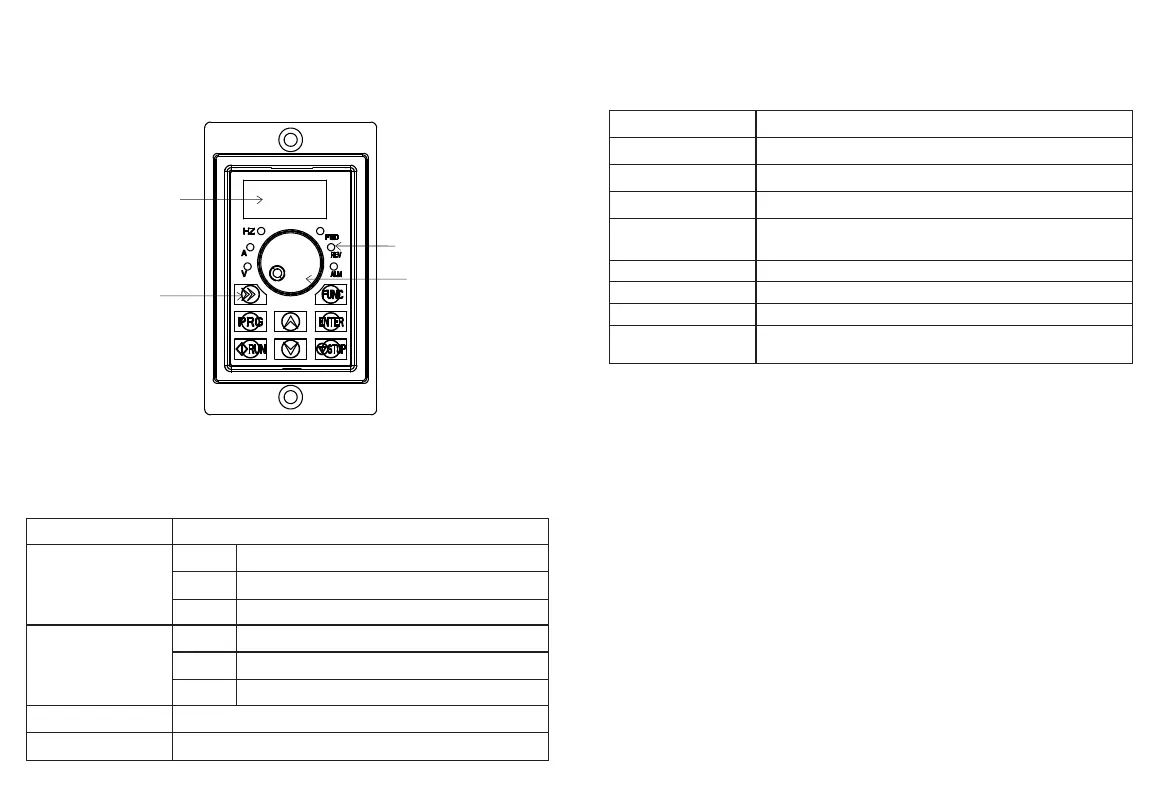
3.1 Introduction to Operation and Display Interface
3.3 Key Function Description
Chapter 3 Key Description
3.2 Description of Function Indicator
-5- -6-
Operating keys
Function indicator light
Speed regulating
potentiometer
Data Display
图3-1
Table 3-1 indicator function list
Name
escription
Status indicator
F W D
R E V
Reverse running indicator The light is on to indicate that the
frequency converter is in reverse operation
ALM
Fault indicator lamp When the frequency converter is in a
fault state, the lamp lights up and goes out in a normal state
Unit indicator
H z
Frequency unit
A
Unit of current
V
Voltage unit
Digital tube display
8Paragraph4BitsLEDDisplay, display frequency, current,
voltage and other information
Analog potentiometer
Panel potentiometer regulates frequency
Table 3-1 Key Function Description
N a m e
D e s c r i p t i o n
PRG
Function Settings Enter Key, Exit Key
FUNC
Ink key
ENTER
Setting Parameter Confirmation
》》
Under the shutdown display interface and the operation display interface, you
can move right to cycle and select display parameters; When modifying
parameters,You can select the modification bit of the parameter
△
Up key, data setting up key
▽
Down key, data setting down key
RUN
In keyboard operation mode, used for patrol operation
STOP
When running, this key can be used to stop the running operation; In case
of fault alarm state, the control mode can be used in many control modes
Press the key to reset the operation
Forward rotation operation indicator The light is on to indicat
that the frequency converter is in a forward running state


 To Next Page