Need help?
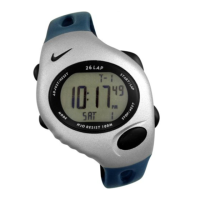
Do you have a question about the Nike TRIAX 120 and is the answer not in the manual?
Instructions on how to navigate between different watch modes.
Measures and records lap and split times within runs.
Recalls lap and split time data from recorded runs.
Countdown interval timer with programmable segments.
Counts in positive or negative increments of one.
Features seven distinct alarms.
Provides time and calendar information for two time zones.
Displays a brief view of functions within each mode.
Provides one touch backlighting.
How to mark a lap and start the next measurement.
Initiates lap/split time measurement with 1/100 second display.
Stops the lap/split time measurement and displays total time.
Resumes lap measurement after stopping.
Stops the current run and starts a new one.
Resets the current run or all runs.
Toggles lap/split time display between primary and secondary positions.
Displays the remaining lap memory capacity.
Navigates through recorded runs by number.
Reviews run data chronologically.
Deletes data for a specific run or all recorded data.
Configures up to 5 countdown timer segments.
Initiates, pauses, and resumes the programmed countdown timer.
Returns the timer to its starting point.
Resets all timer segments to zero.
Increments the counter by one.
Decrements the counter by one.
Resets the counter value to zero.
Configures one of seven distinct alarms with time and zone.
Cycles through the alarm numbers to set.
Toggles the selected alarm between active and inactive states.
Deactivates all set alarms simultaneously.
Configures current time, date, and time zone.
Selects and displays information for alternate time zones.
Initiates a demonstration of watch functions.
Toggles audible confirmation tones.
Manually illuminates the watch display.
Enables automatic illumination upon button press.
Disables automatic illumination.
Defines the maximum values for Chronograph, Timer, and Counter.
Specifies the water resistance rating of the watch.
Lists the materials used for watch components.
Information on battery life and replacement.
Details the warranty terms and conditions for USA purchases.
 General
| Brand | Nike |
|---|---|
| Model | TRIAX 120 |
| Category | Fitness Electronics |
| Language | English |


 To Next Page