Need help?
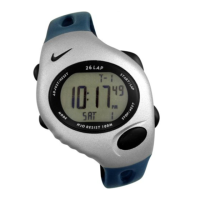
Do you have a question about the Nike TRIAX 50 and is the answer not in the manual?
Allows setting and displaying time for different geographical locations.
Enables or disables the hourly chime or alarm sound.
Quickly returns the watch to TIME mode from any other mode.
Select how lap or split times are displayed on the screen.
Options to save recorded run data or clear it from memory.
Controls the activation and deactivation of individual alarms.
Disables all set alarms simultaneously.
Enables positive or negative increment counting for various activities.
Review historical lap, split, and run times.
Select specific recorded runs for viewing or management.
Options to clear individual or all recorded run data.
Initiates and halts the countdown sequence for training segments.
Select, reset, or clear training segments.
 General
| Brand | Nike |
|---|---|
| Model | TRIAX 50 |
| Category | Fitness Electronics |
| Language | English |


 To Next Page