EasyManua.ls Logo

Nike TRIAX ARMORED II - User Manual

Nike TRIAX ARMORED II
3 pages
Print Icon
To Next Page IconTo Next Page
Loading...
TRIAX ARMORED II
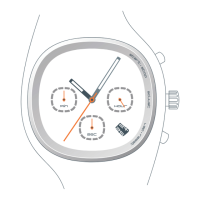
chrono
24 HOUR dial
corresponds with
Time of Day
Chronograph
SECONDS dial
(0-60)
Chronograph
MIINUTES dial
(0-60)
Pull Crown
to first click
to set date
Crown
Pull Crown
to second click
to set time
Start / Stop
Chronograph
Mark Lap /
Reset Chronograph
NOTE: The Chronograph will stop and reset after one hour
Question and Answer IconNeed help?

Do you have a question about the Nike TRIAX ARMORED II and is the answer not in the manual?

Summary

TRIAX ARMORED II Chrono Operation

Setting the Date

Pull the crown to the first click to set the date on the watch.

Setting the Time

Pull the crown to the second click to set the correct time.

Chronograph Functions

Start, stop, mark lap, and reset the chronograph using the crown and buttons.

TRIAX ARMORED II Chrono Calibration and Reset

Chronograph Calibration

Calibrate stopwatch dial hands to the '0' position by pulling the crown.

Chronograph Reset

Reset the watch by pulling the crown or pressing side buttons simultaneously.

TRIAX ARMORED II Super & Regular Specifications

Material Specifications

Details on crystal, strap, case, caseback, and buckle materials for the watch.

Battery Replacement and Warnings

Information on battery types and important safety warnings for replacement.

Nike TRIAX ARMORED II Specifications

General IconGeneral
BrandNike
ModelTRIAX ARMORED II
CategoryFitness Electronics
LanguageEnglish

Related product manuals