EasyManua.ls Logo

Nikko Gamma I - Page 7

Default Icon
22 pages
Print Icon
To Next Page IconTo Next Page
To Previous Page IconTo Previous Page
Loading...
DISASSEMBLY
Note:
Three
digit
numbers
circled
in
this
chapter
(C))
are
represented
by
a
(*)
in
the
parts
listing.
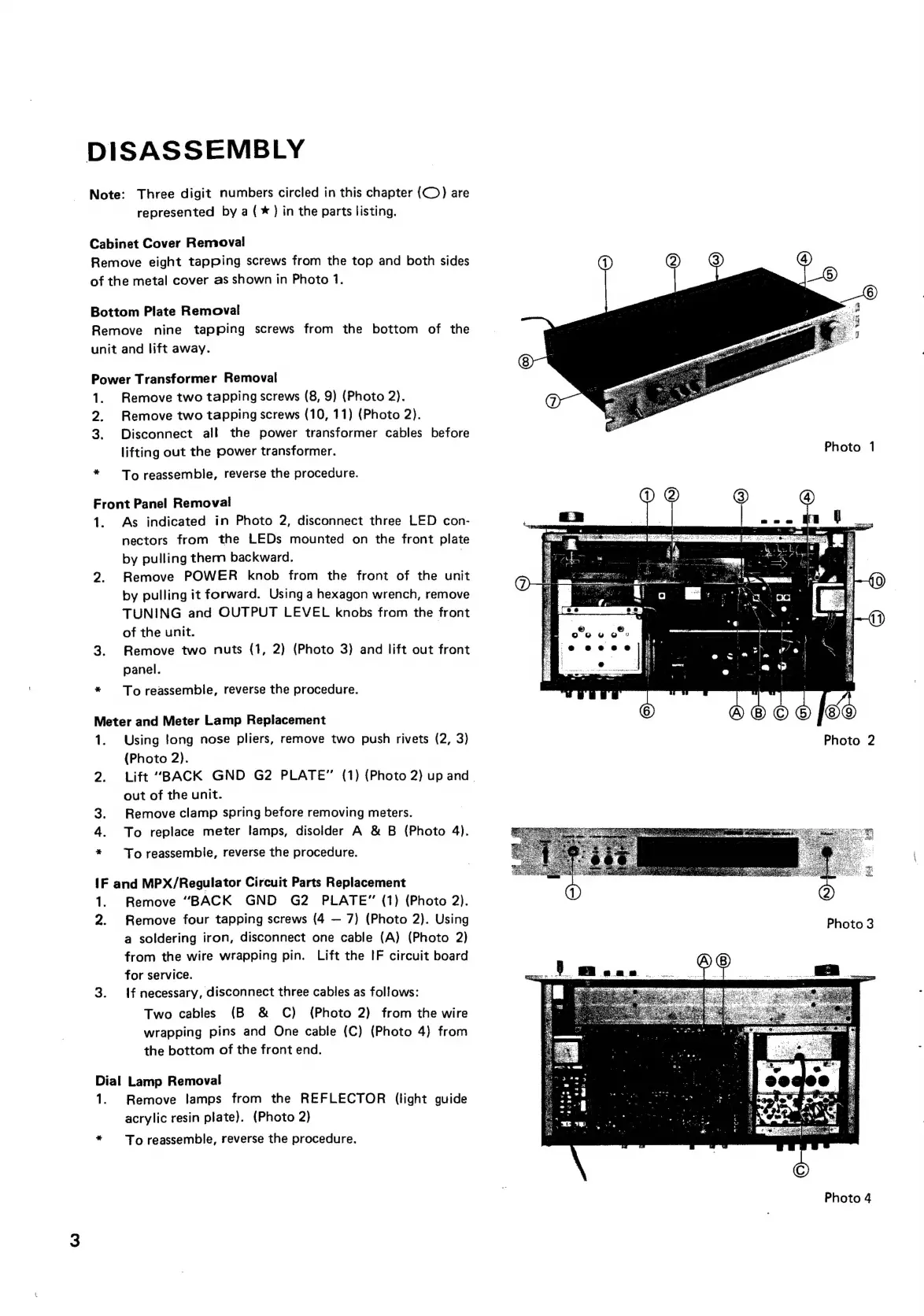
Cabinet
Cover
Removal
Remove
eight
tapping
screws
from
the
top
and
both
sides
of
the
metal
cover
as
shown
in
Photo
1.
Bottom
Plate
Removal
Remove
nine
tapping
screws
from
the
bottom
of
the
unit
and
lift
away.
Power
Transformer
Removal
1.
Remove
two
tapping
screws
(8,
9)
(Photo
2).
2.
Remove
two
tapping
screws
(10,
11)
(Photo
2).
3.
Disconnect
all
the
power
transformer
cables
before
lifting
out
the
power
transformer.
Photo
1
*
To
reassemble,
reverse
the
procedure.
Front
Panel
Removal
1.
As
indicated
in
Photo
2,
disconnect
three
LED
con-
nectors
from
the
LEDs
mounted
on
the
front
plate
1
by
pulling
them
backward.
|
abo
7
2.
Remove
POWER
knob
from
the
front
of
the
unit
pubes
;
by
pulling
it
forward.
Using
a
hexagon
wrench,
remove
TUNING
and
OUTPUT
LEVEL
knobs
from
the
front
of
the
unit.
re“
eee
3.
Remove
two
nuts
(1,
2)
(Photo
3)
and
lift
out
front
eecee
panel.
a
*
Toreassemble,
reverse
the
procedure.
Meter
and
Meter
Lamp
Replacement
1.
Using
Jong
nose
pliers,
remove
two
push
rivets
(2,
3)
(Photo
2).
pHa
2.
Lift
“BACK
GND
G2
PLATE”
(1)
(Photo
2)
up
and.
out
of
the
unit.
3.
Remove
clamp
spring
before
removing
meters.
4.
To
replace
meter
lamps,
disolder
A
&
B
(Photo
4).
*
To
reassemble,
reverse
the
procedure.
{F
and
MPX/Regulator
Circuit
Parts
Replacement
1.
Remove
“BACK
GND
G2
PLATE”
(1)
(Photo
2).
2.
Remove
four
tapping
screws
(4
7)
(Photo
2).
Using
a
soldering
iron,
disconnect
one
cable
(A)
(Photo
2)
from
the
wire
wrapping
pin.
Lift
the
IF
circuit
board
for
service.
3.
{f
necessary,
disconnect
three
cables
as
follows:
Two
cables
(B
&
C)
(Photo
2)
from
the
wire
wrapping
pins
and
One
cable
(C)
(Photo
4)
from
the
bottom
of
the
front
end.
Dial
Lamp
Removal
1.
Remove
lamps
from
the
REFLECTOR
(light
guide
acrylic
resin
plate).
(Photo
2)
To
reassemble,
reverse
the
procedure.
Photo
4