7
s
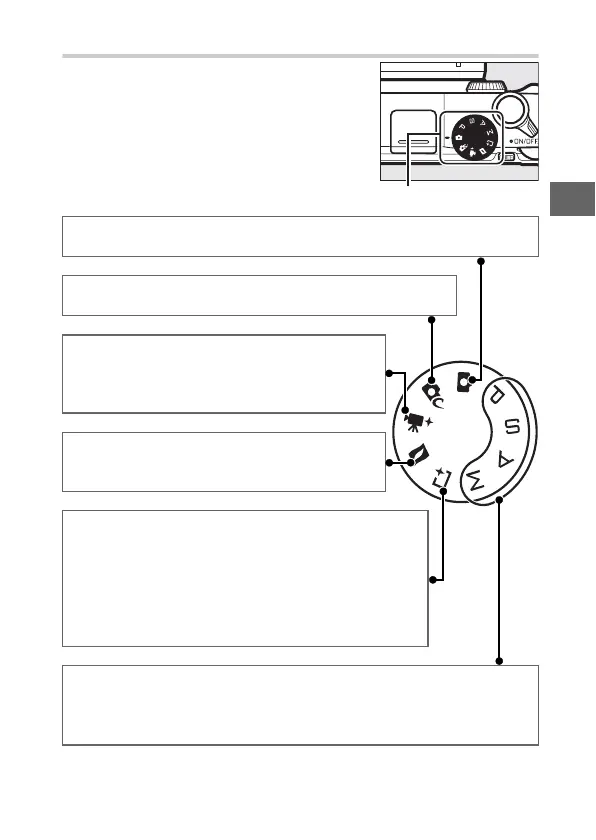
The Mode Dial
The camera offers a choice of the follow-
ing shooting modes:
Mode dial
C Auto mode (0 31): Let the camera pick the settings for photographs
and movies.
w Creative mode (0 39): For photographs in which you
want to use special effects or match settings to the scene.
v Advanced movie mode (0 48): Choose an expo-
sure mode and adjust shutter-speed or aperture
or record movies in slow or fast motion or with
other special effects.
z Motion Snapshot mode (0 71): Each time the
shutter is released, the camera records a still
image and about 1.6 s of movie footage.
u Best moment capture mode (0 61): Choose Active
Selection to select the best picture from 40 shots in
temporary storage, Slow view to choose the best tim-
ing for the shot while the scene plays back in slow
motion, or Smart Photo Selector to let the camera
pick the best shot based on composition and move-
ment.
t, u, v, and w modes (0 56): Control shutter speed and aperture for
advanced photographic effects.
• t: Programmed auto (0 56)
• u: Shutter-priority auto (0 57)
• v: Aperture-priority auto (0 58)
• w: Manual (0 59)



 To Next Page