EasyManua.ls Logo

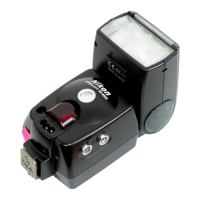
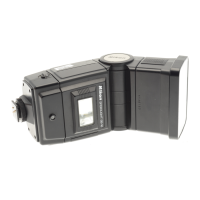
Nikon Autofocus Speedlight SB-27 - User Manual

Nikon Autofocus Speedlight SB-27
92 pages
Print Icon
To Next Page IconTo Next Page
Loading...
Instruction Manual
En
SB-27
SB-27
Autofocus SpeedlightAutofocus SpeedlightAutofocus Speedlight

Table of Contents

Questions and Answers

  • R
    robert73Jul 26, 2025
    Why does my Nikon Camera Flash power off?
    • M
      Michael ThompsonJul 26, 2025
      Your Nikon Camera Flash may turn off because the battery power is exhausted; replace the batteries with fresh ones. Alternatively, if you are using cameras in Group VII, the camera setting switch may be set to K. If so, set the camera setting switch to ?.
  • H
    Heather VelasquezAug 1, 2025
    Why is the f blinking on my Nikon Autofocus Speedlight SB-27?
    • M
      Molly TaylorAug 1, 2025
      If the f indicator blinks on your Nikon Camera Flash, it means the lens aperture is not set to its minimum (highest f-number). To fix this, set the lens aperture to its minimum, or set the exposure mode to A or M.
  • M
    Mary CooperAug 7, 2025
    Why no J indicator appears on my Nikon Camera Flash?
    • A
      Alexander DanielAug 7, 2025
      If the J indicator does not appear on your Nikon Camera Flash, it could be due to several reasons: * The batteries may not be correctly installed. Ensure they are re-installed with the correct "+" and "–" directions. * The battery power may be weak. Try installing new batteries. * The battery contacts inside the battery chamber may be contaminated. Clean the battery contacts.
  • N
    Nicholas EllisAug 13, 2025
    What does it mean when M above ZOOM blinks on Nikon Autofocus Speedlight SB-27?
    • R
      roymaryAug 13, 2025
      If the M above the ZOOM blinks on your Nikon Camera Flash (for cameras in Group I and II), it means the auto zoom-head positioning is canceled. To resolve this, resume auto zoom-head positioning.
  • J
    Julia LeeAug 19, 2025
    Why no indicator bars appear on my Nikon Autofocus Speedlight SB-27 Camera Flash?
    • A
      Aaron MorrisAug 19, 2025
      If no indicator bars appear on your Nikon Camera Flash, it means that the built-in bounce flash adapter is used for bounce flash operation or is not correctly set into place. To solve this, fold the diffuser card back into the unit.

Summary

Foreword

Camera groups

About this manual

Speedlight parts

LCD panel indications

Preparations for taking flash photographs

Installing batteries

Standby function

Attaching the SB-27 to the camera

Adjusting the flash head

Selecting a measurement system (meters;feet)

The ready-light

Test firing with the open-flash button

Setting ISO film speed

Setting zoom-head position

Basic flash operation

Selecting a flash mode

Flash Operation in AUTO Mode (Group I)

Flash Operation in AUTO Mode (Group II)

Flash Operation in AUTO Mode (Group III)

Flash Operation in AUTO Mode (Group IV)

Flash Operation in AUTO Mode (Group V - Part 1)

Flash Operation in AUTO Mode (Group V - Part 2)

Flash Operation in AUTO Mode (Group VI)

Flash Operation in AUTO Mode (Group VII)

If the ready-light blinks after shooting

Advanced flash operation

Bounce flash

Techniques for using bounce flash to achieve softer, more natural lighting and shadows.

Multiple flash

Methods for using multiple flash units to eliminate harsh shadows or illuminate backgrounds.

Flash operation in Manual (M) mode

Synchronization in continuous shooting

Guide numbers for determining correct aperture

Autofocus flash operation in dim light

Bounce flash operation

Procedures for bounce flash operation

Highlight your subjects eyes using bounced flash

To set up the diffuser card

Instructions for setting up the diffuser card to create catchlights and enhance subject's eyes.

Close-up flash operation in AUTO mode

Close-up flash operation in AUTO mode (Groups I-VI)

Close-up flash operation using a TTL Remote Cord

Exposure compensation for flash photography

Setting exposure compensation for flash

Setting exposure compensation on the SB-27

Detailed steps for adjusting exposure compensation directly on the SB-27 flash unit.

Exposure compensation for flash photography

Canceling exposure compensation

Procedure for resetting exposure compensation settings on the SB-27 to zero.

Cameras in Group III

Using camera's EV compensation for flash exposure with Group III cameras.

Multiple flash operation-using more than one Speedlight

Multiple Flash Operation Procedures (Groups I-VI)

Manual multiple flash operation procedures

Setting Forced TTL and Forced A modes

Forced TTL mode

Instructions for setting the SB-27 to Forced TTL mode for slave unit operation.

Setting Forced TTL and Forced A modes

Forced A mode

Instructions for setting the SB-27 to Forced A mode for non-TTL Auto Flash compensation.

Canceling Forced TTL and Forced A modes

Steps to return the SB-27 from Forced TTL or Forced A mode to normal operation.

Red-eye reduction control

Other information

Using an external power source

Connecting the SB-27 to a camera with a sync cord

Warning indications on the camera

Troubleshooting

Optional accessories

Speedlight Care Tips

Avoid physical shocks

Recommendations to prevent damage from dropping or hitting the SB-27.

Never disassemble

Warning against disassembling the SB-27 due to high-voltage circuitry.

Keep the SB-27 away from water

Instructions to protect the SB-27 from moisture as it is not waterproof.

Notes on Batteries

About NiCd batteries

Points to note when using NiCd batteries, including performance and charging.

Using SB-27 in Low Temperatures

Tips for optimal battery performance and operation in cold environments.

Glossary of terms

Specifications

Nikon Autofocus Speedlight SB-27 Specifications

General IconGeneral
Zoom Range24-85mm
Zoom HeadYes
Power Source4 x AA batteries
AF AssistYes
Flash ModesTTL, Manual
Bounce AngleUp to 90 degrees
Recycling TimeApprox. 6 seconds
Number of FlashesApprox. 100 to 200
Compatible CamerasNikon SLR cameras with TTL flash control
Guide Number36 m, 118 ft (ISO 100, at 35mm zoom head position)

Related product manuals