55
Simple Playback Operations
54
Set the Mode dial to ˘ to set the camera to Playback mode. In
Playback mode, recorded images are visible on the Monitor. Multiple
reduced size images can be viewed at once (Thumbnail Playback) or
reviewed for deletion.
Full-Frame Playback (See p. 74)
1
Set the Mode dial to ˘.
•The most recent photograph is displayed in the Monitor. Press the Multi
selector to select the image to display.
2
Press and hold the Zoom button to see the image in closer
detail. Press the button to return to the original view. Use the
Multi selector to see the hidden parts of the zoomed image.
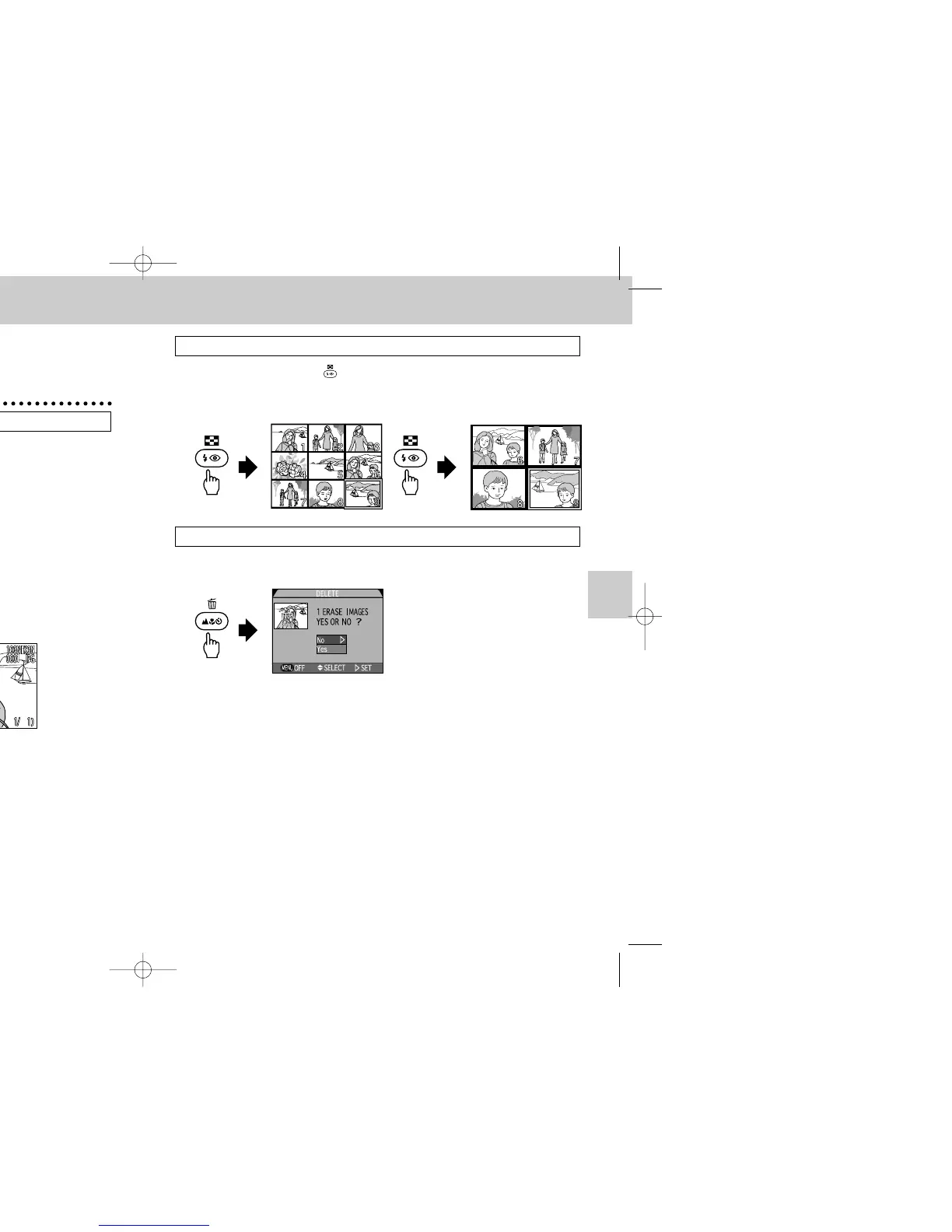
Thumbnail Playback (See p. 76)
1
Press the Thumbnail ( ) button once to display nine Thumbnail
images, or twice to display four Thumbnail images. The
Thumbnail image can be selected with the Multi selector and
displayed Full-frame.
Deleting Photographs in Full-Frame Playback (See p. 77)
1
Press the Delete (D) button in Full-frame playback.
•The delete confirmation dialog is displayed. You can delete an image after
confirming with the confirmation dialog.
Simple Shooting and Playback
COOLPIX995 (E) 01.5.30 0:39 PM Page 54


 To Next Page