26
Basic Photography and Playback: G Easy Auto Mode
Step 4 Viewing and Deleting Images
Viewing Images (Playback Mode)
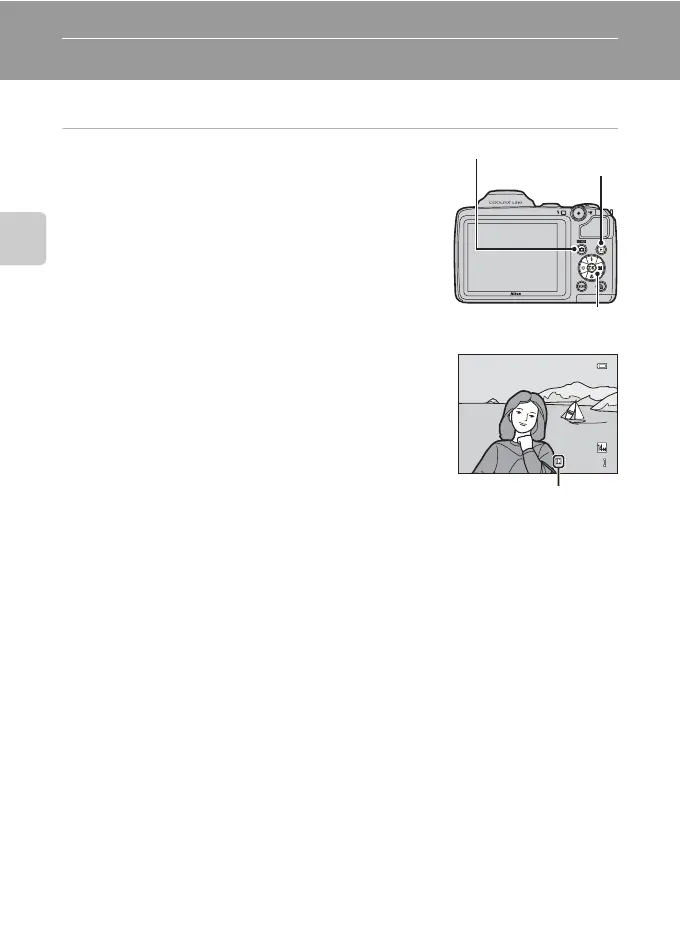
Press the c button.
The last image captured is displayed in full-frame playback
mode.
Press the multi selector H or J to display the previous image.
Press I or K to display the next image.
Images may be displayed briefly at low resolution while being
read from the memory card or internal memory.
Press the A button or the b (e movie-record) button to
switch to shooting mode. You can also press the shutter-
release button.
When C is displayed, images saved in the internal memory are
displayed. When a memory card is inserted, C is not displayed
and images saved on the memory card are displayed.
A (shooting mode)
c (playback)
The Multi Selector
4/ 4
1 5 /0 5 / 2 01 2 1 5: 3 0
15/05/2012 15:30
0004.JPG
Internal memory
indicator
C When the Monitor Has Turned Off to Save Power
When the power-on lamp is flashing, pressing the c button will turn the monitor back on (A 116).
C Playback Mode
See “More on Playback” (A 62) and “Editing Image” (A 76) for more information.
C Power On by Pressing the c Button
When the camera is off, hold down the c button to turn on the camera in playback mode. The lens
will not extend.
C Viewing Image
Images captured using face detection (A 24) or pet detection (A 43) will be automatically rotated
when viewing them in full-frame.















 To Next Page