EasyManua.ls Logo

Nikon COOLPIX L28 - User Manual

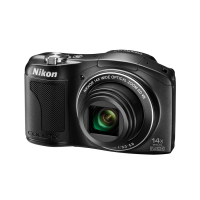
Nikon COOLPIX L28
200 pages
Print Icon
To Next Page IconTo Next Page
Loading...
No reproduction in any form of this manual, in whole or in part (except
for brief quotation in critical articles or reviews), may be made without
written authorization from NIKON CORPORATION.
CT3A03(11)
6MN15911-03
DIGITAL CAMERA
Reference Manual

Table of Contents

Questions and Answers

  • S
    schneideranneSep 18, 2025
    Why doesn't Nikon Transfer 2 start when I connect my Nikon COOLPIX L28?
    • J
      Jenna WrightSep 22, 2025
      Nikon Transfer 2 might not start when your Nikon Digital Camera is connected if the camera is off, the batteries are exhausted, the USB cable is not correctly connected, or the camera is not recognized by the computer. Confirm system requirements and ensure the computer is set to start Nikon Transfer 2 automatically. For more information about Nikon Transfer 2, refer to help information contained in ViewNX 2.
  • J
    John EdwardsAug 25, 2025
    Why doesn't the flash fire on my Nikon Digital Camera?
    • C
      castillojoelAug 25, 2025
      If the flash on your Nikon Digital Camera does not fire, check if the flash mode is set to W (off), if you have selected a scene mode that doesn't support flash, if 'On' is selected for Blink proof in the smart portrait menu, or if another function that restricts flash is enabled.
  • M
    msaundersAug 25, 2025
    What to do if my Nikon Digital Camera is on but not responding?
    • V
      Valerie MillerAug 26, 2025
      If your Nikon Digital Camera is on but not responding, first, wait for any recording to end. If the problem continues, turn the camera off. If it still doesn't turn off, remove and reinsert the battery or disconnect and reconnect the AC adapter if you're using one. Note that while any data currently being recorded will be lost, previously recorded data will remain unaffected.
  • T
    Tina ElliottAug 27, 2025
    Why does my Nikon COOLPIX L28 Digital Camera turn off without warning?
    • L
      Laura OconnellAug 27, 2025
      Your Nikon Digital Camera might be turning off unexpectedly because the batteries are exhausted, it's automatically turning off to save power, or the camera and batteries have become too cold to function correctly.
  • G
    gevansSep 23, 2025
    Why aren't the images to be printed displayed on my Nikon COOLPIX L28?
    • K
      Katelyn CruzSep 23, 2025
      If the memory card contains no images, replace the memory card. Remove the memory card to print images from the internal memory of your Nikon Digital Camera.
  • D
    dryanSep 23, 2025
    Why can't I select paper size with my Nikon Digital Camera?
    • E
      Ernest BaileySep 23, 2025
      Paper size cannot be selected from the camera in the following situations, even when printing from a PictBridge-compatible printer. Use the printer to select paper size. The printer does not support the paper sizes specified by the camera. The printer automatically selects the paper size for your Nikon Digital Camera.
  • J
    Jason GonzalesSep 10, 2025
    Why is red-eye reduction affecting unaffected areas on my Nikon COOLPIX L28?
    • J
      Julia RiversSep 10, 2025
      When taking pictures with V (auto with red-eye reduction) or fill flash with slow sync and red-eye reduction in Night portrait mode on your Nikon Digital Camera, red-eye reduction may be incorrectly applied to areas not affected by red-eye. Use auto mode or any scene mode other than Night portrait, and change the flash mode to any setting other than V (auto with red-eye reduction) and try taking a picture again.
  • A
    andrea54Sep 12, 2025
    What to do if I cannot switch to shooting mode on my Nikon COOLPIX L28 Digital Camera?
    • A
      alexa32Sep 12, 2025
      If you cannot switch to shooting mode on your Nikon Digital Camera, disconnect the USB cable.
  • C
    Cheyenne DavidsonSep 3, 2025
    Why are the colors unnatural in my Nikon COOLPIX L28 photos?
    • W
      William HuberSep 4, 2025
      If the colors appear unnatural in your Nikon Digital Camera images, the white balance or hue may not be adjusted properly.
  • Y
    yestesSep 1, 2025
    Why do my Nikon COOLPIX L28 Digital Camera images appear smeared?
    • J
      Jacob BurnsSep 1, 2025
      If images appear smeared when taken with your Nikon Digital Camera, the lens may be dirty. Clean the lens.

Summary

Introduction

Read This First

Important information and safety precautions before using the camera.

For Your Safety

Critical warnings for safe operation and to prevent injury.

Notices

Legal and compliance notices for specific regions and product use.

Camera Overview and Basics

Parts of the Camera

Identifies and describes the external components of the camera body.

The Basics of Shooting and Playback

Fundamental steps for taking pictures and reviewing them.

Shooting Functions

Shooting Features

Describes available shooting modes and camera settings for photography.

Focusing

Information on the camera's focusing capabilities, including face detection.

Playback and Movie Functions

Playback Features

Explains how to view, zoom, edit, and manage captured images.

Recording and Playing Back Movies

Instructions for recording and playing back video clips.

Settings, Reference, and Troubleshooting

General Camera Setup

How to adjust various camera settings like language, date, and monitor options.

Reference Section

Detailed explanations of menus, editing, and advanced features.

Technical Notes and Index

Troubleshooting, specifications, caring, and index for quick reference.

Nikon COOLPIX L28 Specifications

General IconGeneral
Megapixel20.1 MP
Camera typeCompact camera
Sensor typeCCD
Image stabilizerYes
Total megapixels20.48 MP
Image sensor size1/2.3 \
Image formats supportedJPEG XR
Maximum image resolution5152 x 3864 pixels
Still image resolution(s)-
Digital zoom4 x
Optical zoom5 x
Focal length range4.6 - 23 mm
Lens structure (elements/groups)6/5
Maximum focal length (35mm film equiv)130 mm
Minimum focal length (35mm film equiv)26 mm
FocusTTL
Focus adjustmentAuto
Auto focusing (AF) modesCentre weighted Auto Focus, Contrast Detection Auto Focus
Light meteringCentre-weighted, Spot
ISO sensitivity80, 400, 800, 1600
ISO sensitivity (max)16000
ISO sensitivity (min)80
Light exposure controlProgram AE
Light exposure correction± 2EV (1/3EV step)
Camera shutter typeElectronic, Mechanical
Fastest camera shutter speed1/2000 s
Slowest camera shutter speed4 s
Power source typeBattery
Video resolutions320 x 240, 640 x 480, 1280 x 720 pixels
Motion JPEG frame rate30 fps
Video formats supportedAVI, M-JPEG
Maximum video resolution1280 x 720 pixels
Analog signal format systemNTSC, PAL
Memory slots1
Internal memory27 MB
Compatible memory cardsSD, SDHC, SDXC
Field of view98 %
Display diagonal3 \
Display resolution (numeric)230000 pixels
USB version2.0
Scene modesBacklight, Beach, Close-up (macro), Cuisine, Dawn, Dusk, Fireworks, Museum, Night landscape, Night portrait, Panorama, Party (indoor), Pet, Portrait, Snow, Sports, Sunset
Image editingCrop
White balanceAuto, Cloudy, Daylight, Flash, Fluorescent, Incandescent, Manual
Self-timer delay10 s
Languages supportARA, CHI (SIMPL), CHI (TR), CZE, DAN, DEU, DUT, ENG, ESP, FIN, FRE, GRE, HUN, ITA, JPN, KOR, NOR, POL, POR, RUM, RUS, SWE, TUR, UKR
Product colorBlack
Operating temperature (T-T)0 - 40 °C
Operating relative humidity (H-H)0 - 85 %
Weight and Dimensions IconWeight and Dimensions
Depth29 mm
Width95.4 mm
Height59.8 mm
Weight164 g

Related product manuals