32
Basic Photography and Playback: Auto Mode
Taking Pictures with the Self-Timer
The camera is equipped with a ten-second and two-second timer for self-portraits.
When using the self-timer, use of a tripod is recommended. Turn vibration
reduction (A 105) off when using a tripod.
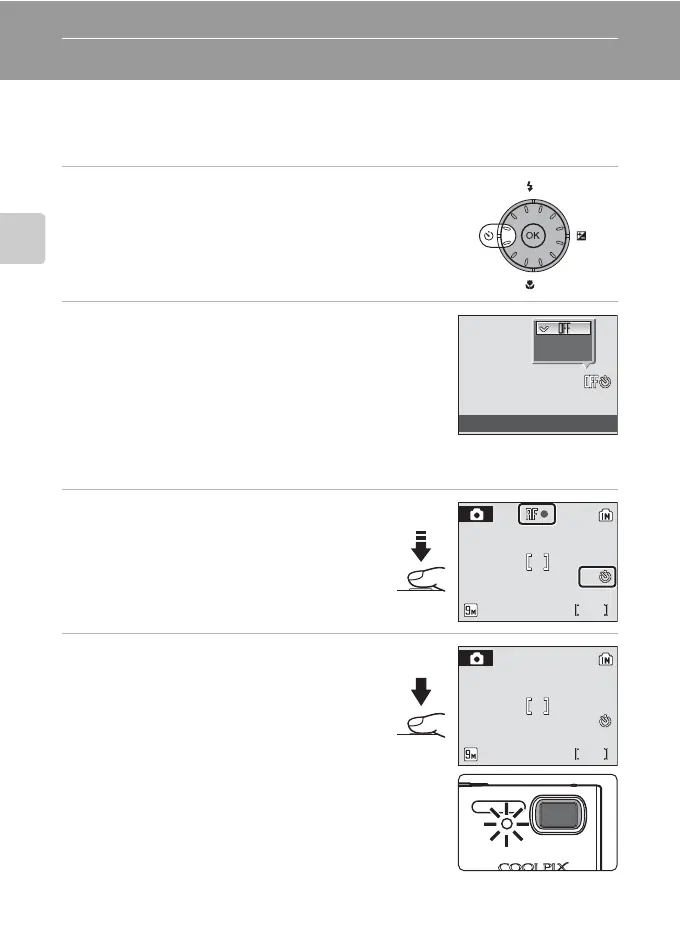
1 Press n (self-timer).
The self-timer menu is displayed.
2 Use the rotary multi selector to choose 10s or
2s and press k.
10s (ten seconds): suited for important occasions (such
as weddings)
2s (two seconds): suited for preventing camera shake
The mode selected for self-timer is displayed.
If a setting is not applied by pressing k within a few seconds, the selection will be
cancelled.
3 Frame the picture and press the
shutter-release button halfway.
Focus and exposure will be set.
4 Press the shutter-release button the
rest of the way down.
The self-timer starts and the number of seconds
remaining until the shutter is released is
displayed in the monitor. The self-timer lamp
will blink. The lamp stops blinking one second
before the picture is taken and remains lit until
the shutter is released.
When the shutter is released, the self-timer
turns off.
To stop the timer before a picture is taken, press
the shutter-release button again.
2s
10s
Self-timer
10
10
15
15
15
9
15





 To Next Page