67
Playing Voice Recordings
Voice Recordings
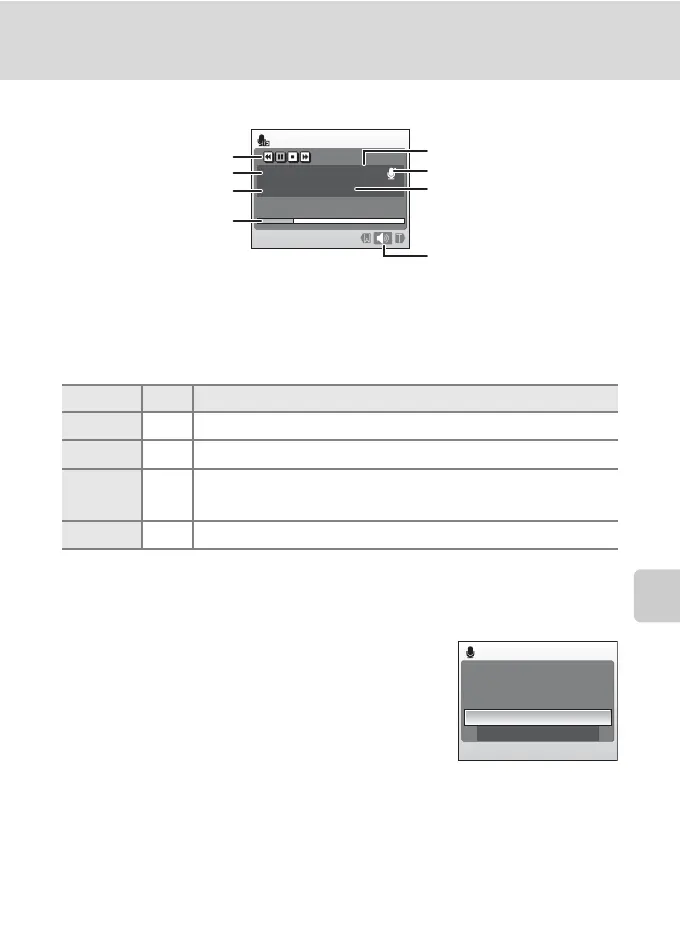
Operations During Playback
Use the zoom buttons, g or f, to adjust playback volume.
Playback controls appear at the top of the monitor. Press the rotary multi selector
J or K to choose a control, then press k to perform the selected operation. The
following operations are available.
Deleting Sound Files
Press
l
during playback or after selecting a sound file
from the select sound file screen. A confirmation dialog
is displayed. To delete the file, select
Yes
and press
k
.
To exit without deleting the sound file, select
No
.
To Press Description
Rewind K Rewind voice recording. Playback resumes when k is released.
Advance L Advance voice recording. Playback resumes when k is released.
Pause
O
P
Pause playback.
Resume playback that has been paused.
End Q End playback and return to the sound file selection screen.
Audio playback
00:00:05/00:00:20
001
15/05/2008 17:30
Control icons
File number
Playback time
Progress indicator
Date and time of recording
Length of recording
Volume
Sound quality
Delete
File will be deleted. OK?
Ye s
No











 To Next Page