60
Movies
Movies
Recording Movies
To shoot movies with sound recorded via the built-in microphone, select shooting
mode and follow the steps below.
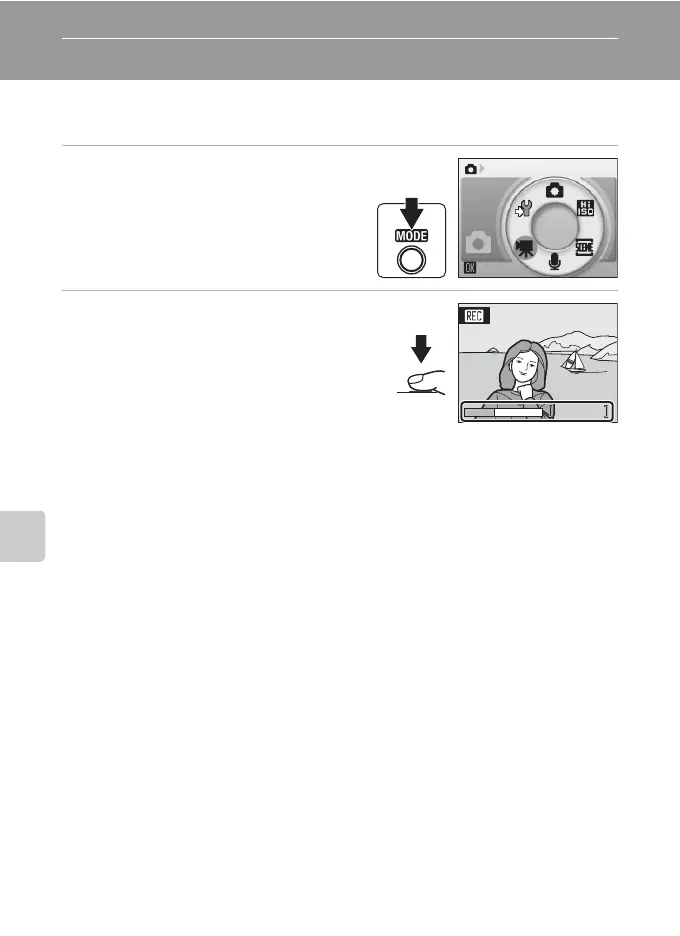
1 Enter movie mode by pressing e
in shooting mode, selecting D (use
the rotary multi selector), and then
pressing k.
Exposure count display shows maximum
total length of movie that can be recorded.
2 Press the shutter-release button all
the way down to start recording.
A progress bar at the bottom of the monitor
shows the amount of recording time remaining.
To end recording, press the shutter-release
button all the way down a second time.
Recording will automatically stop if the internal
memory or memory card becomes full, or recording time reaches ten minutes in length.
B Recording Movies
• Flash mode (A 30), self-timer (A 32), and exposure compensation (A 34) cannot be applied or
changed. Macro mode (A 33) is available.
• Macro mode setting cannot be applied or changed while movies are being recorded. Apply or
change setting as necessary before movie recording begins.
• Optical zoom cannot be adjusted once movie recording begins. Digital zoom cannot be applied
before movie recording begins. However, digital zoom (up to 2×) can be applied while movies are
being recorded.
D Changing Movie Settings
Movie options and auto-focus mode can be changed in the movie menu (A 61).
Movie
12s
12s





 To Next Page