59
Pictmotion by muvee
More on Playback
Viewing Pictmotion Movies
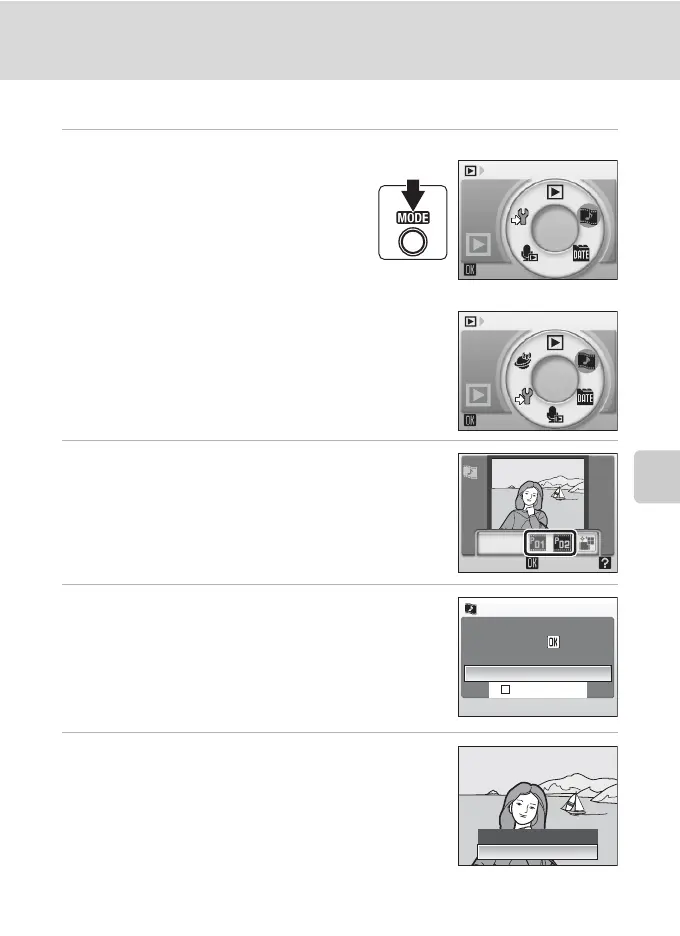
1 Enter Pictmotion playback mode by
pressing e in playback mode,
selecting D (use the rotary multi
selector), and then pressing k.
2 Use the rotary multi selector to choose the
desired Pictmotion movie and press k.
3 Choose Play and press k.
Playback starts.
If Loop is selected, the movie will repeat automatically.
To select or deselect Loop, choose Loop and press k.
Use the zoom buttons, g or f, to adjust playback volume.
To pause the movie, press k during playback.
4 Choose End and press k.
Monitor returns to that shown in step 2.
To resume playback, choose Restart and press k.
C Pictmotion Playback
This camera cannot play Pictmotion movies created with another make or model of camera.
Pictmotion by muvee
Pictmotion by muvee
COOLPIX S52
COOLPIX S52c
Play
Loop
Play
Pause:
Pictmotion
Restart
End





 To Next Page