166
CUSTOM SETTINGS AND OTHER MENUS—CUSTOM SETTINGS
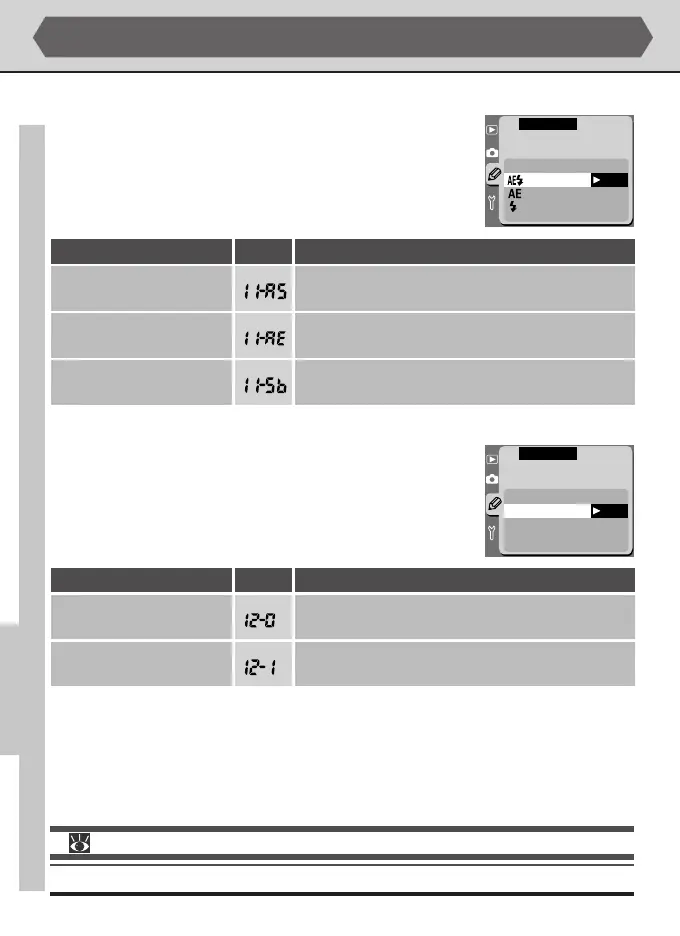
Custom Setting 11: AE/Flash Bracketing
By default, both auto-exposure and flash exposure change
with each shot taken while auto bracketing is in effect. This
option can be used to change camera settings so that brack-
eting affects only one of auto-exposure and flash exposure.
OK
F11 AE/Flash
Bracketing
AE & Flash
AE Only
Flash Only
CSM MENU
Description
Both auto-exposure and flash exposure change with
each shot.
Only auto-exposure changes with each shot; flash
exposure remains fixed.
Custom Setting 12: Assign Command Dial
By default, the main command dial controls shutter speed
(shutter-priority auto and manual exposure modes) while the
sub-command dial controls aperture (aperture-priority and
manual exposure modes). This relationship can be reversed
using this option.
F12 Assign
Command Dial
OFF Main=S, Sub=A
ON Main=A, Sub=S
OK
CSM MENU
Description
No.
No.
Option
AE & Flash
(default)
AE Only
Option
Main command dial controls shutter speed, sub-com-
mand dial aperture.
Main=S, Sub=A
(default)
Main command dial controls aperture, sub-command
dial shutter speed.
Main=A, Sub=S
For more information on:
pg. 100 Auto bracketing
Custom Settings (continued)
Only flash exposure changes with each shot; auto-
exposure remains fixed.
Flash Only



 To Next Page