193
Menu Guide—Custom Settings
Custom Setting b4: EV Steps for Exposure Compensation
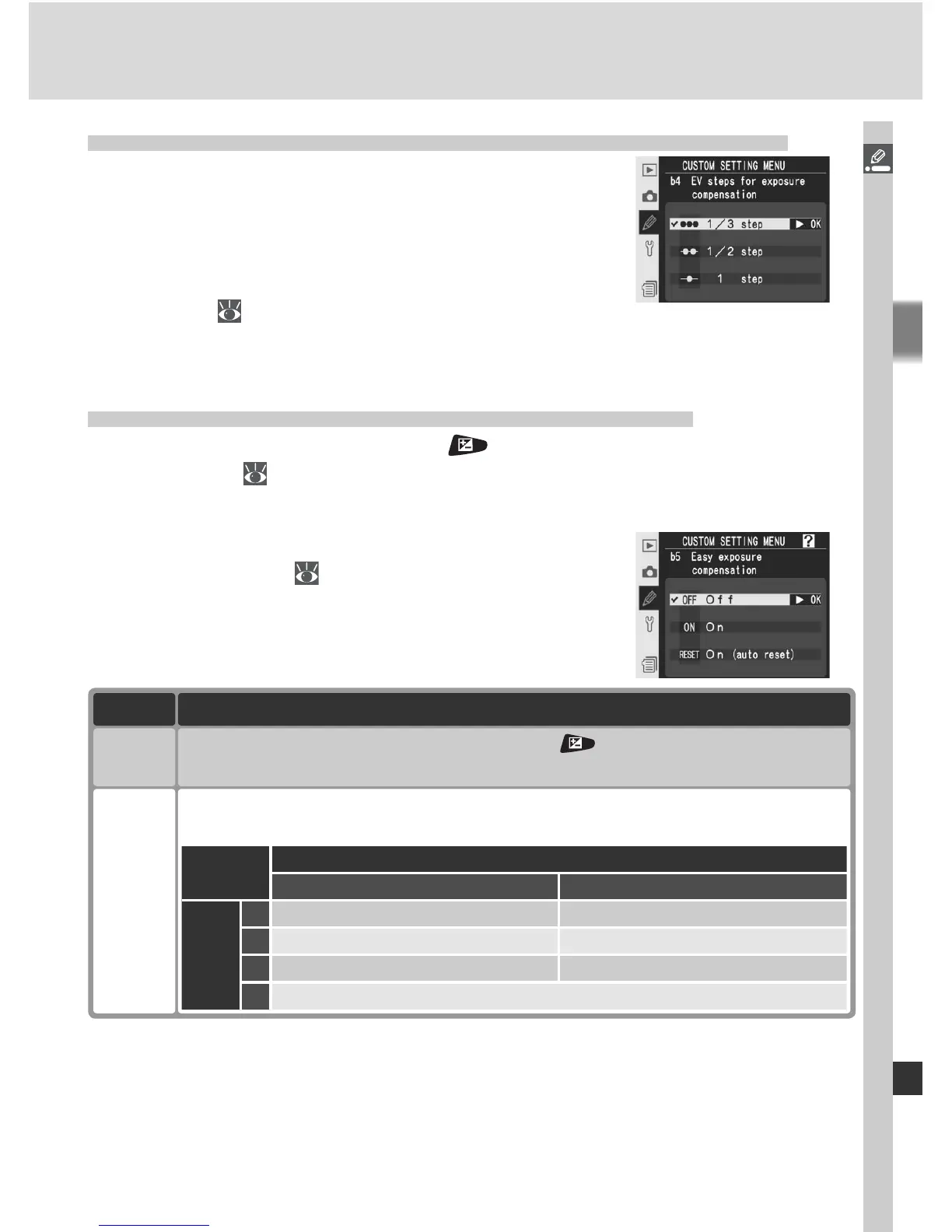
This option determines whether adjustments to
exposure compensation are made in increments
equivalent to
1
/
3 EV (1/3 step, the default option),
½ EV (1/2 step), or 1 EV (1 step). Highlight b4
Exposure comp. EV in the second level of the
CSM menu (
180) and press the multi selector
to the right. Press the multi selector up or down to highlight an option, then
press to the right to make a selection.
Custom Setting b5: Easy Exposure Compensation
This option controls whether the button is needed to set exposure
compensation ( 99). If On is selected, the 0 at the center of the exposure
display will blink even when exposure compensation is set to ±0.
Highlight b5 Exposure comp. in the second level
of the CSM menu ( 180) and press the multi
selector to the right. Press the multi selector up
or down to highlight an option, then press to the
right to make a selection.
Option Description
Off
(default)
On
Exposure compensation set by rotating command dial only. Dial used de-
pends on option selected for Custom Setting f6 > Change main /sub.
Command dials (Custom Setting f6) > Change main / sub
Off On
Exposure
mode
P Sub-command dial Sub-command dial
S Sub-command dial Main command dial
A Main command dial Sub-command dial
M N / A
Exposure compensation set by pressing button and rotating main
command dial.



 To Next Page