112
Q
Connecting the Camera
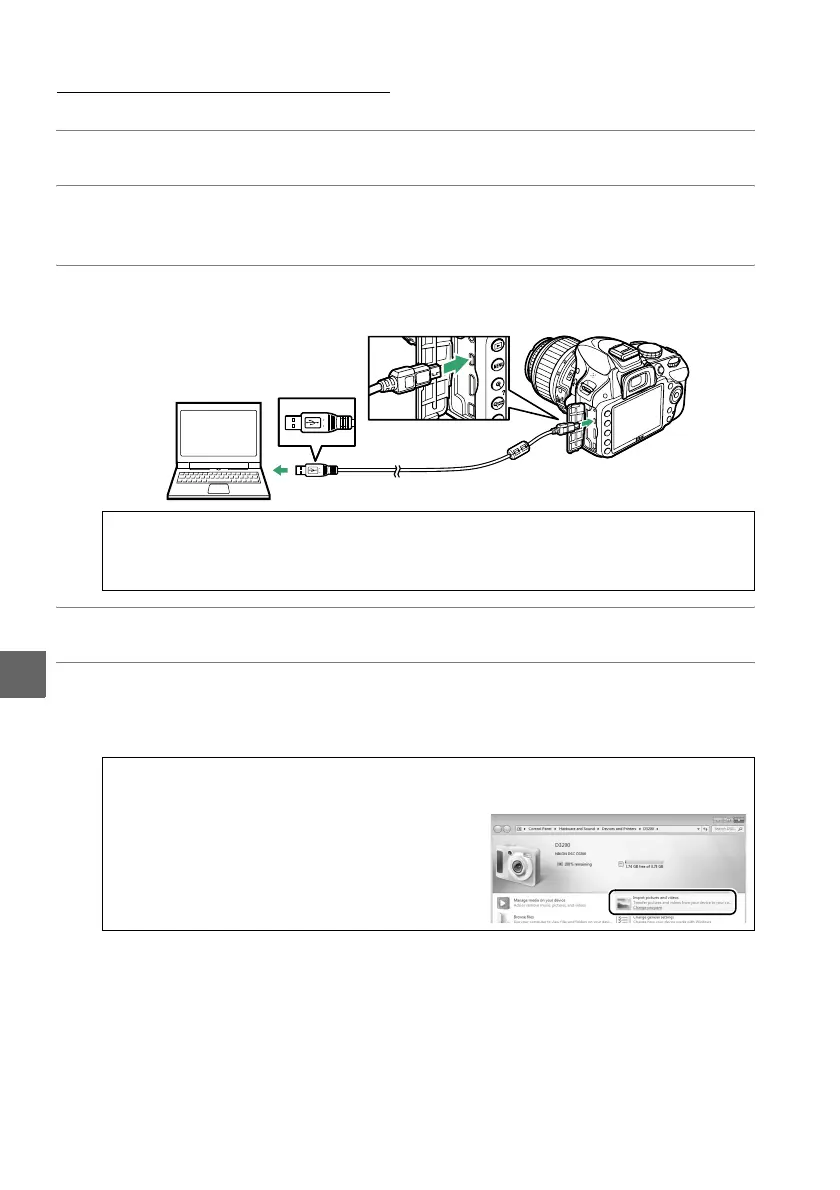
Connect the camera using the supplied UC-E17 USB cable.
1 Turn the camera off.
2 Turn the computer on.
Turn the computer on and wait for it to start up.
3 Connect the USB cable.
Connect the USB cable as shown.
4 Turn the camera on.
5 Start Nikon Transfer 2.
If a message is displayed prompting you to choose a program, select
Nikon Transfer 2.
D USB Hubs
Connect the camera directly to the computer; do not connect the cable via a USB hub
or keyboard.
A Windows 7
If the following dialog is displayed, select Nikon Transfer 2 as described below.
1 Under Import pictures and videos, click
Change program.
A program selection dialog
will be displayed; select Import file using
Nikon Transfer 2 and click OK.
2 Double-click Import file.



 To Next Page