128
i
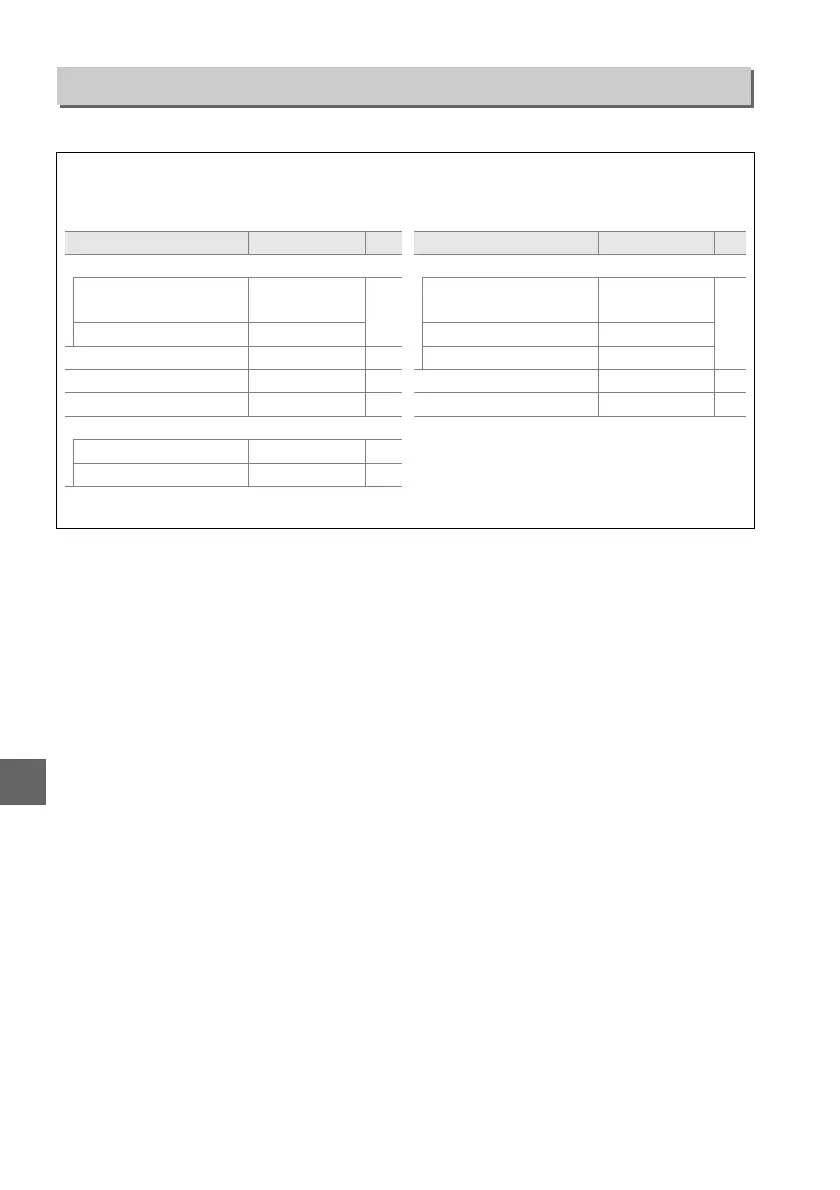
Select Ye s to reset shooting menu settings.
Reset Shooting Menu
G button ➜ C shooting menu
A Reset Shooting Options
Selecting Ye s for Reset shooting menu also restores Picture Control settings to their default
values (0 77) and resets the following:
* Not displayed if e (Auto-area AF) is selected for AF-area mode > Viewfinder.
Option Default 0
Release mode
i, j, k, l, p, n, o,
P, S, A, M
Single frame
31
m Continuous
Focus point
*
Center 40
Flexible program Off 54
A (L) button hold Off 143
Focus mode
Viewfinder Auto-servo AF 35
Live view/movie Single-servo AF 81
Flash mode
i, k, p, n
Auto front-curtain
sync
48
o Auto slow sync
P, S, A, M Front curtain sync
Exposure compensation Off 63
Flash compensation Off 65
Option Default 0



 To Next Page