103
x
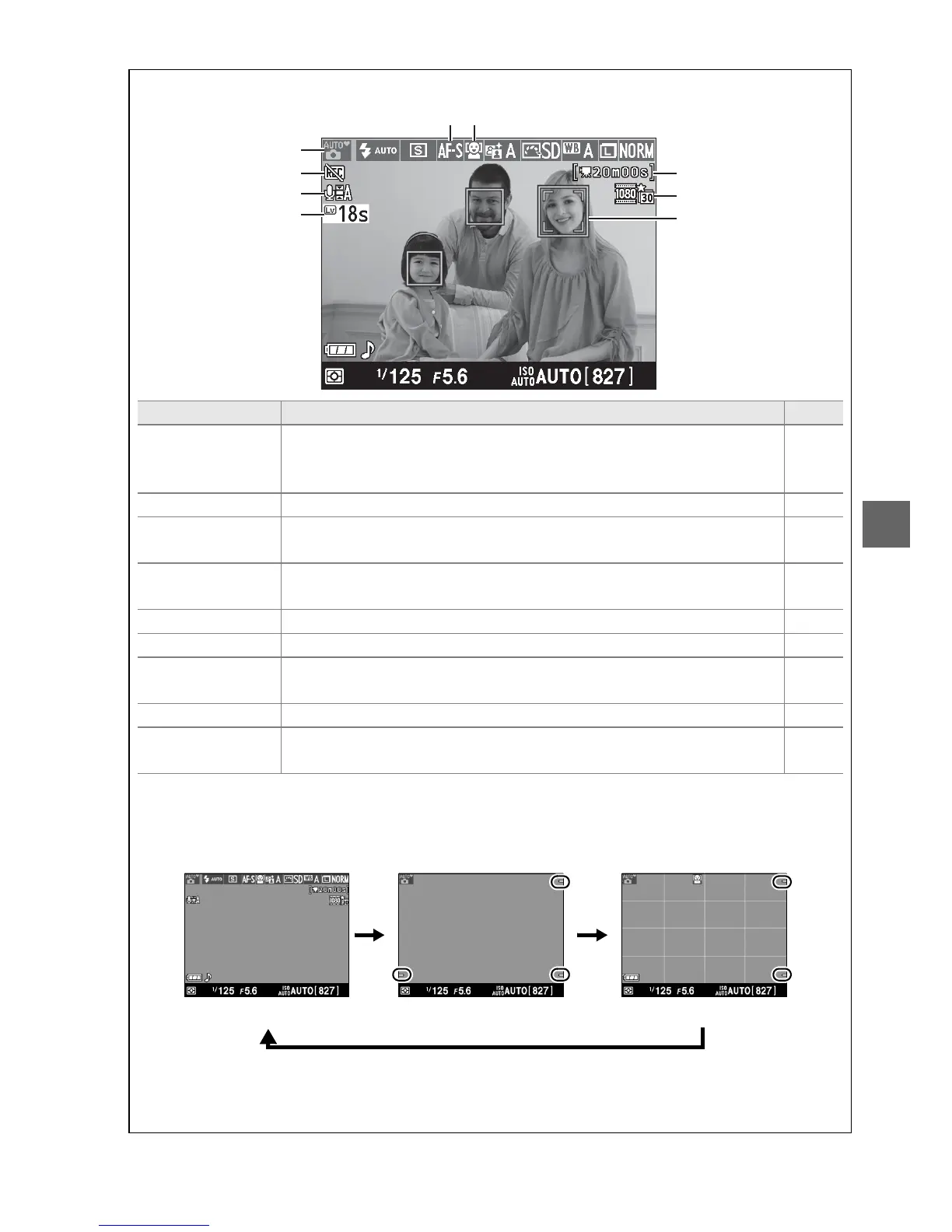
A The Live View Display
Item Description 0
q
Shooting mode
The mode currently selected with the mode dial.
Select i or j
for automatic scene selection (autofocus only; 0 104).
26, 30,
61,
115
w
“No movie” icon Indicates that movies can not be recorded. 107
e
Audio recording
indicator
Indicates whether sound is being recorded with movies. 109
r
Time remaining
The amount of time remaining before live view ends
automatically.
Displayed if shooting will end in 30 s or less.
105
t
Focus mode The current focus mode. 100
y
AF-area mode The current AF-area mode. 101
u
Time remaining
(movie mode)
The recording time remaining in movie mode. 107
i
Movie frame size The frame size of movies recorded in movie mode. 109
o
Focus point
The current focus point. The display varies with the option
selected for AF-area mode (0 101).
102
A Live View Display Options
Press the R button to cycle through display options as shown below.
Circled areas indicate edges of movie frame crop
Show indicators Hide indicators
*
Framing grid
*
* A crop showing the area recorded is displayed during movie recording when frame sizes
other than 640 × 424 are selected for Movie settings > Movie quality in the shooting
menu (0 109; the area outside the movie frame crop is grayed out during recording).
i
o
u
q
w
e
r
y
t



 To Next Page