72
Error Messages
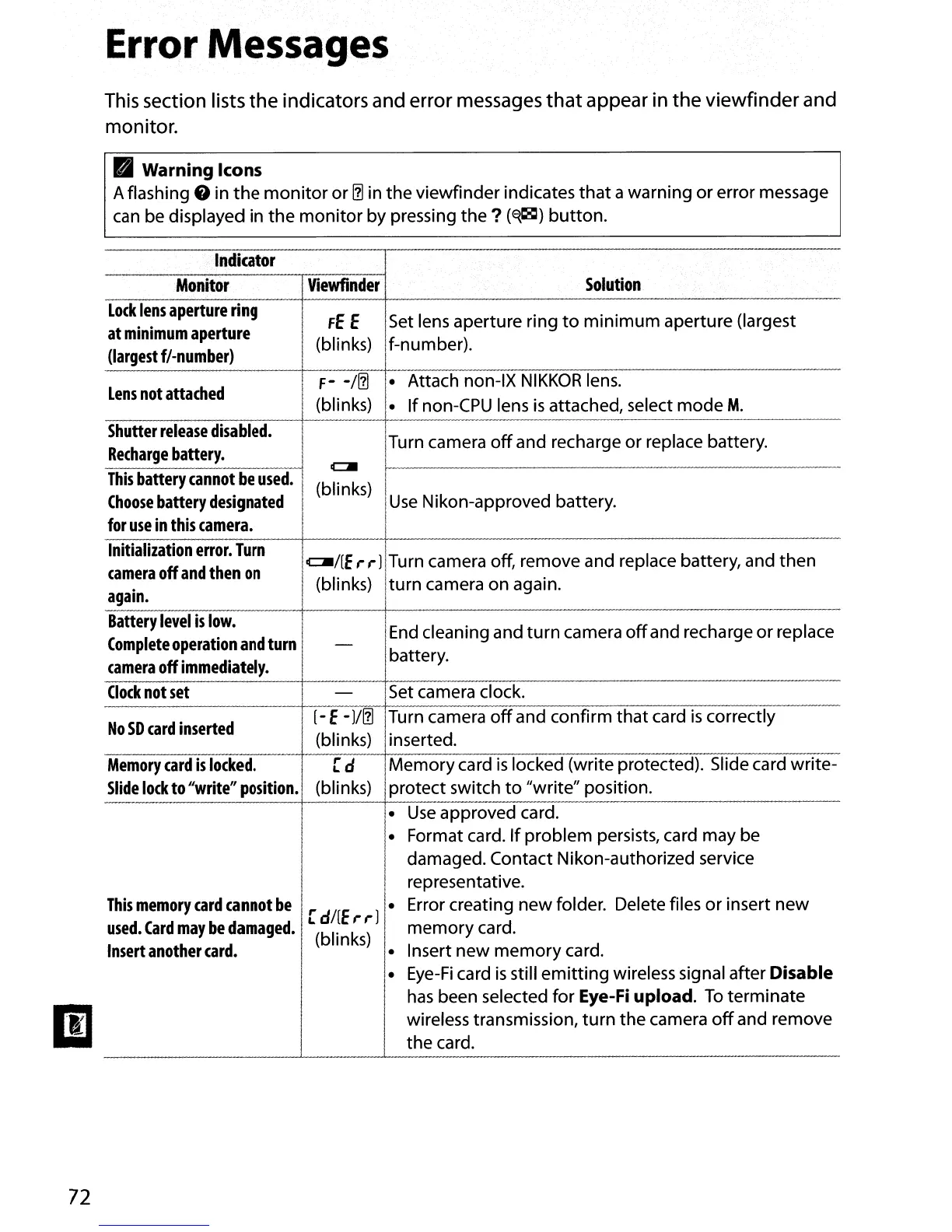
This section lists
the
indicators and error messages
that
appear in
the
viewfinder
and
monitor.
II
Warning Icons
Aflashing
8
in
the
monitor or
111
in the viewfinder indicates that awarning or error message
can
be
displayed in the monitor by pressing the ?
(~)
button.
.
Indicator
Monitor
Viewfinder
Solution
Lock
lens
aperture
ring
!
FE
E
ISet
lens
aperture ring
to
minimum aperture (largest
at
minimum
aperture
(largest
f/-number)
(blinks) If-number).
Lens
not
attached
F-
-/111
- Attach non-IX
NIKKOR
lens.
(blinks)
- If
non-CPU
lens
is
attached, select mode
M.
Shutter
release
disabled.
ITurn camera
off
and recharge or replace battery.
Recharge
battery.
I
CJI
I
I
This
battery
cannot
be
used.
(blinks)
I
I
Choose
battery
designated
I
Use
Nikon-approved battery.
for
use
in
this
camera.
I
Initialization
error.
Turn
i
camera
off
and
then
on
CJl/[E,.,.)iTurn camera off, remove and replace battery, and then
I
again.
(blinks) Iturn camera on again.
Battery
level
is
low.
lEnd cleaning and turn camera
off
and recharge or replace
Complete
operation
and
turn
-
Ibattery.
camera
off
immediately.
Clock
not
set
-
iSet camera clock.
No
SD
card
inserted
[-E-
)/111
ITurn camera
off
and confirm that
card
is
correctly
(blinks)
iinserted.
Memory
card
is
locked.
[ d IMemory card
is
locked (write protected). Slide card write-
Slide
lock
to
"write"
position.
(bli
nks)
Iprotect switch
to
"write" position.
i.
Use
approved card.
I-
Format card. If problem persists, card may
be
I
damaged. Contact Nikon-authorized service
I
representative.
This
memory
card
cannot
be
[d/(E,.,.)
- Error creating new folder. Delete files or insert new
used.
Card
may
be
damaged.
(blinks)
memory
card.
Insert
another
card.
I.
Insert new memory card.
i
Eye-Fi
card
is
still emitting wireless signal after Disable
,-
I
has
been selected for Eye-Fi upload.
To
terminate
I
I
I
wireless transmission, turn the camera
off
and remove
I
the
card.
I



 To Next Page