- BASIC
OPERATION-continued-------------'-
C10
-
..
®
::
J I
~,~
poo".
~
:
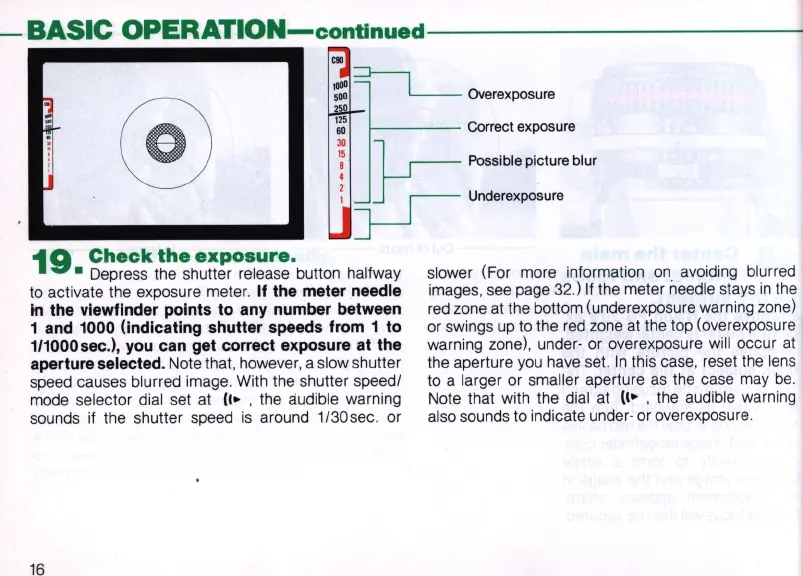
Correct exp
os
ure
I l
r--
Possible picture blur
,
p-
U
"""~poo""
19
Check
the
exposure.
• Depress the shutter release button halfway
to activate the exposure meter.
If the meter needle
in
the viewfinder points to any number between
1 and 1000 (indicating shutter speeds from 1 to
111000sec.),
you
can get correct exposure at the
aperture selected.
Note that, however, a slow shutter
speed causes blurred image. With the shutter speedl
mode selector dial set at
(I.
, the audible warning
sounds if the shutter speed
is
around
1/30sec
. or
16
slower (For more information
on
avoiding blurr
ed
images, see page
32
.) If the meter needle stays
in
the
red zone at the bottom (underexposure warning zone)
or swings
up
to the
red
zone at the top (overex
po
sure
warning zone), under- or overexposure will occur
at
the aperture
you
have set.
In
this case, reset the lens
to a larger or smaller aperture
as
the case may
be
.
Note that with the dial at
(I.
, the audible warning
also sounds to indicate under- or overexposure.



 To Next Page