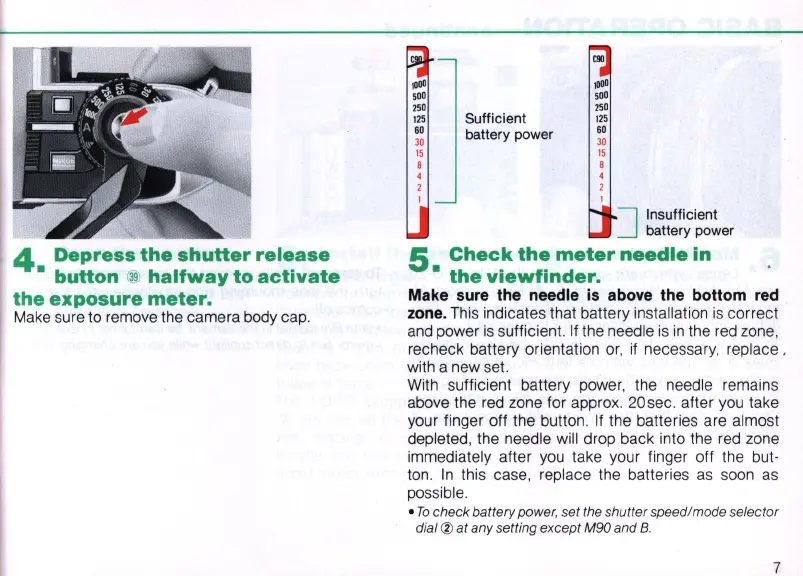
4
Depress
the
shutter
release
•
button
@
halfway
to
activate
the
exposure
meter.
Make
sure to remove the camera body cap.
,000
500
250
125
60
30
15
,
4
2
Sufficient
battery power
,000
500
250
'25
60
30
15
,
4
2
]
Insufficient
battery power
5
Check
the
meter
needle
in
•
the
viewfinder.
Make
sure
the needle
is
above
the bottom
red
zone.
This indicates that battery installation
is
correct
and
power
is
sufficient.
If
the needle
is
in
the
red
zone,
recheck battery orientation
or
,
if
necessary, replace ,
with a new set.
With sufficient battery power, the needle remains
above the
red
zone for approx. 20sec. after
you
take
your finger off the button.
If
the batteries are almost
depleted, the needle will drop back into the
red
zone
immediately after
you
take your finger off the but-
ton.
In
this case, replace the batteries
as
soon
as
possible .
•
To
check
battery power, set the shutter speed/mode selector
dial
®
at
any setting except M90 and B.
7



 To Next Page