EasyManua.ls Logo

Nikon MD-3 - ATTACHING THE MOTOR DRIVE; Attaching the Motor Drive

Nikon MD-3
25 pages
Print Icon
To Next Page IconTo Next Page
To Previous Page IconTo Previous Page
Loading...
ATTACHING
THE MOTOR
DRIVE
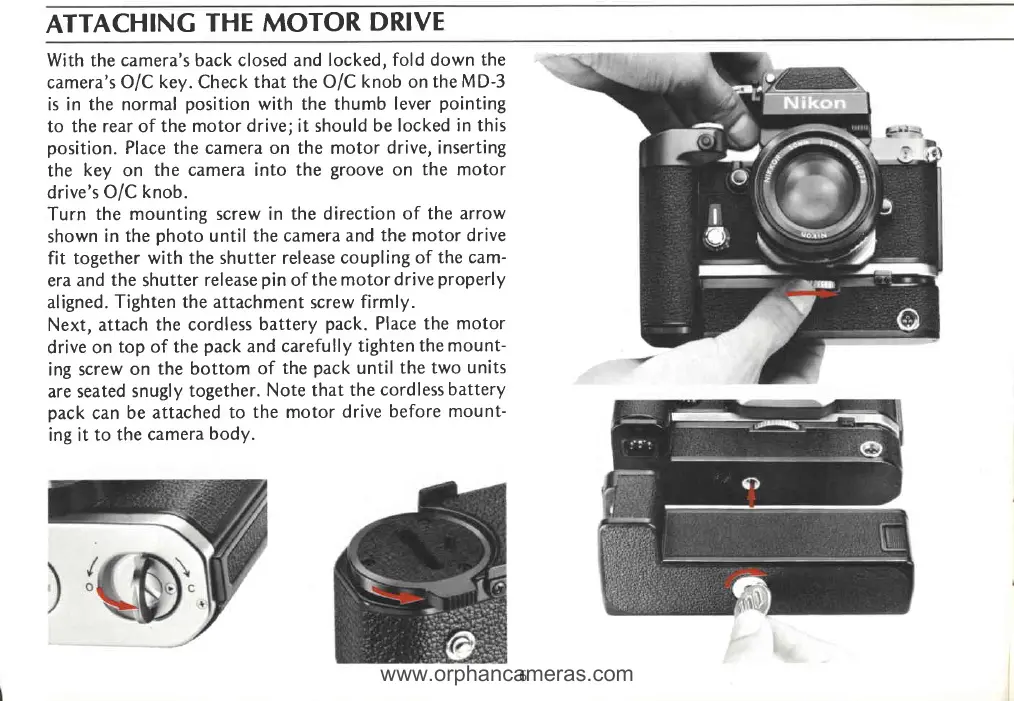
With
the
camera's back closed and
locked, fold down
the
camera's
O/C key. Check
that the O/C
knob
on
the
MD-3
is in the normal
position
with the thumb
lever
pointing
to the rear of the
motor drive; it should
be locked
in this
position.
Place the camera on the motor
drive, inserting
the
key on
the camera into
the
groove
on
the motor
drive's
O/C
knob.
Turn
the mounting screw in
the direction of
the arrow
shown
in the
photo
until
the camera and
the motor drive
fit together
with the shutter release
coupling of
the cam-
era
and
the
shutter
release
pin
of
the motordrive
properly
aligned.
Tighten the attachment
screw
firmly.
Next, attach
the cordless
battery
pack.
Place the
motor
drive on
top of the
pack
and carefully
tighten
the mount-
ing screw
on
the bottom
of
the
pack
until
the two
units
are seated
snugly
together.
Note that
the
cordless
battery
pack
can
be attached
to
the motor
drive
before mount-
ing it to
the camera
body.
www.orphancameras.com

Related product manuals