EasyManua.ls Logo

Nikon Speedlight - Exposure Determination for Basic Assembly

Nikon Speedlight
26 pages
Print Icon
To Next Page IconTo Next Page
To Previous Page IconTo Previous Page
Loading...
FLASH
PHOTOGRAPHY
WITH BASIC
ASSEMBLY-
continued
Exposure
Determination
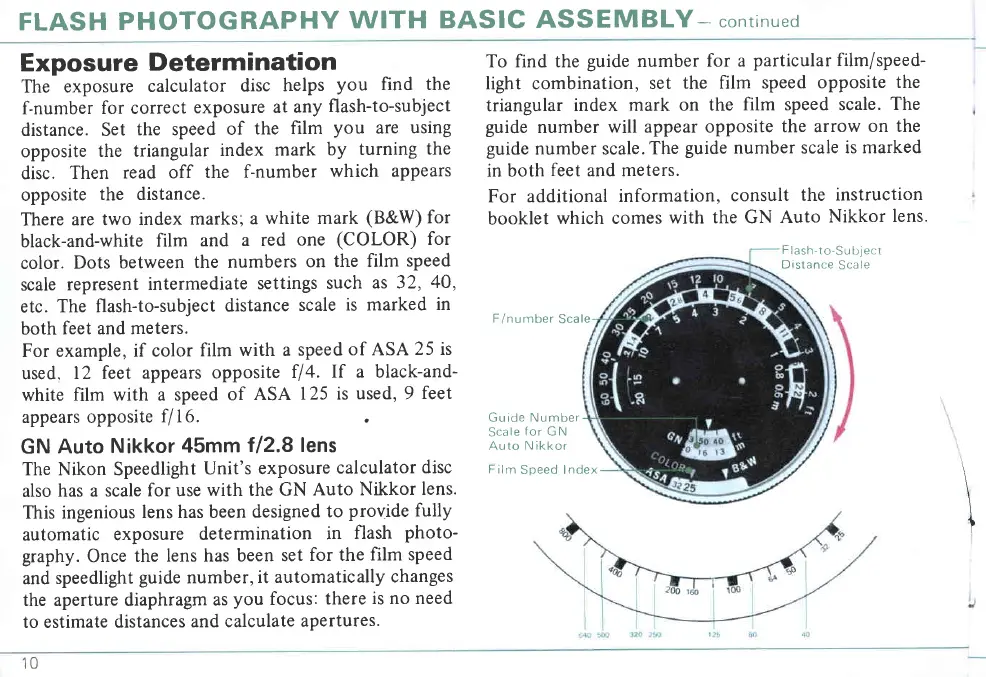
The exposure
calculator
disc
helps
you
find the
f-number
for correct
exposure
at any
flash-to-subject
distance. Set
the speed
of
the
film
you
are
usrng
opposite
the triangular
index
mark
by
turning
the
disc.
Then
read off
the
f-number
which appears
opposite
the distance.
There
are two
index
marks;
a
white mark
(B&W)
for
black-and-white
film
and
a red
one
(COLOR)
for
color.
Dots
between
the numbers
on
the film speed
scale
represent
intermediate
settings
such
as 32,
40,
etc.
The flash-to-subject
distance
scale
is marked
in
both
feet and meters.
For example,
if color
film
with a
speed
of ASA
25 is
used,
12 feet
appears opposite
fl4.
lf a black-and-
white
film with a speed
of
ASA
125 is
used, 9
feet
appears opposite
f/16.
.
GN
Auto
Nikkor
45mm
f/2.8 lens
The Nikon Speedlight
Unit's
exposure
calculator
disc
also
has a scale
for use
with the GN
Auto
Nikkor
lens.
This ingenious
lens has been
designed
to
provide fully
automatic
exposure
determination
in
flash
photo-
graphy.
Once
the
lens has been
set
for the
film speed
and
speedlight
guide
number,
it automatically
changes
the aperture diaphragm
as
you
focus:
there
is no need
to estimate
distances
and calculate
apertures.
To find the
guide
number
for a
particular film/speed-
light combination,
set
the film speed
opposite
the
triangular
index mark
on the
film speed scale.
The
guide
number
will appear opposite
the arrow
on the
guide
number scale.
The
guide
number scale
is marked
in both
feet
and meters.
For additional
information,
consult
the
instruction
booklet
which comes
with
the GN
Auto
Nikkor
lens.
F
lash-to-Su
bject
Distance
Scale
F/number
Scale
Guide Number
Scale
for
GN
Auto N ikkor
Film
Speed Index
10

Related product manuals