Home
Nikon
Transmitter
WT-5
Page 50
Nikon WT-5 - Page 50
64 pages
Manual
Save Page as PDF
To Next Page
To Next Page
To Previous Page
To Previous Page
Loading...
En_01
36
7
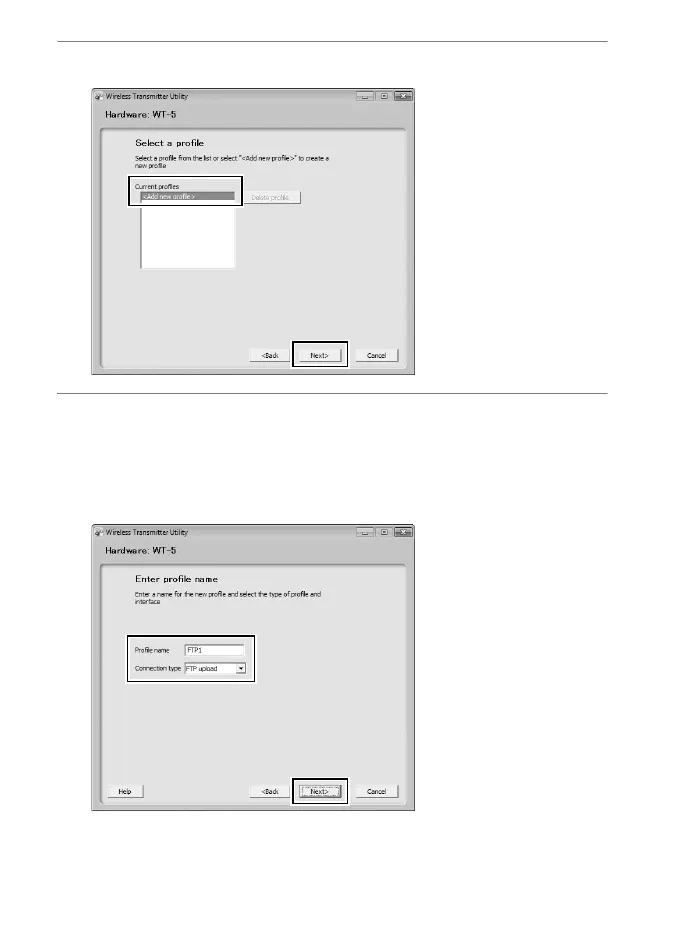
Select
Add new profile
and click
Next
.
8
Enter the f
ollowing informa
tion and click
Next
.
•
Profile name
: Enter a name of up to 16 charac
ters.
•
Connection type
: Choose
FTP uploa
d, Image transfer
, Camera
control, or HTTP ser
ver (
0
ii).
49
51
Table of Contents
Main Page
Default Chapter
5
For Your Safety
5
Notices
7
Table of Contents
14
Introduction
15
Connection Types
17
Connecting the WT-5
18
Wireless Connections
19
Step 1: Getting Ready
21
Step 2: Selecting the WT-5
22
Step 3: the Connection Wizard
22
Step 4: Network Settings
30
Copying Profiles
36
Appendices
39
Accessing the Camera
39
Creating Network Profiles with the Wireless Transmitter Utility
47
Troubleshooting
59
Specifications
60
Index
62



 To Next Page