En_01
44
16
Connect the WT-5.
Insert a memory card in the camera, connect the WT-5, and
turn the camera on.
17
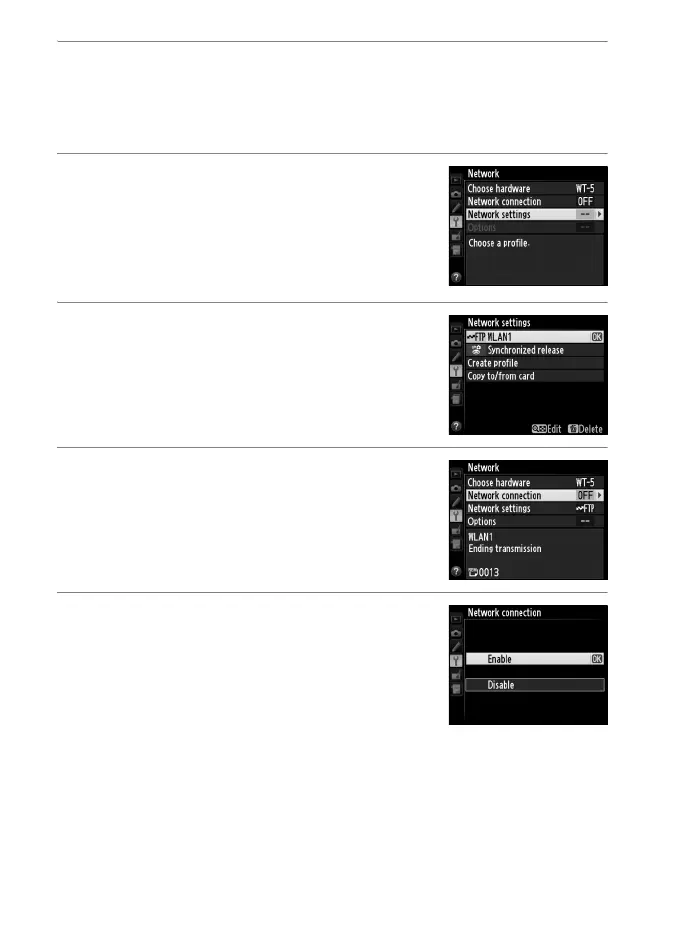
Display network profiles.
Select Network in the camera setup
menu, then highlight Network settings
and press 2 to display the profiles list.
18
Select the new network profile.
Highlight the new network profile and
press 2 to return to the network menu.
19
Select Network connection.
Highlight Network connection and
press 2.
20
Select Enable.
Highlight Enable and press 2 to connect
to the network.



 To Next Page