EasyManua.ls Logo

Nilfisk-Advance Supreme 150 - User Manual

Nilfisk-Advance Supreme 150
26 pages
Print Icon
To Next Page IconTo Next Page
Loading...
107407394 b DE-SV-EN-FI-DA
Instructions for use
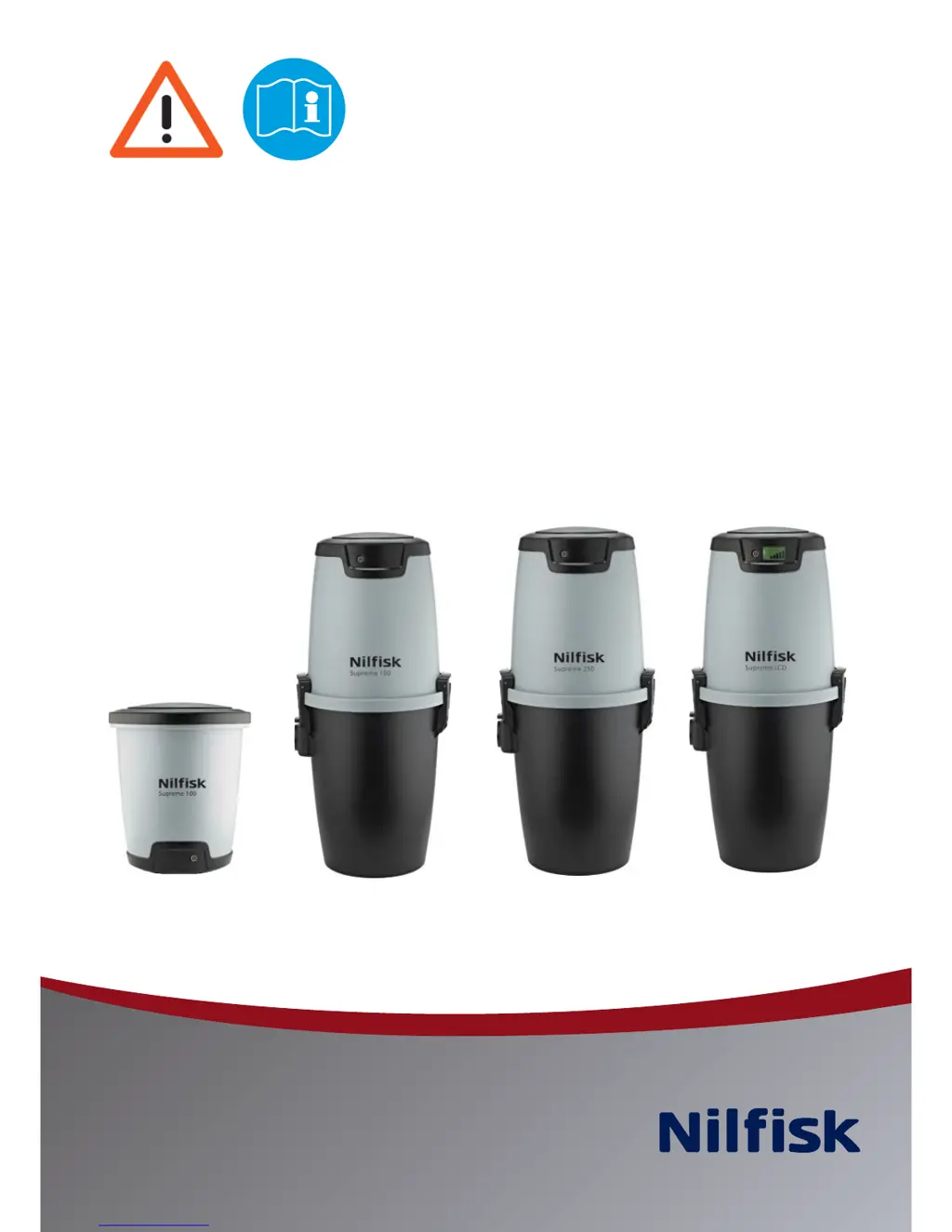
Supreme 100
Supreme 150/Performer 150
Supreme 250/Performer 250
Supreme LCD

Questions and Answers

Summary

Important Safety Precautions

Technical Data

Specifications for each vacuum cleaner model, including dimensions, motor power, and capacity.

Essential Instructions (UK Only)

Specific safety and electrical connection guidelines for users in the United Kingdom.

Supreme 100 Assembly Instructions

Fitting the Wall Bracket

Steps to securely mount the wall bracket for the Supreme 100 vacuum unit.

Locating Vacuum Cleaner on Wall Bracket

Instructions for positioning and attaching the Supreme 100 vacuum unit to its wall bracket.

Connecting the Machine

Procedure for connecting suction and exhaust pipes to the Supreme 100 vacuum unit.

Supreme 100 Operating Instructions

Starting and Stopping the Machine

Guidance on operating the Supreme 100 vacuum cleaner using manual or wireless hoses.

Servicing the Supreme 100

Routine maintenance and troubleshooting for the Supreme 100, including thermal cut-out.

Supreme 100 Filter and Dust Bag Management

Replacing the Dust Bag

Detailed steps for safely removing and replacing the dust bag in the Supreme 100 vacuum unit.

Replacing and Cleaning the Filter

Instructions on maintaining the filter for optimal performance, including cleaning and replacement.

Supreme 150;250 Series Assembly Instructions

Fitting the Wall Bracket

Steps for installing the wall bracket for the Supreme 150/250 series vacuum units.

Locating Vacuum Cleaner on Wall Bracket

Procedure for mounting the Supreme 150/250 series vacuum cleaner onto its wall bracket.

Connecting the Machine

Guide to connecting the suction hose and exhaust pipe for the Supreme 150/250 series.

Utility Inlet (Canada)

Information on installing and using the optional utility inlet accessory, standard in Canada.

Supreme 150;250 Series Operating Instructions

Starting the Machine

How to operate the Supreme 150/250 series cleaners using manual, on/off, or wireless hoses.

Servicing the Supreme 150;250 Series

Maintenance advice and thermal protector reset for Supreme 150/250 series vacuum cleaners.

Supreme LCD Display Guide

Explanation of Display Indicators

Details on the meaning of symbols and lights shown on the Supreme LCD model's display.

Supreme 150;250 Series Filter and Dust Bag Management

Replacing the Bag Filter

Instructions for removing and fitting the bag filter in the Supreme 150/250 series units.

Fitting the Bag Filter

Steps to correctly install the bag filter into the dust container of the Supreme 150/250 series.

Replacing the Dust Bag

Guide to safely removing and replacing the dust bag for the Supreme 150/250 series.

Fitting the Dust Bag

Procedure for correctly installing a new dust bag into the Supreme 150/250 series cleaner.

Electrical Connection

Low Voltage Cable Connections

Guidance on connecting low voltage cables to the vacuum unit and connection panel.

Accessories

Telescopic Tube

How to adjust the length of the telescopic tube for optimal use.

Radiator;Crevice Nozzle

Use of the nozzle for reaching difficult areas like corners, crevices, and radiators.

Dusting Brush

Application of the dusting brush on lamps, pictures, curtains, and textiles.

Standard Floor Nozzle

Using the universal floor nozzle for carpets, parquet, and other flooring surfaces.

Furniture Nozzle

Practical use of the nozzle for vacuuming furniture, cushions, and textiles.

Troubleshooting

Vacuum Cleaner Will Not Start

Diagnosing and resolving issues when the vacuum cleaner fails to start, including thermal protector.

Vacuum Cleaner Will Not Stop

Troubleshooting steps for when the vacuum cleaner fails to shut off, checking for fused pins or blockages.

Poor Suction Power

Identifying causes of reduced suction, such as blockages, lid closure, or clogged filters/bags.

Supreme LCD Display Indicators

Explanation of display indicators for speed, battery, service, airflow, and overheating on LCD models.

Service and Maintenance Guides

Supreme 100 Service;Maintenance

Maintenance schedule and procedures for the Supreme 100, including dust bag and filter checks.

Supreme 150;250 Series Service;Maintenance

Maintenance schedule and procedures for Supreme 150/250 series, covering dust container, bag, and filter.

Dimensional Drawings

Supreme 100 Dimensions

Diagrams showing the overall dimensions and mounting clearances for the Supreme 100 model.

Supreme 150;250 Series Dimensions

Diagrams illustrating the dimensions and installation requirements for Supreme 150/250 series units.

Wireless Communication and Hose Handle

Transceiver Box Installation and Setup

Instructions for mounting and initially connecting the transceiver box for wireless operation.

Wireless Hose Handle Operation

How to use the wireless hose handle for starting, stopping, and regulating suction power.

Deluxe Info Center Display

Explanation of symbols and indicators on the Deluxe hose handle's info center display.

Replacing Hose Handle Battery

Step-by-step guide to replacing the batteries in the wireless hose handle.

Summary

Important Safety Precautions

Technical Data

Specifications for each vacuum cleaner model, including dimensions, motor power, and capacity.

Essential Instructions (UK Only)

Specific safety and electrical connection guidelines for users in the United Kingdom.

Supreme 100 Assembly Instructions

Fitting the Wall Bracket

Steps to securely mount the wall bracket for the Supreme 100 vacuum unit.

Locating Vacuum Cleaner on Wall Bracket

Instructions for positioning and attaching the Supreme 100 vacuum unit to its wall bracket.

Connecting the Machine

Procedure for connecting suction and exhaust pipes to the Supreme 100 vacuum unit.

Supreme 100 Operating Instructions

Starting and Stopping the Machine

Guidance on operating the Supreme 100 vacuum cleaner using manual or wireless hoses.

Servicing the Supreme 100

Routine maintenance and troubleshooting for the Supreme 100, including thermal cut-out.

Supreme 100 Filter and Dust Bag Management

Replacing the Dust Bag

Detailed steps for safely removing and replacing the dust bag in the Supreme 100 vacuum unit.

Replacing and Cleaning the Filter

Instructions on maintaining the filter for optimal performance, including cleaning and replacement.

Supreme 150;250 Series Assembly Instructions

Fitting the Wall Bracket

Steps for installing the wall bracket for the Supreme 150/250 series vacuum units.

Locating Vacuum Cleaner on Wall Bracket

Procedure for mounting the Supreme 150/250 series vacuum cleaner onto its wall bracket.

Connecting the Machine

Guide to connecting the suction hose and exhaust pipe for the Supreme 150/250 series.

Utility Inlet (Canada)

Information on installing and using the optional utility inlet accessory, standard in Canada.

Supreme 150;250 Series Operating Instructions

Starting the Machine

How to operate the Supreme 150/250 series cleaners using manual, on/off, or wireless hoses.

Servicing the Supreme 150;250 Series

Maintenance advice and thermal protector reset for Supreme 150/250 series vacuum cleaners.

Supreme LCD Display Guide

Explanation of Display Indicators

Details on the meaning of symbols and lights shown on the Supreme LCD model's display.

Supreme 150;250 Series Filter and Dust Bag Management

Replacing the Bag Filter

Instructions for removing and fitting the bag filter in the Supreme 150/250 series units.

Fitting the Bag Filter

Steps to correctly install the bag filter into the dust container of the Supreme 150/250 series.

Replacing the Dust Bag

Guide to safely removing and replacing the dust bag for the Supreme 150/250 series.

Fitting the Dust Bag

Procedure for correctly installing a new dust bag into the Supreme 150/250 series cleaner.

Electrical Connection

Low Voltage Cable Connections

Guidance on connecting low voltage cables to the vacuum unit and connection panel.

Accessories

Telescopic Tube

How to adjust the length of the telescopic tube for optimal use.

Radiator;Crevice Nozzle

Use of the nozzle for reaching difficult areas like corners, crevices, and radiators.

Dusting Brush

Application of the dusting brush on lamps, pictures, curtains, and textiles.

Standard Floor Nozzle

Using the universal floor nozzle for carpets, parquet, and other flooring surfaces.

Furniture Nozzle

Practical use of the nozzle for vacuuming furniture, cushions, and textiles.

Troubleshooting

Vacuum Cleaner Will Not Start

Diagnosing and resolving issues when the vacuum cleaner fails to start, including thermal protector.

Vacuum Cleaner Will Not Stop

Troubleshooting steps for when the vacuum cleaner fails to shut off, checking for fused pins or blockages.

Poor Suction Power

Identifying causes of reduced suction, such as blockages, lid closure, or clogged filters/bags.

Supreme LCD Display Indicators

Explanation of display indicators for speed, battery, service, airflow, and overheating on LCD models.

Service and Maintenance Guides

Supreme 100 Service;Maintenance

Maintenance schedule and procedures for the Supreme 100, including dust bag and filter checks.

Supreme 150;250 Series Service;Maintenance

Maintenance schedule and procedures for Supreme 150/250 series, covering dust container, bag, and filter.

Dimensional Drawings

Supreme 100 Dimensions

Diagrams showing the overall dimensions and mounting clearances for the Supreme 100 model.

Supreme 150;250 Series Dimensions

Diagrams illustrating the dimensions and installation requirements for Supreme 150/250 series units.

Wireless Communication and Hose Handle

Transceiver Box Installation and Setup

Instructions for mounting and initially connecting the transceiver box for wireless operation.

Wireless Hose Handle Operation

How to use the wireless hose handle for starting, stopping, and regulating suction power.

Deluxe Info Center Display

Explanation of symbols and indicators on the Deluxe hose handle's info center display.

Replacing Hose Handle Battery

Step-by-step guide to replacing the batteries in the wireless hose handle.

Nilfisk-Advance Supreme 150 Specifications

General IconGeneral
BrandNilfisk-Advance
ModelSupreme 150
CategoryVacuum Cleaner
LanguageEnglish

Related product manuals