3.Prepare mobile devices
1) During flight, the APP performance will be greatly affected if phone call comes or other
interruption come across, so it is suggested to have your mobile set as No-disturbing mode.
2)Enter the setting menu-wireless and network-WLAN, check the WIFI signal connection status.
And it takes about 30-60 seconds from WIFI signal searching to connection.
3) Choose WIFI signal of the quadcopter(FPV_X231), enter with the password(1234567890).All the
indicator lights will be solid on after successful connection.
4) Enter the main interface of APP.
5) Add the camera by clicking icon(01). Then mobile device will show the preview in the screen.
After about 2 seconds, APP enters into "connection interface".
HOW TO FLY?
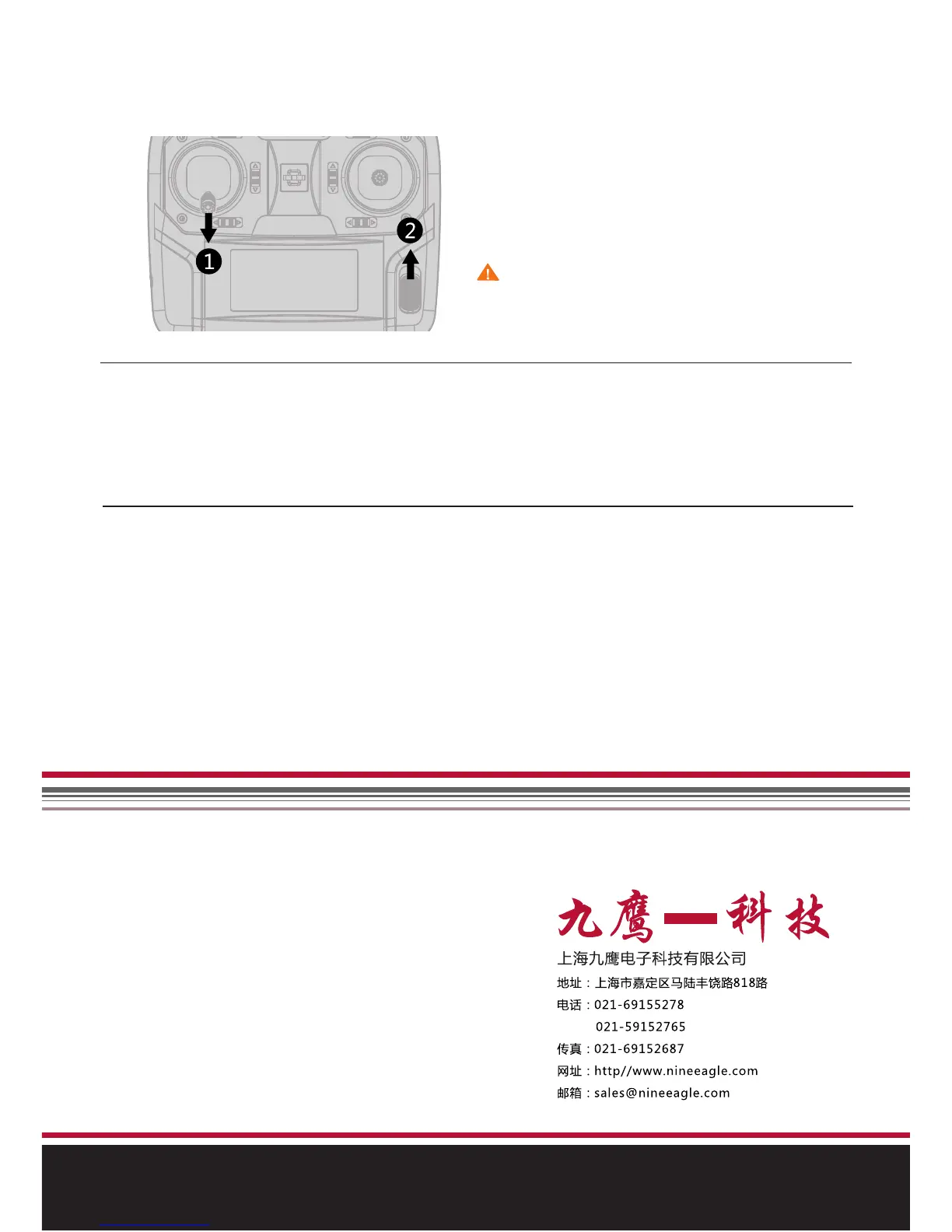
1) Move the throttle stick to the lowest position.
2) Turn on transmitter
3) Release the throttle stick
Attention: Please do move the throttle stick to
the lowest position when powering on transmitter.
Otherwise the quadcopter won’t start.
Move the throttle stick to the lowest position,
and turn on transmitter. Then release the throttle
stick.
2.Connect Li-po battery to quadcopter
1)Plug Micro SD card into card slot of the camera.
2)Remove the battery cover off the quadcopter, pull out the power connection line.
3)Put the quadcopter horizontally, connect the quadcopter with the li-po battery.
4)Put the battery inside the battery compartment and close the cover.
5)Make sure to keep the quadcopter horizontally still and quite.



 To Next Page