【Picture3】
4.Transmitter controlled flying
Place the quadcopter in empty place and let its tail face to pilot. (Take Mode 2 for example)
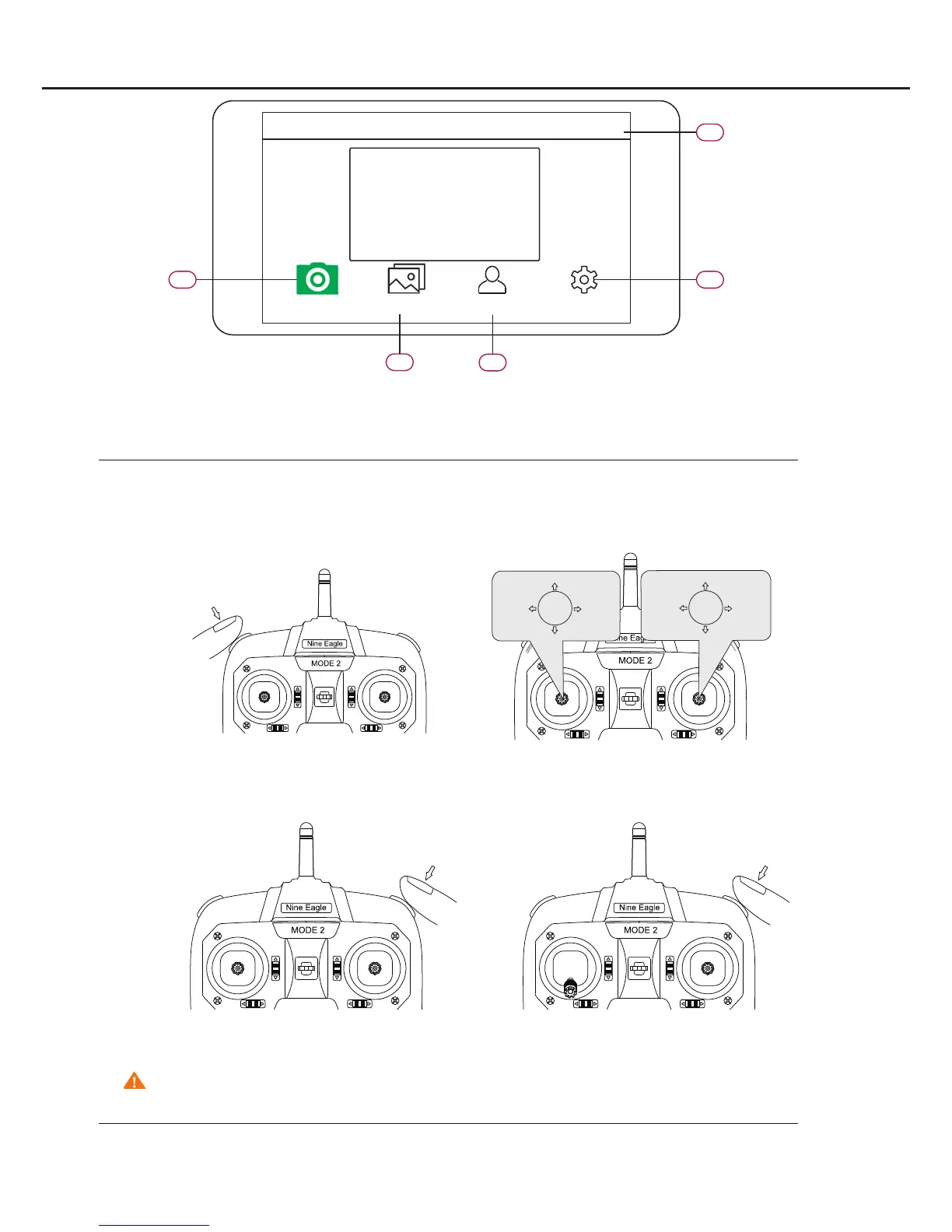
1)Take off:Press the TAKE OFF button on the transmitter. The quadcopter will take off automatically
and hover at the height 1 meter.
【Picture6】
【Picture7】
【Picture4】
【Picture5】
5.Mobile devices controlled flying
2)Transmitter controls:See instruction for sticks on Picture 5
3)Land:Press LAND button on transmitter. Quadcopter will land slowly to the ground.
Attention: Make sure the landing area is clear and landing won’t hurt people before pressing LAND button.
4)Emergency Landing:In case of emergency, move the throttle stick to the bottom and press the land button. Motor
will stop rotating at once and quadcopter will fall down immediately.
Attention: This function is only for emergency use. Please think carefully before using it because it may
damage the quadcopter.
APP connection interface:
01 Add camera: connect the mobile device with the quadcopter.
02 Camera: operation interface
03 Photo album: download, delete and share photos & videos.
04 Users center: download manual or teaching videos
05 Setting: camera, flight parameter and APP setting.
Camera
02
03
04
05
01
Photo album
Users center
Setting
Nineeagle
+
Throttle
Stick
Climb
Descend
Rotage
Right
Rotate
Left
Cyclic
Stick
Forward
After
Right
Left



 To Next Page