【Picture8】
After successful
connection between
mobile device and
quadcopter, the screen of
mobile device will show
control interface
automatically.
【Picture9】
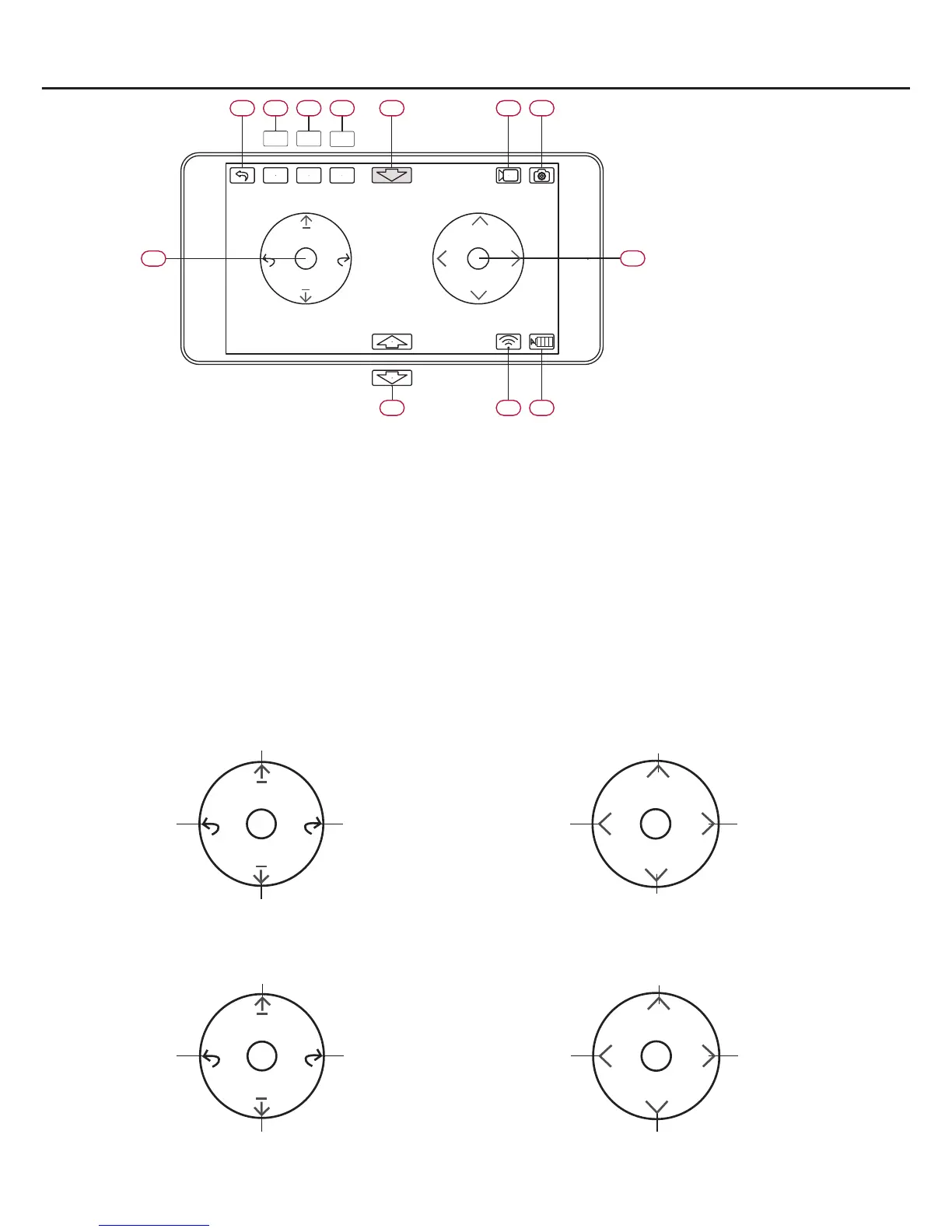
06 back to main interface
07 control mode switch
stick mode
gravity mode
08 flight mode switch
Primary mode: easy to operate for beginners
Senior mode: quick and agile reaction. Gain setting can
be adjusted in setting menu.
09 Calibration: calibrate acceleration sensor calibration by
this button before flying.
Trim: trim hovering during flying.
10 Emergency Landing: During flying, after touching this button,
11 Video shooting
12 Photo taking
13 Left operating stick
14 Right operating stick
15 Take off or Land switch
16 Wifi signal strength indicator
17 Current battery capacity indicator: Green: enough for flying.
Yellow: low battery and need to fly home. Red: battery runs
out and need to land immediately.
motors will stop rotating and quadcopter will fall down at once.
1)Take off:Click 15 Take off switch and motors on quadcopter start to rotate. Then quadcopter will
take off automatically and hover at the height 1 meters in the air.
2)Quadcopter flying control
Using stick mode for flying control:●
Throttle stick is the Right operating stick in mode 1 Throttle stick is the Left operating stick in mode 2
mode 1
Rotate to
left
Right Stick
Climb
Rotate to
right
Descend
Slide to
left
Left Stick
Forward
Slide to
right
Backward
Rotate to
left
Left Stick
Climb
Rotate to
right
Descend
Slide to
left
Right Stick
Forward
Slide to
right
Backward
mode 2
gravity
mode
06 07 08 09 10 11
12
13
14
171615
Senior
mode
Trim
stick
mode
Primary
mode
Calibration



 To Next Page