
 Need help?
Do you have a question about the Ninja BN602 and is the answer not in the manual?
Steps for securely attaching the chopping or dough blade assembly and lid to the processor bowl.
Instructions for starting processing, stopping, and safely removing components.
Guidelines for trimming and cutting ingredients to fit the feed chute for optimal use.
Steps for placing discs, operating the unit, and safely removing parts.
Timed pulses and pauses for consistent chopping results.
Creates silky-smooth sauces and perfect hummus.
Ideal for creating doughs from pie to pizza to cookie doughs.
For slicing, shredding, and crinkle cuts using various ingredients.
Continuous operation for 60 seconds, not linked to Auto-iQ.
Offers control for pulsing and processing with short or long presses.
Instructions for cleaning bowl, lid, disc, and blade assemblies safely.
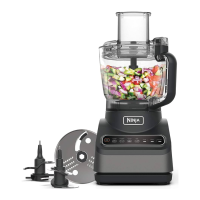
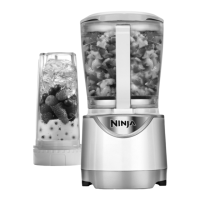
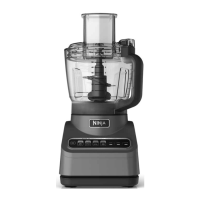
The Ninja Professional Food Processor with Auto-IQ is a versatile kitchen appliance designed to simplify food preparation tasks, offering a range of functions from chopping and pureeing to slicing, shredding, and dough making. This food processor is equipped with Auto-IQ programs, which are intelligent preset programs that combine unique blending and pulsing patterns to achieve consistent results with minimal effort. Users can select from various Auto-IQ programs, including CHOP, PUREE, DOUGH, and DISC, each tailored for specific food processing needs. Additionally, manual settings for LOW, HIGH, and PULSE provide greater control for customized processing.
For chopping tasks, the CHOP program delivers timed pulses and pauses, ensuring consistent chopping results. This is ideal for preparing ingredients like onions, garlic, or nuts. The PUREE program, available on all models, creates smooth, silky sauces and purees, perfect for dips, baby food, or soups. When it comes to baking, the DOUGH program is designed for creating delicious dough, from pie crusts to cookie doughs. For optimal results with dough, users can add mix-ins like chocolate chips or raisins after the dough program has completed. The DISC program is specifically for slicing, shredding, and creating wavy crinkle cuts using a variety of ingredients, such as fresh vegetables and hard cheeses.
The assembly process for the Ninja Professional Food Processor is straightforward. For chopping and dough tasks, the Precision Processor Bowl is placed on the base and turned clockwise to lock it in place. The chopping blade assembly is then held by the top of the shaft and installed in the bowl. A feed chute lid is placed on the bowl and turned clockwise to lock it. To begin processing, users select the desired program. Once processing is complete, the button on the feed chute lid is pressed to unlock it, allowing the lid to be turned counterclockwise and lifted off. The blade assembly is removed before emptying the bowl.
When using the disc attachments for slicing or shredding, the Precision Processor Bowl is again placed on the base and locked. The disc spindle is installed in the bowl, and then the desired disc (reversible slicing/shredding disc, grating disc, or crinkle cut disc) is placed over the spindle. The feed chute lid is then placed on the bowl and locked. For slicing and shredding, the feed chute is used to introduce ingredients. It is important to trim ingredients to fit the feed chute and avoid overfilling it. For best results, ingredients should be firm and chilled. The manual emphasizes that only the DISC program should be used when operating with any of the available discs. Once processing is complete, the disc automatically stops. The button on the feed chute lid is pressed to unlock it, and the lid, disc, and spindle are removed before emptying the bowl.
Maintenance of the Ninja Professional Food Processor is designed for convenience. The bowl, lid, disc, and blade assemblies are top-rack dishwasher safe, making cleanup effortless. For hand-washing, the bowl, lid, disc, and blade assemblies should be washed in warm, soapy water. Care should be taken when handling the blade assemblies due to their sharp edges. A dishwashing utensil with a handle is recommended to avoid direct hand contact with blades. After washing, all parts should be rinsed and air-dried thoroughly. It is crucial to ensure the base is unplugged before cleaning to prevent accidental activation. The manual also includes a warning that the chopping blade assembly is sharp and not locked in place, so caution is advised during pouring to prevent lacerations.
The Auto-IQ programs are a key feature, providing intelligent preset programs that simplify food preparation. These programs are designed to start immediately and automatically stop when processing is complete, eliminating guesswork and ensuring consistent results. The run times for Auto-IQ programs vary from a few seconds to up to a minute. The manual settings, LOW and HIGH, allow for continuous processing for specific durations, while PULSE offers greater control of pulsing and processing, with short presses for short pulses and long presses for longer pulses. An important safety note is that the unit should not be run on HIGH if using the dough blade, as this could lead to damage.
Overall, the Ninja Professional Food Processor with Auto-IQ is a robust and user-friendly appliance that caters to a wide range of food preparation needs, from everyday chopping to more specialized tasks like dough making and precise slicing, all while prioritizing ease of use and maintenance.
 General
| Bowl Capacity | 9 cups |
|---|---|
| Blade Material | Stainless Steel |
| Dishwasher Safe Parts | Yes |
| Wattage | 1000 Watts |
| Number of Speeds | 4 |
| Warranty | 1 year |
| Power | 1000 W |
| Functions | Puree, Dough |
| Capacity | 9 cups |




 To Next Page