EasyManua.ls Logo

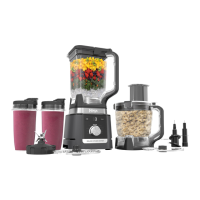
Ninja CT680SS - User Manual

Ninja CT680SS
19 pages
Print Icon
To Next Page IconTo Next Page
Loading...
ninjakitchen.com
1-877-646-5288
INSTRUCTIONS
Intelli-Sense™
Kitchen System
CT680SS

Questions and Answers

  • J
    Justin GonzalezAug 13, 2025
    Why does my Ninja CT680SS show a blinking '- --' message?
    • W
      Willie AyersAug 13, 2025
      If you see a blinking “- --” message on your Ninja Blender, it means the Smart Vessel Recognition feature has detected that you're trying to use a program not designed for the currently installed container. The available programs for each container will light up, indicating which ones you can use.
  • J
    Jennifer MitchellAug 17, 2025
    How to fix a Ninja CT680SS that doesn't turn on?
    • B
      Bobby RoweAug 17, 2025
      If your Ninja blender doesn't turn on, first ensure that it is properly plugged into a power outlet. Once connected, the display should show “- --”. Then, place the container on the base and rotate it clockwise until it clicks into place. When it is ready for use, the available programs will illuminate.
  • R
    Ryan MitchellAug 21, 2025
    How to remove Ninja Blender from counter?
    • S
      Sara CampbellAug 21, 2025
      To remove the Ninja blender from the counter for storage, place your hands underneath both sides of the motor base. Gently pull the unit up and towards you.
  • E
    ecookAug 25, 2025
    What to do if ingredients get stuck in my Ninja CT680SS?
    • J
      jessicawilsonAug 25, 2025
      To fix ingredients getting stuck in your Ninja blender, try using the pre-set programs; their pulses and pauses help ingredients settle towards the blade. Adding liquid can also help. When filling the cup, start with fresh fruits or vegetables, then leafy greens or herbs, followed by liquids or yogurt, seeds, powders, or nut butters, and finally, ice or frozen ingredients.
  • J
    jenningsjulieAug 29, 2025
    How to turn off Ninja CT680SS Blender?
    • S
      Scott Smith MDAug 29, 2025
      To turn off the Ninja blender, remove the container from the base by rotating it counterclockwise and lifting it. The display should then turn off. Unplug the power cord from the outlet.
  • G
    Gavin PowersSep 1, 2025
    How to make snow from solid ice in Ninja CT680SS Blender?
    • M
      milleraaronSep 1, 2025
      To create snow from solid ice in your Ninja blender, use ice straight from the freezer that hasn't started to melt. Start with a few pulses and then switch to a continuous blending cycle.
  • H
    Heather BurchSep 5, 2025
    What to do if the Ninja CT680SS motor base won't stick to the counter?
    • J
      Joshua LaneSep 5, 2025
      If your Ninja blender motor base won’t stick to the counter, ensure that both the surface and the suction feet are clean. Remember that the suction feet will only adhere to smooth surfaces. They will not stick to surfaces like wood, tile, or non-polished finishes. Do not use the unit if the motor base is stuck to an insecure surface.
  • C
    Christopher SweeneySep 9, 2025
    How to prevent Ninja Blender from unevenly chopping food?
    • E
      ebarnesSep 9, 2025
      To prevent uneven chopping with your Ninja blender, cut the food into even sizes before processing. Also, avoid overfilling the Precision Processor™ bowl.

Ninja CT680SS Specifications

General IconGeneral
BrandNinja
ModelCT680SS
CategoryBlender
LanguageEnglish

Related product manuals