EasyManua.ls Logo

Nintendo DSI - Troubleshooting Wireless and Controls; Wireless and Parental Control Issues

Nintendo DSI
72 pages
Print Icon
To Next Page IconTo Next Page
To Previous Page IconTo Previous Page
Loading...
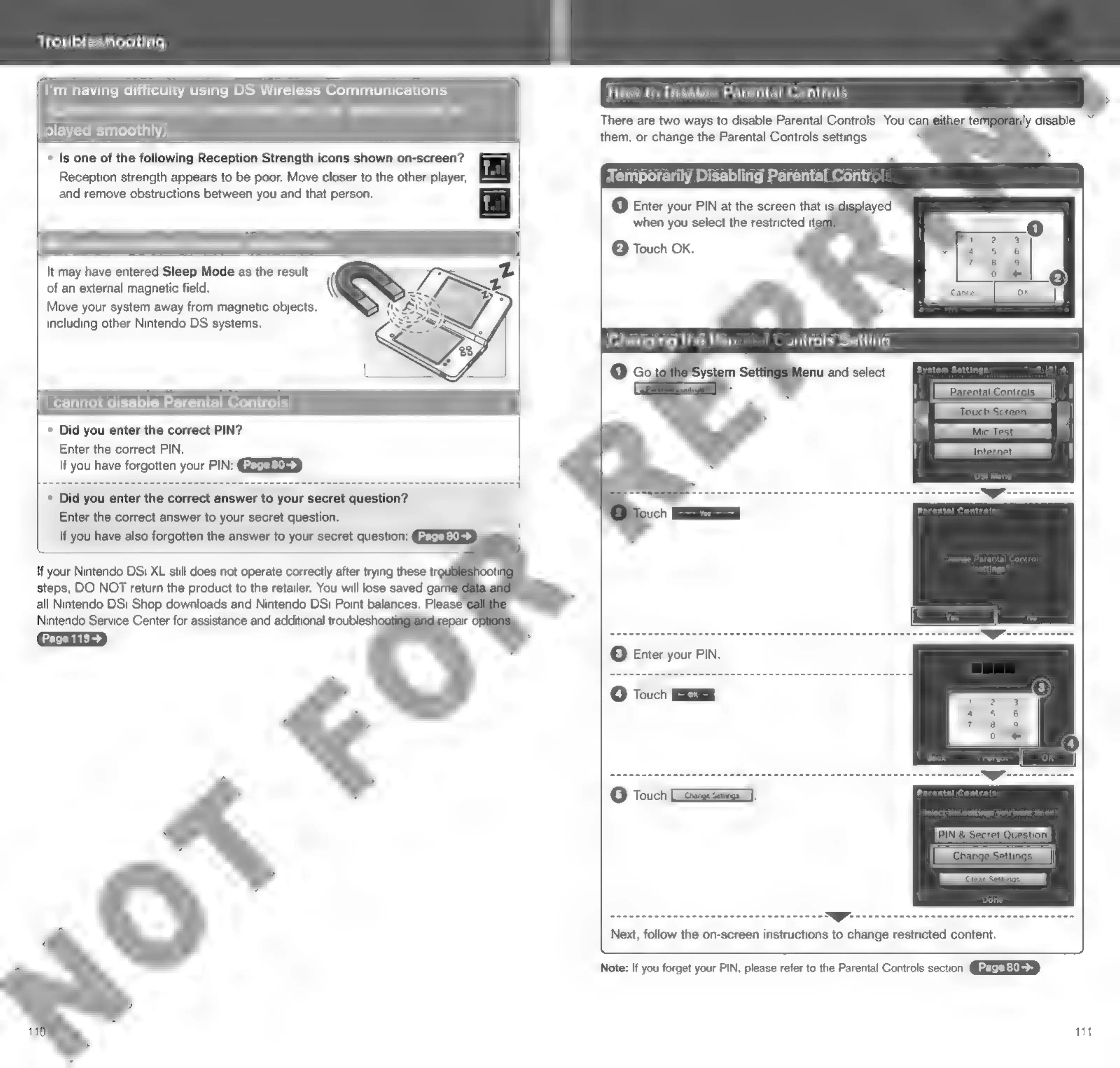
Troubleshooting
I'm
having
difficulty
using
DS
Wireless
Communications
(Communications
are
interrupted
and
the
game
cannot
be
played
smoothly)
*
Is
one
of
the
following
Reception
Strength
icons
shown
on-screen?
Reception
strength
appears
to
be
poor.
Move
closer
to
the
other
player,
and
remove
obstructions
between
you
and
that
person.
My
system
suddenly
enters
Sleep
Mode
of
an
external
magnetic
field.
Move
your
system
away
from
magnetic
objects,
including
other
Nintendo
DS
systems.
It
may
have
entered
Sleep
Mode
as
the
result
(
!
cannot
disable
Parental
Controls
*
Did
you
enter
the
correct
PIN?
Enter
the
correct
PIN.
If
you
have
forgotten
your
PIN:
»
Did
you
enter
the
correct
answer
to
your
secret
question?
Enter
the
correct
answer
to
your
secret
question.
If
you
have
also
forgotten
the
answer
to
your
secret
question:
GFEETEY
If
your
Nintendo
DSi
XL
still
does
not
operate
correctly
after
trying
these
tro
steps,
DO
NOT
return
the
product
to
the
retailer.
You
will
lose
saved
gai
all
Nintendo
DSi
Shop
downloads
and
Nintendo
DSi
Point
balances.
Please
Nintendo
Service
Center
for
assistance
and
additional
troublesh«
i
Page
119>
How
to
Disable
Parental
Controls
when
you
select
the
restricted
ite
@
Touch
OK.
Changing
the
Pare
ontrols
Setting
ye
Parental
Controls
Next,
follow
the
on-screen
instructions
to
change
restricted
content.
Note:
if
you
forget
your
PIN,
please
refer
to
the
Parental
Controls
section.
QGEREYIUES
111

Other manuals for Nintendo DSI

Related product manuals