GBA Service Manual
Page 14
2. Visually check that the blankets are correctly fitted.
3. Visually inspect the Led guide to ensure it is still in good condition and it has no mark.
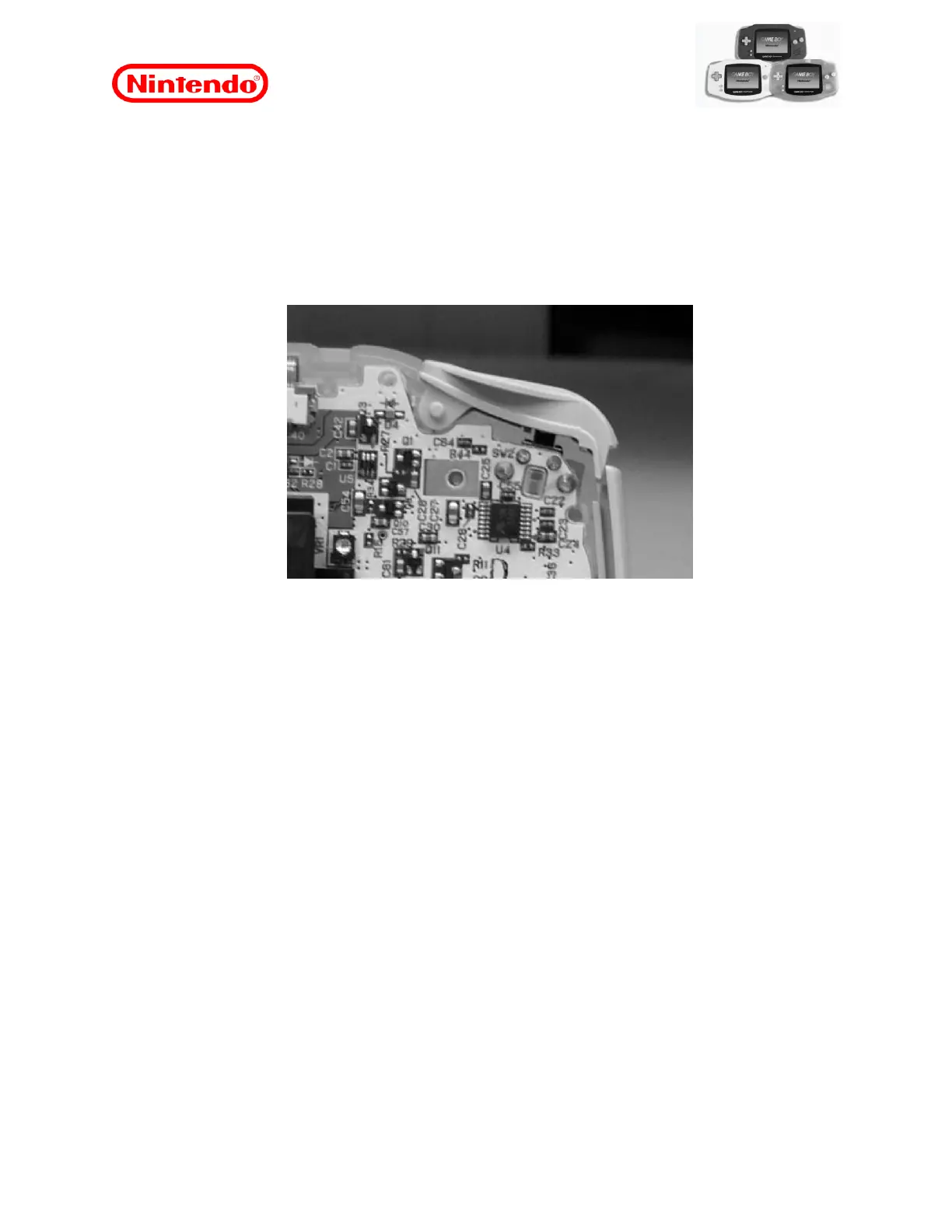
4. Install the spring (metal section) of the L / R buttons between the front case and the PCI,
after the PCI Main have been installed in the front cabinet. Check that the rubber contact
on the push switch is correctly in place.
Note: Make sure the L and R buttons are not inverted.
Figure 12
5. Mount the unit using the steps in section “7.5 Reassembling the Unit” on this page or
carry out any other necessary repair procedures.
7.5 Reassembling the Unit
1. Check that the actuators and contact pads are correctly aligned and positioned before
installing the PCI.
2. Check that there are no foreign metal materials attached to the speaker magnet.
3. Insert the PCI.
Caution: Make sure that the speaker is properly positioned in the front cabinet.
4. Tighten the screws that secure the PCI to the front case, taking care to use the correct
screws.
5. Pull the speaker cables (as shown in the figure), so that they are not crushed when fitting
the front and rear cabinets.














 To Next Page