Contacts
face up
How to Test Glucose Control
Use ONLY TRUEtest Glucose Control Solution
with the TRUEresult Meter.
1.
Allow Control, vial of Strips and Meter to adjust to
68°-77°F (room temperature). Write date first opened
on both Control bottle label and Strip vial label.
Note: Running a Control Test at temperatures
outside the range listed above may cause
Control
to read as a blood test.
2.
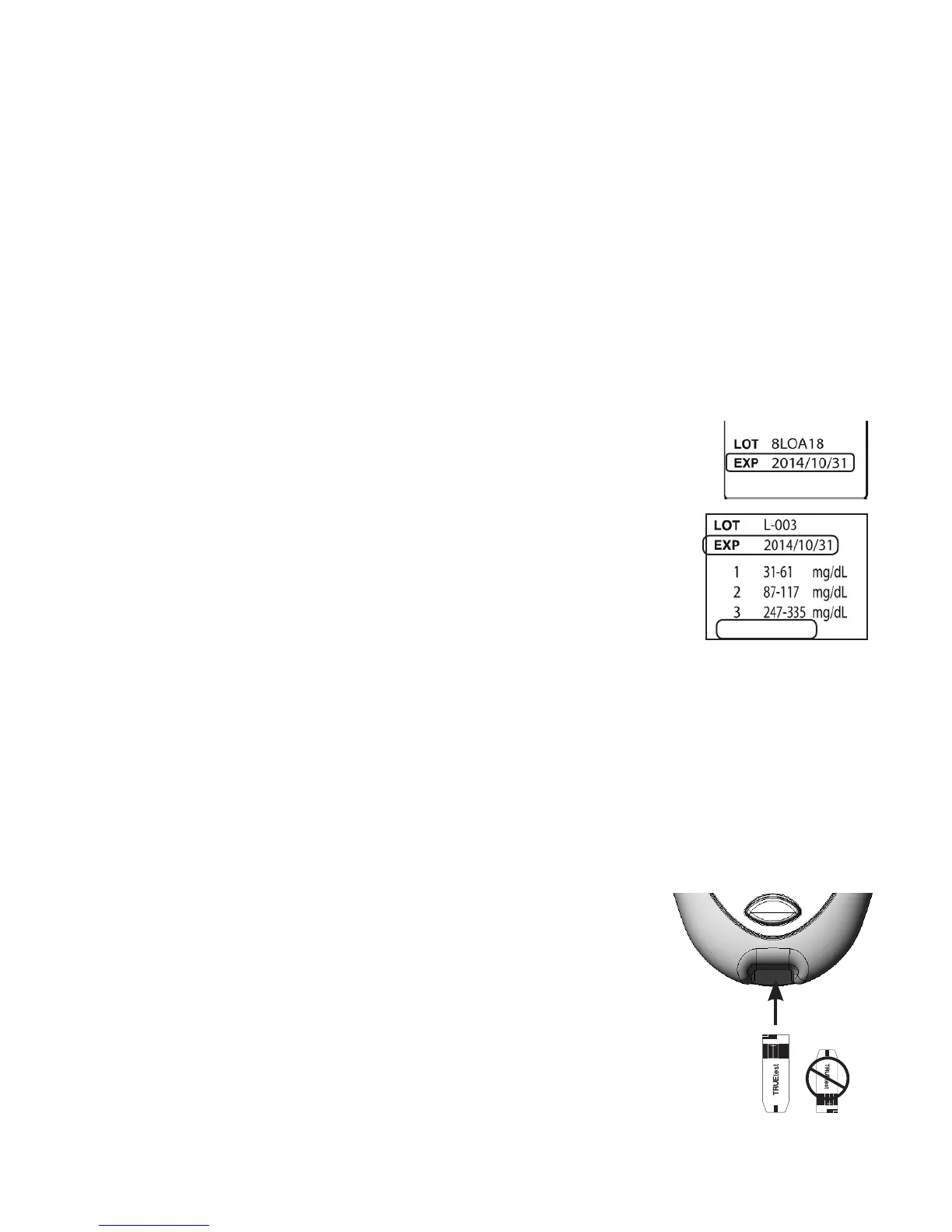
Check dates on Control label and Strip
vial label. Do not use Control or Strips if
Expiration Dates have passed. (Control - 3
months aer opening or date next to EXP
on label, whichever comes first; Strips - 4
months aer opening or date next to EXP
on labels, whichever comes first.) Discard
expired products and use new products.
3. Swirl or invert bottle gently to mix Control.
DO NOT SHAKE!
4. Remove one Strip from vial. Close Strip vial
immediately.
Note: Use Strip quickly aer removal from vial.
5. Insert Strip into Test Port.
Meter turns on.
Note: If Strip has been out of the vial
too long before testing, an error
message appears upon insertion
of the Strip into the Meter.
Release and discard old Strip.
Use new Strip for testing.
18
May 30, 2014


 To Next Page