EasyManua.ls Logo

Nissei WS-1300 - User Manual

Nissei WS-1300
80 pages
Print Icon
To Next Page IconTo Next Page
Loading...
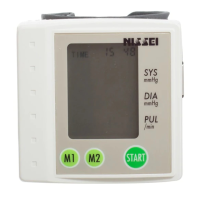
WRIST TYPE
DIGITAL BLOOD PRESSURE MONITOR
WS-1300
INSTRUCTIONS
page 9
ENGLISH
INSTRUCTIONS
page 32
FRENCH
INSTRUKCJA OBSŁUGI
str 68
JĘZYK POLSKI
INSTRUCCIONES
página 56
ESPANÕL
ISTRUZIONI
pagina 44
ITALIANO
BEDIENUNGSANLEITUNG
Seite 20
DEUTSCH
Manufacturer:
NIHON SEIMITSU SOKKI CO., LTD. 2508-13 Nakago Shibukawa Gunma 377-0293 Japan
EC-Representative:
Nissei Healthcare (UK) Ltd. Henfield, BN5 9SJ UK
web site http://www.nisseihealthcare.com

Table of Contents

Questions and Answers

  • M
    Michael StoneAug 3, 2025
    Why Nissei WS-1300 Blood Pressure Monitor has no display when POWER BUTTON is pressed?
    • K
      Kelly RobinsonAug 3, 2025
      If your Nissei Blood Pressure Monitor doesn't show anything when you press the power button, it could be due to the batteries. First, make sure they are inserted correctly. If they are, try replacing all the batteries with a new set.
  • H
    hamiltonbarbaraAug 8, 2025
    What to do if Nissei WS-1300 shows measurement error?
    • P
      pschultzAug 8, 2025
      If you're getting measurement errors on your Nissei Blood Pressure Monitor, it's likely because you were moving or talking during the measurement. To fix this, stay still and quiet while the device is taking a reading.
  • T
    Troy SmithAug 15, 2025
    Why Nissei WS-1300 Blood Pressure Monitor reading is extremely low or high?
    • S
      Shelia FernandezAug 15, 2025
      If the reading on your Nissei Blood Pressure Monitor is extremely low or high, there could be several reasons. Blood pressure varies, so reconfirm that you are using correct posture and that the cuff is wrapped correctly. Also, if you moved or talked during the measurement, rest for 5 minutes and measure again. See TIPS ON TAKING YOUR BLOOD PRESSURE.
  • M
    Maurice DrakeAug 21, 2025
    What to do if Nissei Blood Pressure Monitor shows inflation error?
    • A
      Ashley MartinAug 21, 2025
      If your Nissei Blood Pressure Monitor shows an inflation error, it probably means the cuff wasn't put on correctly. Make sure to apply the cuff properly before taking another reading.
  • R
    Randy BentonAug 27, 2025
    What to do if measurement on Nissei WS-1300 was taken right after exercise?
    • V
      Veronica HuntAug 27, 2025
      If you took a measurement on your Nissei Blood Pressure Monitor right after exercise or any other activities that could influence the reading, measure again after resting for more than 5 minutes. See TIPS ON TAKING YOUR BLOOD PRESSURE.

Summary

Pictorials and Product Components

Product Components Overview

Identifies and illustrates the main parts of the blood pressure monitor.

Installing Batteries and Setting Clock

Battery Installation

Step-by-step guide for inserting batteries into the device compartment.

Clock Configuration

Instructions for setting the year, month, day, hour, and minute.

Cuff Application

Wrapping the Cuff Around Your Wrist

Instructions on how to correctly position and fasten the cuff around the wrist.

Correct Measuring Posture

Posture Guidance

Guidance on maintaining the proper body position for accurate blood pressure readings.

Measuring Method and Indicators

Measurement Procedure

Step-by-step process for taking a blood pressure measurement.

Displayed Indicators

Explanation of symbols and readings like SYS, DIA, PULSE, and inflation/deflation marks.

Pulse Rhythm and Blood Pressure Classification

Irregular Pulse Rhythm

Description of the irregular pulse rhythm indication and its potential causes.

WHO Blood Pressure Classification

Table categorizing blood pressure levels according to WHO guidelines.

Memory Functionality

Recalling Stored Data

How to access past measurement results stored in memory banks.

Deleting Stored Data

Instructions for clearing individual or all stored measurement data.

Basic Product Information

Indications for Use

Specifies the intended use and target user group for the blood pressure monitor.

Method of Measurement

Specifications

Technical details including model, operating principle, ranges, and accuracy.

Precautions for Use

Tips for Accurate Readings

Advice on factors affecting blood pressure and how to prepare for measurement.

Error Displays and Troubleshooting

Error Codes and Solutions

Explains common error messages and provides troubleshooting steps for the device.

Care and Maintenance

Cleaning and Storage

Guidelines for cleaning, storing, and maintaining the blood pressure monitor.

Technical Description

EMC Compliance

Details on electromagnetic compatibility standards and guidance for installation.

Warranty Information

Manufacturers Warranty

Information regarding the warranty period, coverage, and conditions for repair or replacement.

Nissei WS-1300 Specifications

General IconGeneral
BrandNissei
ModelWS-1300
CategoryBlood Pressure Monitor
LanguageEnglish

Related product manuals