16 17
English
Română
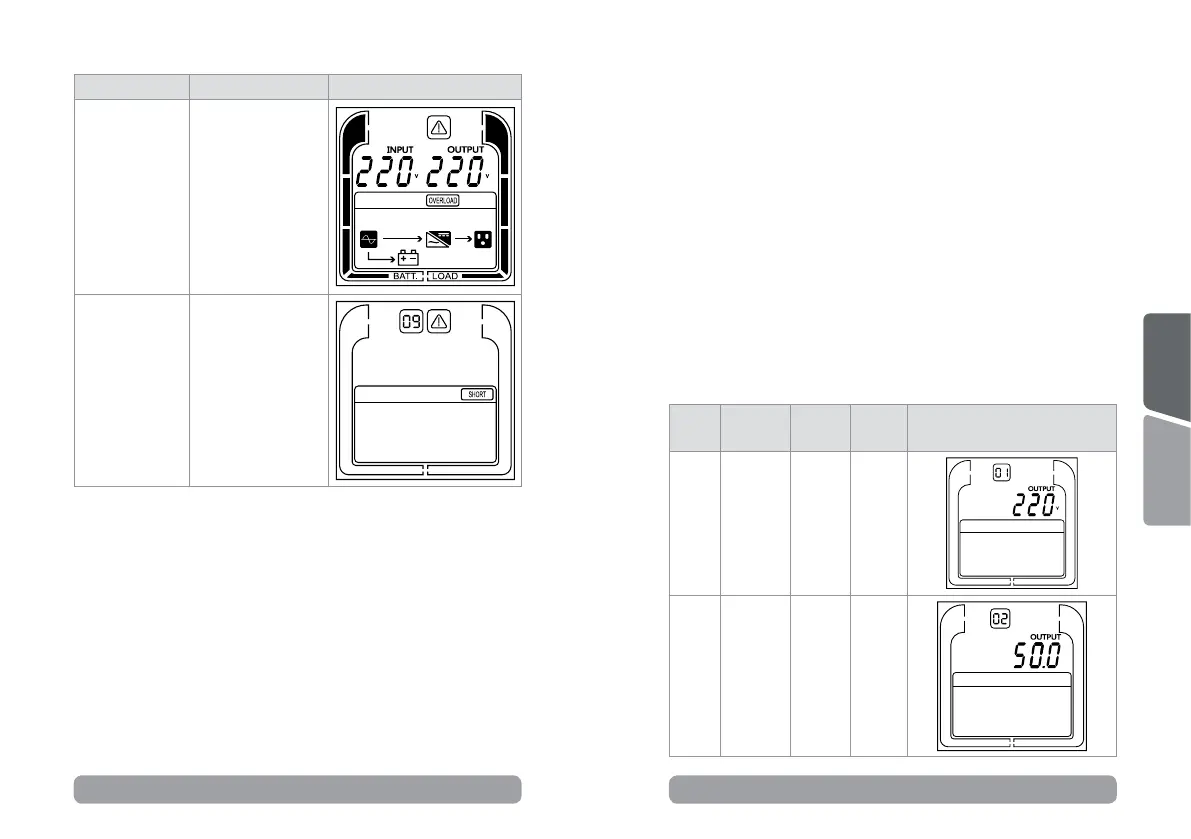
Operaon mode Descripon LCD display
Warning mode
The UPS is
warning because of
overload.
Fault mode
The UPS goes to
fault mode because
output is short.
*Please check ID
event descripons
table for complete
list of fault errors.
5.4 LCD sengs conguraon
There are 5 UPS sengs that can be congured by the user.
1. Press and hold the “ENTER” buon for 5 seconds to acvate the
seng mode.
The rst conguraon parameter will be displayed on the LCD screen.
Note: The manual sengs programming mode can ONLY be
invoked while UPS is in Bypass mode or Standby mode. To make
UPS on Standby mode or Bypass mode, connect ulity power to
UPS and do not turn on UPS.
2. Press the “ENTER” buon to select the seng you want to
congure.
3. Press the “ESC” buons to scroll through the dierent parameters
and select the parameter you want.
4. Press the “ESC” buon for 5 seconds to cancel and exit seng
mode. Press the “ENTER” buon for 5 seconds to save all the
sengs you just do and exit seng mode.
Seng
item
Congure
Submenu
Available
Sengs
Default
Seng
LCD Display
001
Output
Voltage
= [208V]
[220V]
[230V]
[240V]
230V
002
Output
Frequency
= [50Hz]
[60Hz]
50Hz



 To Next Page