8
Replace the Thermicon™ Tip:
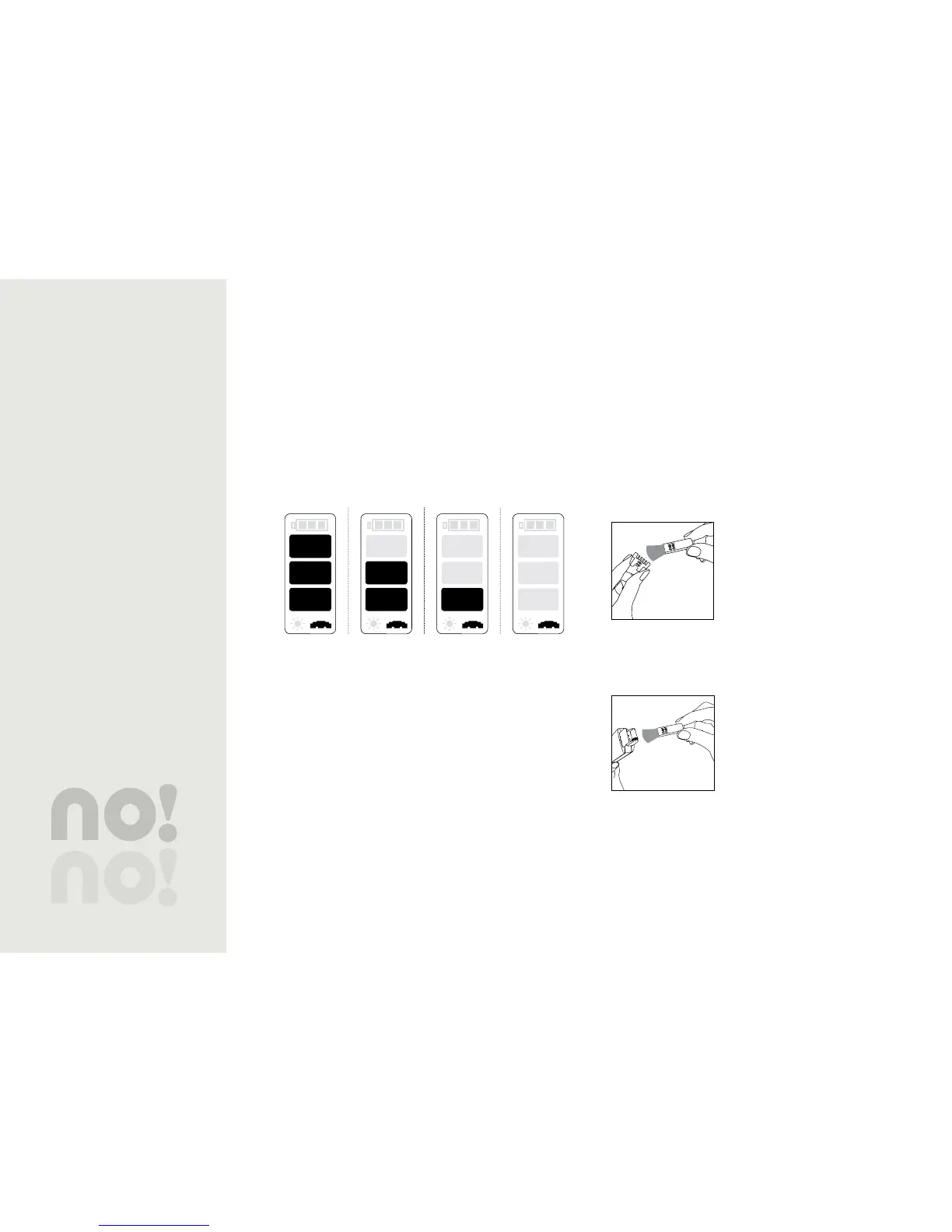
The Thermicon™ Tip indicator appears as you no!no! and lets
you know the present condition of your Thermicon™ Tip.
When the single light turns red•
When the Thermicon™ Tip icon flickers•
If you notice that it is no longer working efficiently•
If the wire is damaged in any way•
New Slightly Used Used Depleted
Table 4: Thermicon™ Tip Status
Maintenance
Do not use any liquids of any kind to clean the Thermicon™
Tip or rollers.
Thermicon™ Tips
It is important to keep the Thermicon™ Tip free of hair
debris. Allowing hair to build up may cause it to burn
out prematurely or malfunction. Check and clean the tip
periodically during each treatment session.
To clean the Thermicon™ Tip:
Turn off your no!no!1.
Remove the Thermicon™ Tip2.
Gently brush clean.3.
Figure 12
Rollers
Although not necessary to the
performance of no!no!, keeping the
rollers clean is all part of proper
maintenance. Use the cleaning brush
to remove excess hair and debris from
the rollers.
Brush debris out and away from the
socket in order to prevent any particles from falling into the
socket.
If any hair or debris fall into the socket, this may cause
no!no! to not function properly. Gently blow any particles
out of the socket before beginning the next treatment.


 To Next Page