43 / 50 55 65 中性英文说明书(欧洲 9632方案 T8E)(apple UI,同轴,三芯)(电子)V1.1FU 43D2U/ FU/ FU/ FU
Smart Applications
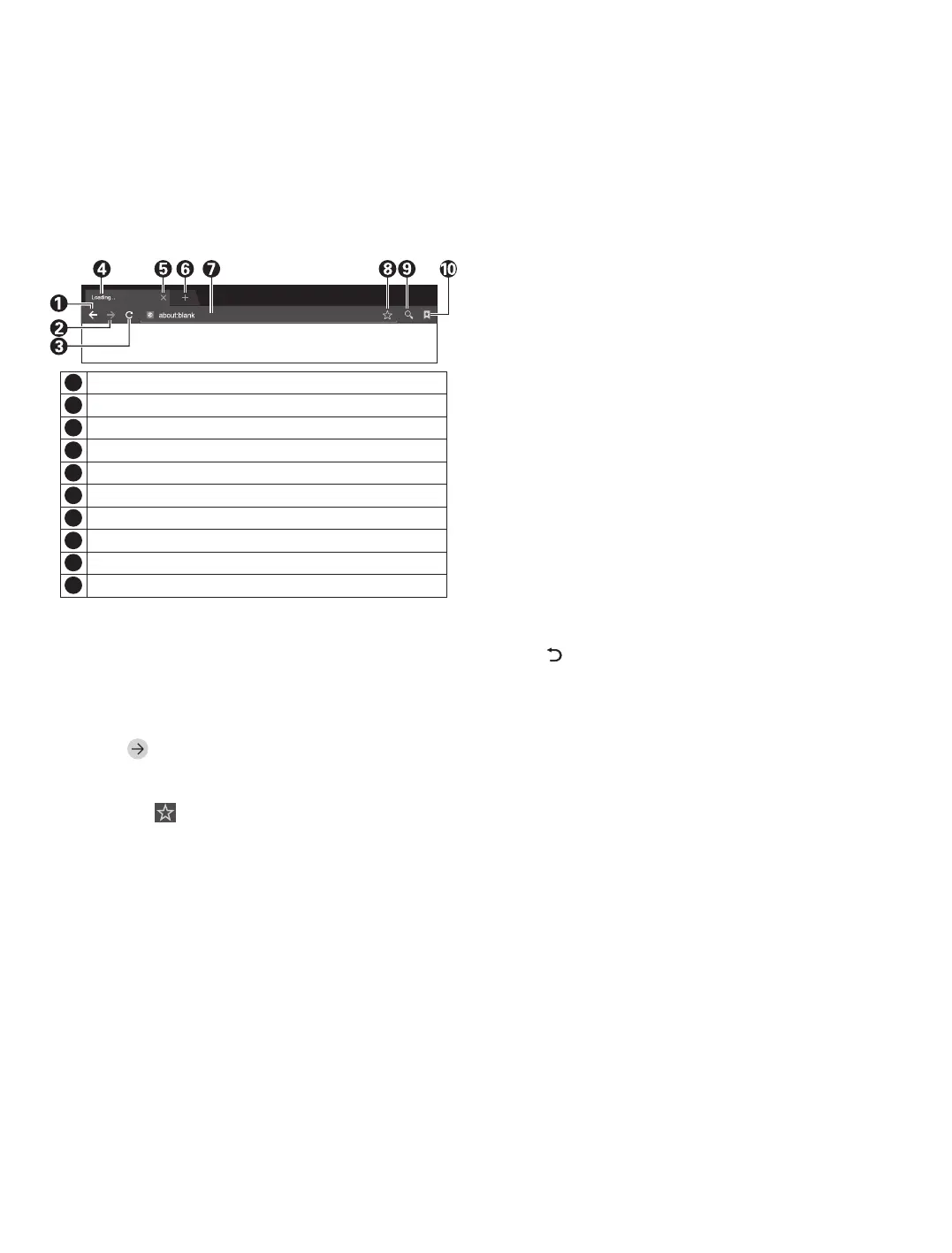
Browser: You can use the browser to show the
text, video, audio and other information on the
Internet.
Before accessing the Internet, please connect your
TV set to the Internet; refer to “Network Settings" for
details. Then select Apps > Browser and press [OK]
key to enter.
Note: Press [MENU] key to display the menu option of
browser.
■ How to access web address?
Press [p]/[q]/[t]/[u] key to select the address
bar, and type the web address in the address bar, then
select the icon in the input method, and press [OK]
key to access the web address.
■ How to save a page in the Bookmark?
Select the icon the browser interface, and press
[OK] key to enter the browser tab and web address.
Select Account, and press [OK] key. Press [p]/[q]
key to select the account for storage, and then press
[OK] key. Select OK, and then press [OK] key to add
the bookmark.
■ How to copy and paste the text in the web
page?
Place the cursor on the text to copied, then press
and hold the left mouse key. When the pair of selecting
cursors appears on the screen, drag the cursor to
select the text. Select Copy on the screen, and click
the left mouse key. Select the target position, press
and hold the left mouse key, and click Paste in the
popup dialog box.
Close the current webpage window.
Add a new webpage window.
5
6
Back to the previous webpage.
Go forward to the next webpage.
Refresh the webpage.
Webpage window of the browser.
1
2
3
4
9
Input box for URL.
Option for adding a bookmark.
7
8
Input option of URL.
Option for viewing bookmark.
10
9
Apk Installer: The Apk installer helps users
manage applications, and allows users to install or
uninstall apps in local disk.
■ How to install an application?
Select Apps > FileManager and press [OK] key to
enter, then press [p]/[q]/[t]/[u] key to select Apk
and press [OK] key to enter. Select the target
installation file in local disk, and press [OK] key to
install. Then select INSTALL and press [OK] key.
Several Apk need setting security when you install it.
■ How to uninstall an application?
Select Apps > Smart Assistant > App Manager.
Select the application which you want to uninstall and
press [OK] key, then select Uninstall and press [OK]
key to uninstall the application.
Multimedia Player: In smart mode, select
Apps > Multimedia in the main interface, and press
[OK] key to run. Select the file type from Video, Music
and Picture.
■ Playing Files in local disk device: Before
playing files in the local disk, insert the USB mass
storage device into the USB interface.
Select local disk device in the file directory, and
press [OK] key to enter. Select the target folder or file,
press [OK] key to enter the folder or play the file, and
press [ ] key to return to the desktop.
Attention:
1. Unstandard USB devices can't be recognized
probably; in this case, please replace a standard
USB device;
2. The stream media system has certain restriction
on the format of files; the playing will be
abnormal if it is out of the system restriction;
3. Do not remove the USB device while playing, or
else the system or device may have problem;
Before replace the USB device, please turn off
the machine's power supply;
4. The system supports standard USB1.1 and
USB2.0 devices, such as USB mass storage
devices and removable hard disks;
5. The maximum output current of the USB port of
this device is 500mA, and the self-protection will
be enabled if it is beyond this limit; please use
external power supply if an external device of
higher current will be connected;
6. The system is complicated; when it is reading or
playing files, the screen may be still or certain
functions may be invalid due to the compatibility
and stability of the USB device; in this case,



 To Next Page