43 / 50 55 65 中性英文说明书(欧洲 9632方案 T8E)(apple UI,同轴,三芯)(电子)V1.1FU 43D2U/ FU/ FU/ FU
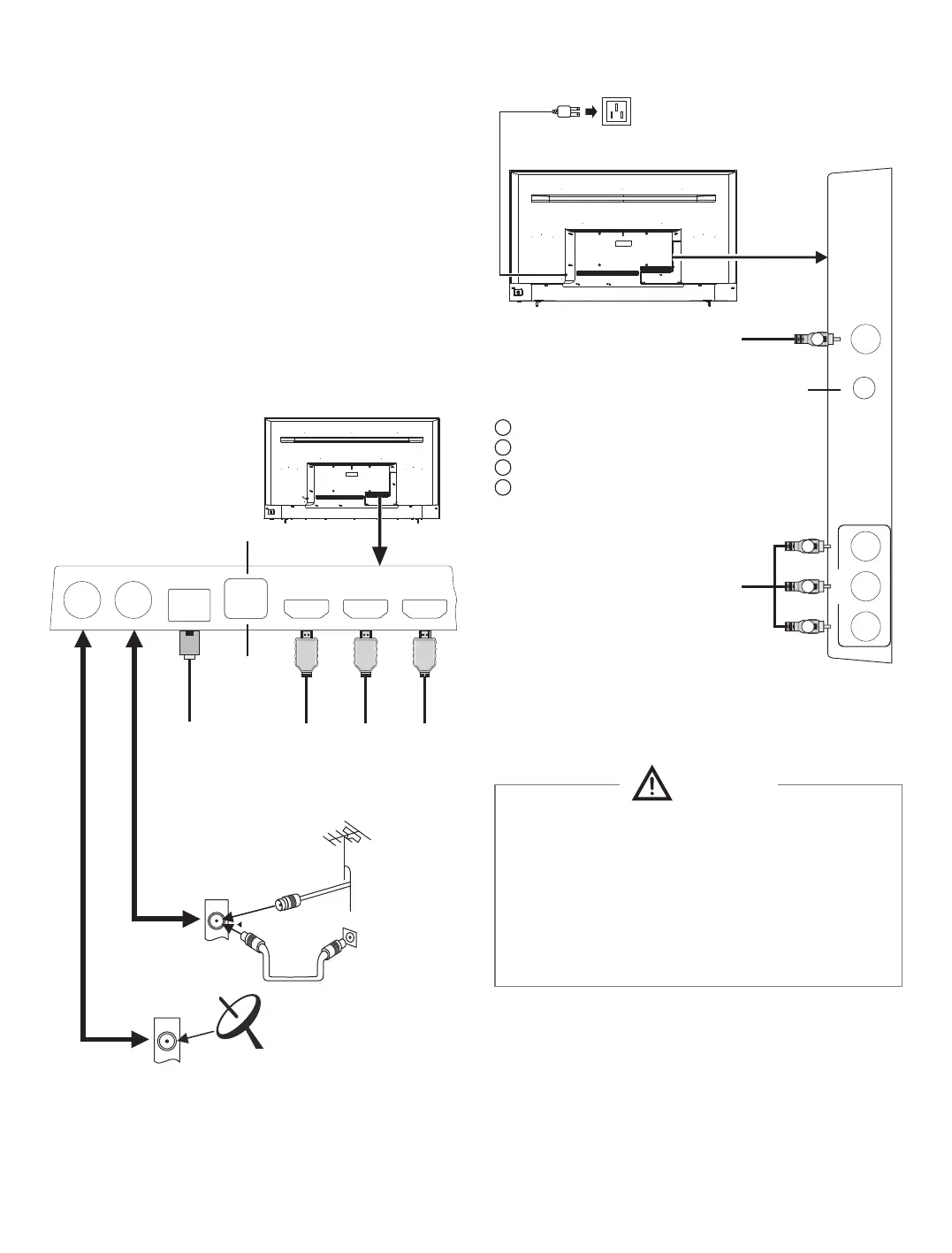
To power socket
(100-240VAC, 50/60Hz)
VIDEO AUDIO-L AUDIO-R
Coaxial-OUT
AV
-
IN
Warning
When connecting outdoor antenna to signal port
of the TV set, please turn off the main power
switch of the TV set first. Do not approach the
outdoor antenna to high voltage mains power
line to avoid electric shock. The wired network
antenna connected to this TV set must be
isolated from the protective grounding, or else it
will cause fire or other hazards.
4
USB 2 Interface
O
Coaxial Output
HDMI 1 Input
Network Input
Remark:
1. USB interfaces support peripheral equipment,
including USB mass storage device, USB mouse,
keyboard, etc.
2. When you need to connect the device which support
the ARC function, please select the HDMI-1
interface.
3. HDMI connector can realize DVI connector function
with external HDMI/DVI commutator.
4.TV2(DVB-S2) interface is optional, please refer to
the device.
5. The peripheral equipment and cables described in
this manual should be purchased separately.
Connecting peripheral equipment
Y
W
R
O
Yellow (VIDEO signal cable)
White (AUDIO-L signal cable)
Red (AUDIO-R signal cable)
Orange (Coaxial signal cable)
USB 1 Interface
HDMI 2 Input
HDM I3 Input
AV Input
Audio Output
W
Y
R
LAN
USB2
USB1
HDMI-1
(ARC)
HDMI-2HDMI-3
AUDIO-OUT
TV 2
R F
(UART)
(DVB-S2)
TV 1
(DVB-T2)


 To Next Page