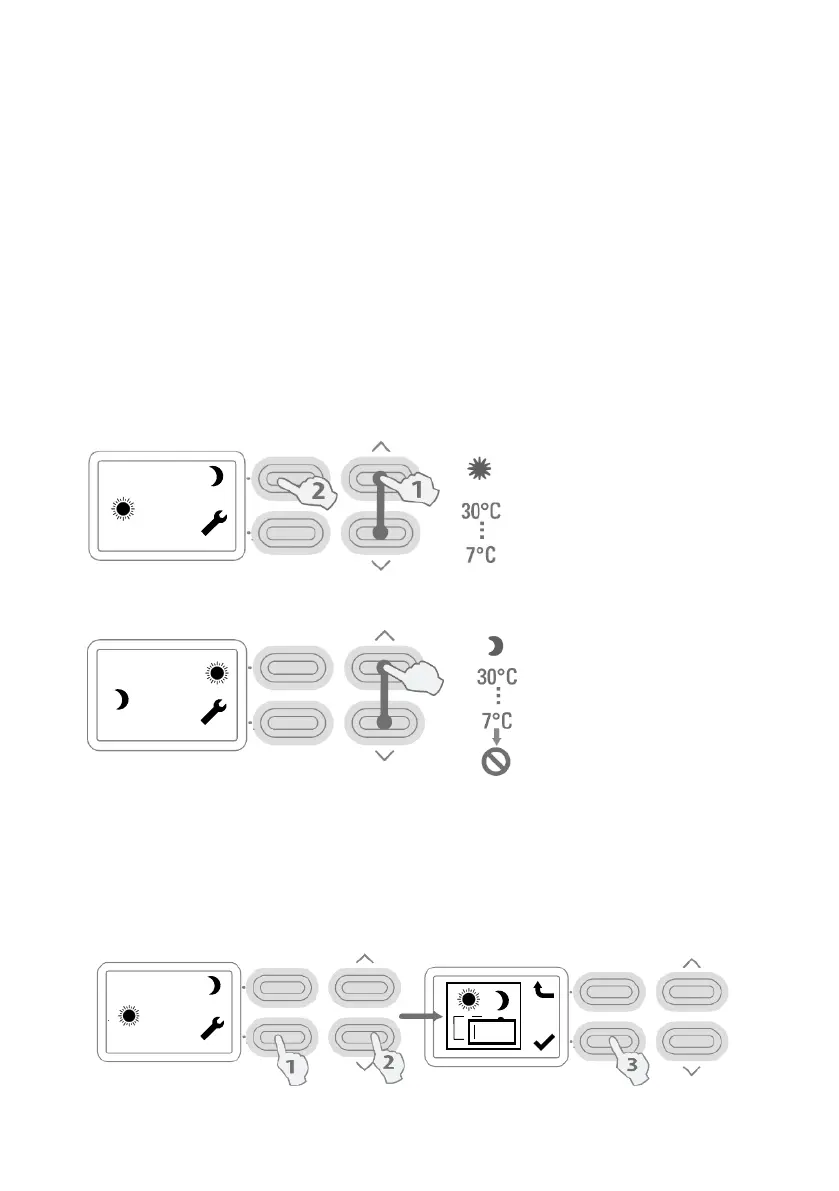
NOTE: To manually switch heat modes (e.g. from night/off-peak to day/peak or vice
versa), simply press the top left button next to the picture of either the sun or the moon.
PROGRAMME
1. Press Setting Button.
2. Press Down button to see Programme icon as shown.
3. Press ✓ button to enter Programme mode.
ADAPTIVE START
Adaptive Start is an intelligent feature that allows the heater to begin heating the room
before the start of the heating period to ensure the room is at the required temperature
when the period starts.
Day/ Peak (SUN):
Night/ Off-Peak (MOON):
SET TEMPERATURE / OVERRIDE
1. Use the up and down buttons to increase or decrease the temperature.
2. Press to cycle the Day/ Peak (SUN) or Night/ Off-peak (MOON) mode.
MO 13:45
21
MO 13:45
21
220000
>>
MO 13:45
21
the mode has
been switched off



 To Next Page