Editing or Deleting a Profile
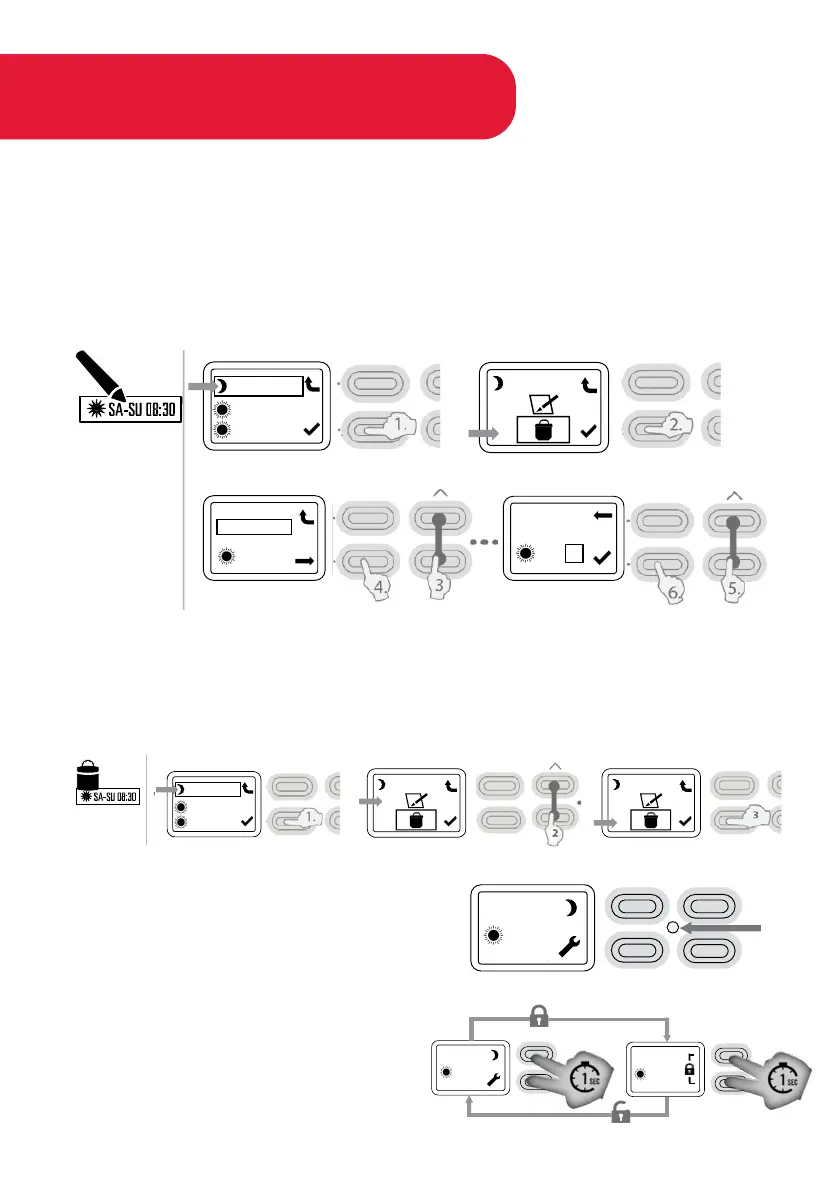
EDIT PROFILE
1. Select profile you want to edit and press ✓ button.
2. Press ✓ button to enter into profile.
3. Use arrow keys to cycle through profile Days.
4. Press ✓ button to change time.
5. Set Time by using arrow keys.
6. Press ✓ to confirm changes.
DELETE PROFILE
1. Select profile by pressing ✓ button.
2. Press arrow button until Bin icon is highlighted.
3. Press ✓ button to confirm delete.
LED INDICATOR
Yellow LED will indicate when element is
energised.
KEY LOCK (CHILD LOCK)
Press the buttons pictured simultaneously
for 1 second to enable/disable key lock.
MO 13:45
21
>
>
.
.
MO 13:45
21
.
.
MO 13:45
21
.
.
MO-SU22:00
SA-SU09:00
MO-FR06:20
MO-SU22:00
SA-SU09:00
MO-FR06:20
MO-SU22:00
.
.
MO-SU22:00
.
.
MO-SU22:00
.
.
MO-SU
13:45
>>
>>
MO-SU
13:45
>>
>>



 To Next Page