EasyManua.ls Logo

NOCO Genius GENIUS2X2 - User Manual

NOCO Genius GENIUS2X2
11 pages
Print Icon
To Next Page IconTo Next Page
Loading...
User Guide & Warranty
DANGER
READ AND UNDERSTAND ALL SAFETY INFORMATION BEFORE USING THIS PRODUCT. Failure to
follow these safety instructions may result in ELECTRICAL SHOCK, EXPLOSION, FIRE, which may
result in a SERIOUS INJURY, DEATH, or PROPERTY DAMAGE.
Electrical Shock. Product is an electrical device that can shock and cause serious injury. Do not cut power
cords. Do not submerge in water or get wet.
Explosion. Unmonitored, incompatible, or damaged batteries can explode if used with product. Do not
leave product unattended while in use. Do not attempt to jump start a damaged or frozen battery. Use
product only with batteries of recommended voltage. Operate product in well ventilated areas.
Fire. Product is an electrical device that emits heat and is capable of causing burns. Do not cover product.
Do not smoke or use any source of electrical spark or fire when operating product. Keep product away from
combustible materials.
Eye Injury. Wear eye protection when operating product. Batteries can explode and cause flying debris.
Battery acid can cause eye and skin irritation. In the case of contamination of eyes or skin, flush aected
area with running clean water and contact poison control immediately.
Explosive Gases. Working in the vicinity of a lead-acid is dangerous. Batteries generate explosive gases
during normal battery operation. To reduce risk of battery explosion, follow all safety information instructions
and those published by the battery manufacturer and manufacturer of any equipment intended to be used
in the vicinity of battery. Review cautionary markings on these products and on engine.
For more information
and support visit:
www.no.co/support
Multi-Bank Series
Question and Answer IconNeed help?

Do you have a question about the NOCO Genius GENIUS2X2 and is the answer not in the manual?

Summary

Safety Warnings

Electrical Shock Hazard

Product is an electrical device that can shock and cause serious injury. Do not cut power cords.

Explosion Hazard

Unmonitored, incompatible, or damaged batteries can explode if used with product. Do not leave product unattended.

Fire Hazard

Product is an electrical device that emits heat and is capable of causing burns. Do not cover product.

Eye Injury Hazard

Wear eye protection when operating product. Batteries can explode and cause flying debris.

Explosive Gases Hazard

Working in the vicinity of a lead-acid is dangerous. Batteries generate explosive gases.

Important Safety Warnings

How To Use

Charging Modes Explained

Explanation of the six available charging modes: Standby, 12V, 12V AGM, 12V LITHIUM, 6V, and Force Mode.

Force Mode Operation

How to manually initiate charging when battery voltage is too low to be detected.

Connecting Battery in Vehicle

Detailed steps for connecting the charger to a battery installed within a vehicle.

Connecting Battery Outside Vehicle

Detailed steps for connecting the charger to a battery that has been removed from a vehicle.

Charging Process

Device Interface

Summary

Safety Warnings

Electrical Shock Hazard

Product is an electrical device that can shock and cause serious injury. Do not cut power cords.

Explosion Hazard

Unmonitored, incompatible, or damaged batteries can explode if used with product. Do not leave product unattended.

Fire Hazard

Product is an electrical device that emits heat and is capable of causing burns. Do not cover product.

Eye Injury Hazard

Wear eye protection when operating product. Batteries can explode and cause flying debris.

Explosive Gases Hazard

Working in the vicinity of a lead-acid is dangerous. Batteries generate explosive gases.

Important Safety Warnings

How To Use

Charging Modes Explained

Explanation of the six available charging modes: Standby, 12V, 12V AGM, 12V LITHIUM, 6V, and Force Mode.

Force Mode Operation

How to manually initiate charging when battery voltage is too low to be detected.

Connecting Battery in Vehicle

Detailed steps for connecting the charger to a battery installed within a vehicle.

Connecting Battery Outside Vehicle

Detailed steps for connecting the charger to a battery that has been removed from a vehicle.

Charging Process

Device Interface

Overview

The NOCO Genius Multi-Bank Series represents a highly innovative and advanced line of battery chargers designed for simplicity and efficiency. These chargers are among the safest and most effective available, offering a comprehensive solution for maintaining various battery types.

Function Description

The Genius Multi-Bank series is engineered to charge a wide range of 6V and 12V lead-acid batteries, including Wet (Flooded), Gel, MF (Maintenance-Free), CA (Calcium), EFB (Enhanced Flooded Battery), and AGM (Absorption Glass Mat). Additionally, it supports 12V Lithium (LiFePO4) batteries. These chargers are suitable for batteries with capacities up to 40 Amp-Hours and are capable of maintaining all battery sizes.

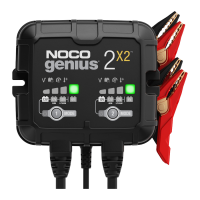
The device operates with six distinct charging modes: Standby, 12V, 12V AGM, 12V LITHIUM, 6V, and Force Mode. Each bank in the Genius Multi-Bank 2X2/2X4 models operates independently, allowing for isolated and simultaneous charging of multiple batteries.

Usage Features

Before beginning any charging process, users must carefully read and understand all safety information provided in the manual to prevent electrical shock, explosion, fire, serious injury, death, or property damage. It is crucial to consult the battery manufacturer's specific precautions and recommended charge rates, and to determine the battery's voltage and chemistry.

Getting Started:

  1. Verify Battery: Confirm the voltage and chemistry of the battery to be charged.
  2. Connect Cables: Ensure battery clamps or eyelet terminal connectors are properly connected to the battery terminals.
  3. Plug In: Connect the AC power plug to an electrical outlet.
  4. Standby Mode: Upon first use, the charger will enter Standby mode, indicated by an orange LED, signifying no power is being supplied to the battery.
  5. Select Charge Mode: Press the Mode button to cycle through the available charge modes. For advanced modes like 6V, 12V Lithium, or Force Mode, the button must be pressed and held for a specified duration (3 or 5 seconds). The selected mode's LED will illuminate, and Charge LEDs will indicate the charging process based on battery health.
  6. Maintenance Charging: Once charging begins, the charger can remain connected to the battery indefinitely for maintenance.

Charging Modes in Detail:

  • Standby: In this mode, the charger is not actively charging or providing power. Energy Save is active, drawing minimal power from the outlet. The orange Standby LED will illuminate.
  • 12V: For 12-volt Wet Cell, Gel Cell, Enhanced Flooded, Maintenance-Free, and Calcium batteries. The 12V white LED illuminates when selected.
  • 12V AGM: For 12-volt AGM batteries. The 12V AGM white LED illuminates when selected.
  • 12V LITHIUM: Designed for 12-volt lithium-ion batteries, including lithium iron phosphate. The 12V Lithium blue LED illuminates. This mode should only be used with batteries equipped with a Battery Management System (BMS). Extreme care is advised, and users should consult the battery manufacturer for recommended charging rates and voltages.
  • 6V (Press & Hold 3 Seconds): For 6-volt lead-acid batteries (Wet Cell, Gel Cell, Enhanced Flooded, Maintenance-Free, and Calcium). The 6V white LED illuminates.
  • Force Mode (Press & Hold 5 Seconds): This mode allows manual initiation of charging when the battery voltage is too low for automatic detection (below 1V). After activating Force Mode, the charger operates for five minutes under the selected charge mode before reverting to standard charging with low voltage detection reactivated. CAUTION: This mode disables safety features, and live power is present at the connectors. All connections must be made prior to entering Force Mode, and connections should not be touched together due to the risk of sparks, fire, explosion, property damage, injury, and death.

Connecting to the Battery:

  • Polarity: Identify the positive (POS, P, +) and negative (NEG, N, -) battery terminals. The positive terminal is typically larger.
  • Vehicle Installation:
    1. Position AC and DC cords to avoid damage from moving vehicle parts.
    2. Keep clear of fan blades, belts, pulleys, and other moving engine parts.
    3. Determine which battery terminal is grounded to the chassis.
    4. For negative-grounded vehicles: Connect the POSITIVE (RED) clamp/eyelet from the charger to the POSITIVE (+) ungrounded battery terminal. Connect the NEGATIVE (BLACK) clamp/eyelet to the vehicle chassis or engine block, away from the battery, to a heavy gauge metal part.
    5. For positive-grounded vehicles: Connect the NEGATIVE (BLACK) clamp/eyelet from the charger to the NEGATIVE (-) ungrounded battery terminal. Connect the POSITIVE (RED) clamp/eyelet to the vehicle chassis or engine block, away from the battery, to a heavy gauge metal part.
    6. Connect the battery charger to an electrical outlet, avoiding facing the battery.
    7. When disconnecting, reverse the sequence, removing the negative (or positive for positive ground) first.
  • Outside Vehicle Installation:
    1. Check battery terminal polarity.
    2. Attach a 24-inch-long 6-gauge (AWG) insulated battery cable to the NEGATIVE (-) battery terminal.
    3. Connect the POSITIVE (RED) clamp/eyelet from the charger to the POSITIVE (+) battery terminal.
    4. Position yourself and the free end of the cable as far from the battery as possible, then connect the NEGATIVE (BLACK) clamp/eyelet to the free end of the cable.
    5. Connect the battery charger to an electrical outlet, avoiding facing the battery.
    6. When disconnecting, reverse the sequence, breaking the first connection as far from the battery as practical.
    7. Marine batteries must be removed and charged on shore unless the equipment is specifically designed for marine use.

Charging Times:

The manual provides estimated charging times based on battery size (Ah) and depth of discharge (DOD). These are for reference, as actual times may vary due to battery conditions and temperature. The Genius Multi-Bank features thermal compensation to automatically adjust charging profiles for optimal performance.

LED Indicators:

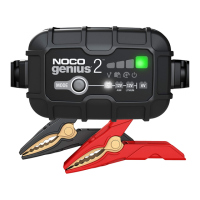
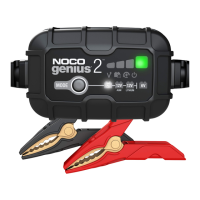
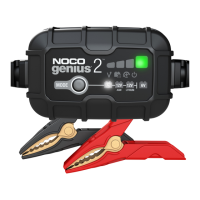
  • Charge LEDs (25%, 50%, 75%, 100%): These LEDs pulse "on" and "off" to indicate the battery's state-of-charge. Once a charge level is reached, the corresponding LED will go solid, and the next LED will begin to pulse. The 100% Green LED pulses during charging and becomes solid green when fully charged and optimized.
  • Error LEDs:
    • Standby LED (Solid): Charger is in Standby or battery voltage is too low to detect.
    • Overvoltage Error LED (Solid Red): Battery voltage is above the protect voltage.
    • Bad Battery Error LED (Solid Red): Connected battery will not hold a charge.
    • Reverse Polarity Error LED (Solid Red): Reverse polarity detected.
    • Hot/Cold LED (Solid Red): Internal temperature is too high. Flashes Red (with other error LEDs) when internal temperature is too low. The charger will resume function once the temperature returns to normal.

Auto-Memory: The charger has a built-in auto-memory feature, returning to the last used charge mode when reconnected. To change modes after the initial use, simply press the Mode button.

Maintenance Features

  • Cleaning: Power off the product before any maintenance or cleaning. If the product comes into contact with liquid or any contaminant, clean and dry it immediately using a soft, lint-free (microfiber) cloth. Avoid getting moisture into openings.
  • Storage: Store the product in a dry location, away from high concentrations of dust or airborne materials. Ensure it is placed on flat, secure surfaces to prevent falling. The recommended storage temperature is between -22°F and 140°F (-30°C and 60°C), never exceeding 80°C.
  • Handling: Handle the product with care. Avoid impacts, and do not use if damaged (e.g., cracks in casing or cables). Do not use with a damaged power cord. Humidity and liquids can damage the product; avoid handling near liquids. If the product becomes wet during operation, disconnect it from the battery immediately and discontinue use. Do not disconnect by pulling on the cables.
  • Modifications: Do not attempt to alter, modify, or repair any part of the product. Disassembling the product can cause injury, death, or property damage. Any modifications will void the warranty. If the product is damaged, malfunctions, or comes into contact with liquid, discontinue use and contact NOCO support.
  • Compatibility: The product is only compatible with 6-volt and 12-volt Lead-Acid, AGM, and 12-volt Lithium batteries. Do not attempt to use with other battery types, as this may result in injury, death, or property damage. Always consult the battery manufacturer if unsure of the battery's chemistry or voltage.
  • Operating Temperature: The product is designed to operate in ambient temperatures between -4°F and 104°F (-20°C and 40°C). Do not operate outside these ranges or charge a frozen battery. Discontinue use if the battery becomes excessively warm.
  • Location: Prevent battery acid from contacting the product. Do not operate in closed or poorly ventilated areas. Do not place the battery on top of the product. Position cable leads to avoid accidental damage from moving vehicle or engine parts, which could cause injury or death.

NOCO Genius GENIUS2X2 Specifications

General IconGeneral
Input Voltage100-240VAC
Input Frequency50-60Hz
Number of Banks2
EfficiencyUp to 85%
DisplayLED indicators
Charging Voltage12V
Maximum Charging Current2A per bank
Battery TypesLead-acid, Lithium
Operating Temperature0°C to 40°C
Storage Temperature-20°C to 60°C
ProtectionReverse polarity, Short circuit
Protection FeaturesOvercharge, Short-circuit

Related product manuals