Need help?
Do you have a question about the Nokia 2720 V Flip and is the answer not in the manual?
Identifies and labels the physical buttons and components of the phone.
Instructions for inserting or replacing SIM and memory cards.
Navigating the phone's interface, apps, and basic functions.
Adjusting volume levels for calls, media, and alarms.
Locking the screen and buttons to prevent accidental use.
Steps to enable a screen lock code for enhanced security.
Methods for typing characters, numbers, spaces, and symbols.
Inputting emergency contact information for SOS calls.
Procedures for initiating an emergency SOS call.
Instructions for sending an SOS alert message to contacts.
Using Google Assistant for voice commands and information retrieval.
Guidance on making, answering, and rejecting phone calls.
Managing and organizing phone numbers for contacts.
Customizing the incoming call alert sound.
Applying wallpapers to customize the phone's display.
Instructions for using the camera to capture still images.
Using the camera's self-timer for delayed shots.
Accessing and previewing captured photos.
Steps for capturing video footage with the phone's camera.
Viewing recorded video clips.
Connecting to the internet and navigating websites.
Setting up and using Wi-Fi for making phone calls.
Playing MP3 music files on the device.
Navigating and selecting music tracks to play.
Tuning into FM radio stations.
Viewing video files stored on the phone.
Capturing audio recordings.
Using the phone's clock functions.
Configuring alarms for specific times.
Setting up a timed countdown for alerts.
Overview of managing and transferring data.
Steps to transfer files between the phone and a PC.
Reviewing and managing permissions granted to applications.
Configuring privacy options for web browsing.
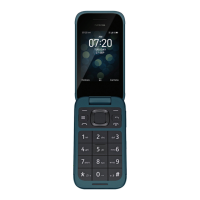
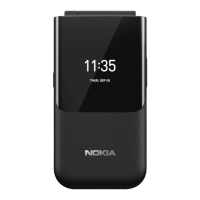
The Nokia 2720 V Flip is a mobile phone designed for ease of use, featuring a classic flip design and a focus on essential communication and accessibility. It supports basic phone functions, messaging, and some smart features through Google Assistant.
The Nokia 2720 V Flip primarily functions as a communication device, allowing users to make and receive calls, send and receive text messages, and manage contacts. It also integrates Google Assistant for voice-activated tasks and information retrieval. For enhanced safety, an accessibility mode can be activated, which transforms the Google Assistant button into an SOS call button, making it easier to contact emergency contacts. The phone includes a camera for taking photos and recording videos, a music player for MP3 files, and an FM radio. Basic organizational tools like a clock with alarm and timer functions, a calendar, a calculator, and a unit converter are also built-in. Internet browsing is supported, and the device offers Wi-Fi and Bluetooth connectivity for data transfer and peripheral connections.
The phone's physical design includes a set of buttons for navigation and control. The scroll button is central for accessing the apps list and selecting features. Left and right selection buttons, a back button, and a power/end button provide intuitive navigation. Volume buttons are located on the side for easy adjustment during calls or media playback. The SOS call/Google Assistant button serves a dual purpose, depending on whether accessibility mode is enabled. When accessibility mode is off, it activates Google Assistant, allowing users to search online, translate, make notes, and set appointments using voice commands. When accessibility mode is on, pressing and holding the button for three seconds or pressing it twice quickly initiates an SOS call to predefined ICE (In Case of Emergency) contacts. The phone also supports sending SOS messages if calls are unanswered.
Text input is performed by repeatedly pressing number buttons to cycle through letters, similar to traditional feature phones. A space is entered by pressing '0', and special characters or punctuation marks by pressing '*'. Character cases can be switched by repeatedly pressing '#'. Numbers can be typed by pressing and holding a number button. The text size on the display can be adjusted for better readability, especially in accessibility mode, where text is larger and alerts are louder.
For calls, users can dial numbers directly or select contacts from their saved list. The phone supports Real-Time Text (RTT) for communication during calls, with options to make RTT visible during calls, automatically make only RTT calls, or manually select between phone calls and RTT calls. Contacts can be added to the phone memory or SIM card and can be imported from old phones via Bluetooth or from Gmail/Outlook accounts or memory cards.
Messaging allows users to compose and send text messages, with the ability to add contacts from the phone's list. An E-mail app is available for managing email accounts, enabling users to send and receive emails.
Personalization features include changing the ringtone and wallpaper. Users can choose from pre-defined wallpapers, take a new photo with the camera, or select an image from the gallery.
The camera function allows users to take photos and record videos. A self-timer can be used for photos. Photos and videos can be viewed immediately after capture or accessed later through the Gallery and Video apps, respectively. Videos can be watched in full screen, and both photos and videos can be shared via email, messaging, or Bluetooth.
Internet browsing is straightforward, allowing users to enter web addresses and navigate using the scroll button as a mouse cursor. Browsing history can be cleared for privacy.
Connectivity options include Bluetooth for pairing with other devices and Wi-Fi for internet access and Wi-Fi calling. Wi-Fi calling enables calls over a Wi-Fi connection when a mobile network is unavailable.
The music player supports MP3 files, allowing users to listen to playlists, artists, albums, or individual songs. Songs can also be set as ringtones. The FM radio requires a compatible headset to act as an antenna and can search for available stations. Stations can be saved as favorites, and the audio can be switched to the phone's speakers while the headset remains connected.
Organizational tools include a clock with alarm and countdown timer functions. Alarms can be set to repeat and given names. The calendar allows users to add reminders for events. A calculator is available for basic arithmetic, and a unit converter helps with various measurements.
The device emphasizes the importance of using compatible accessories. Only approved chargers should be used to avoid damage and voiding the warranty. Similarly, only compatible memory cards are recommended to prevent data corruption and device damage.
Battery life can be extended by following several tips: always charging the battery fully, muting unnecessary sounds (like keypad sounds), using wired headphones instead of the loudspeaker, setting the screen to switch off after a short time, lowering screen brightness, and selectively using network connections like Bluetooth only when needed.
The phone's memory can be managed by checking the amount of free space available for media and application data. Content can be copied between the phone and a computer by enabling USB storage in the settings and connecting with a compatible USB cable. This allows users to browse the phone's content on their computer and drag and drop files.
Security and privacy settings allow users to manage app permissions, granting or denying access to various phone functions. Internet privacy settings include an option to enable "Do not track" to prevent websites from tracking browsing activity.
The device is designed with Hearing Aid Compatibility (HAC) in mind, meeting FCC requirements with an M4/T4 level rating for acoustic and inductive coupling with hearing aids. Users are advised to test the phone with their specific hearing aid or cochlear implant to determine if any interference occurs, as individual results may vary.
 General
| Network | GSM / HSPA / LTE |
|---|---|
| Weight | 118 g (4.16 oz) |
| SIM | Nano-SIM |
| Display Resolution | 240 x 320 pixels, 4:3 ratio (~143 ppi density) |
| External Display | 1.3 inches, 240 x 240 pixels |
| Internal Storage | 4GB |
| RAM | 512MB |
| Main Camera | 2 MP |
| Operating System | KaiOS |
| Chipset | Qualcomm MSM8905 Snapdragon 205 (28 nm) |
| CPU | Dual-core (2x1.1 GHz Cortex-A7) |
| GPU | Adreno 304 |
| Sound Loudspeaker | Yes |
| Sound 3.5mm jack | Yes |
| WLAN | Wi-Fi 802.11 b/g/n, hotspot |
| Bluetooth | 4.1, A2DP, LE |
| GPS | Yes, with A-GPS |
| Radio | FM radio |
| USB | microUSB 2.0 |
| Dimensions | 192.7 x 54.5 x 11.6 mm (unfolded) |
| Display Type | TFT |
| Display Size | 2.8 inches |
| Battery | Li-Ion 1500 mAh, removable |
| Colors | Black |

 To Next Page