When you switch on your phone for the
first time, you may be prompted to get the
configuration settings from your service
provider (network service). For more
information, refer to Connect to
support. See "Configuration", p. 18, and
"Configuration setting service", p. 37.
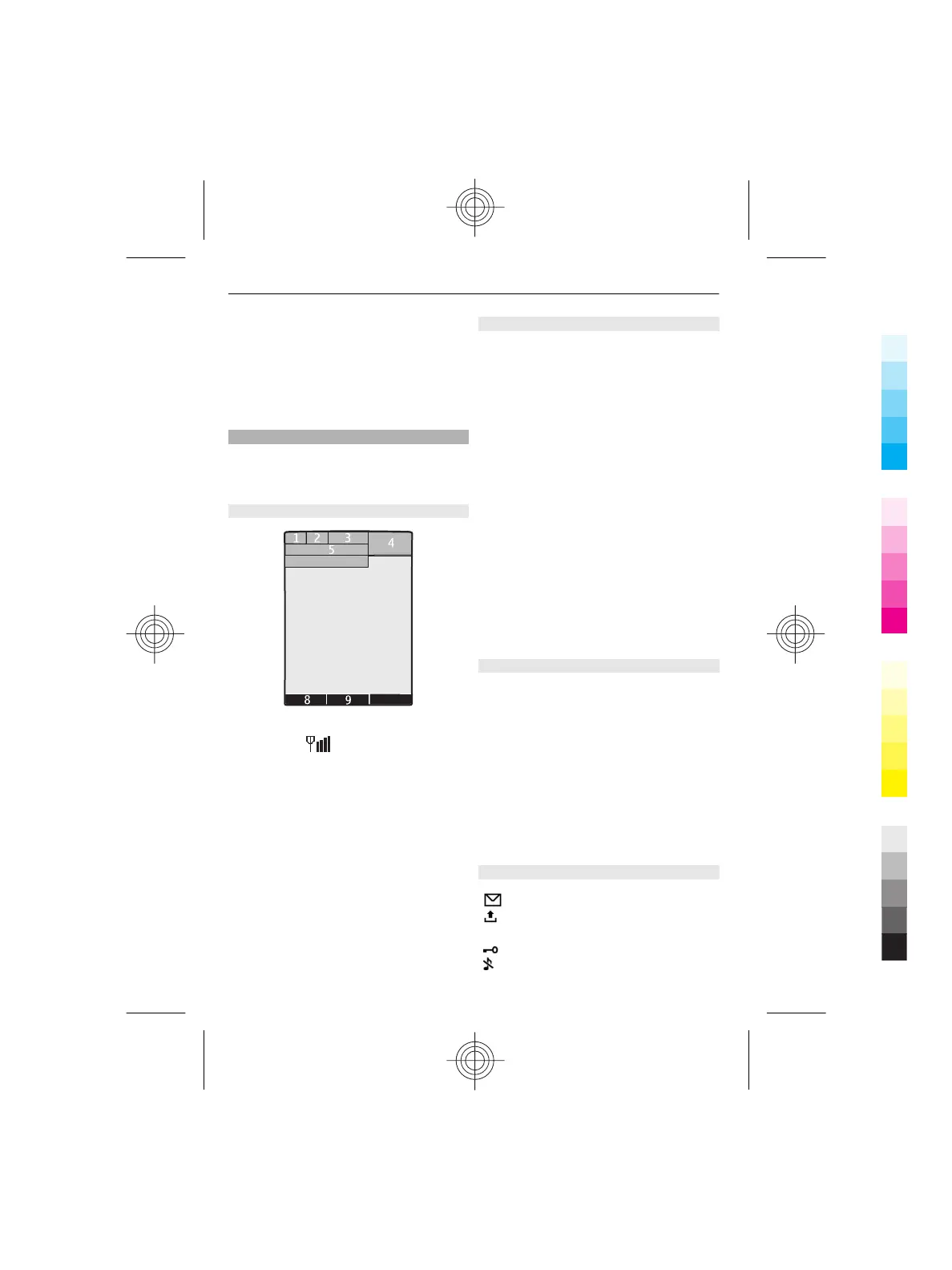
Standby mode
When the phone is ready for use, and you
have not entered any characters, the
phone is in the standby mode.
Display
7
6
10
1 Signal strength of the cellular
network
2 Battery charge status
3 Indicators
4 Clock
5 Name of the network or the operator
logo
6 Date
7 Display
8 Function of the left selection key
9 Function of the Navi key
10 Function of the right selection key
You may change the function of the left
and right selection key. See "Left and right
selection keys", p. 14.
Home screen
The home screen mode displays a list of
selected phone features and information
that you can directly access.
Select Menu > Settings > Display >
Home screen.
To activate the home screen mode, select
Home screen mode.
To organise and change the home screen
mode, select Personalise view.
To select the key that is used to activate
the home screen mode, select Home
screen key.
Depending on the setting, in the home
screen mode, scroll up or down to
navigate in the list, and select Select,
View, or Edit. The arrows indicate that
further information is available. To stop
navigating, select Exit.
Shortcuts in the standby mode
To access a list of missed, received, and
dialled calls, press the call key once. To call
a number from the list, scroll to the
number or name, and press the call key.
To open the web browser, press and hold
0.
To call your voice mailbox, press and hold
1.
You can use keys as shortcuts. See
"Dialling shortcuts", p. 19.
Indicators
You have unread messages.
You have unsent, cancelled, or
failed messages.
The keypad is locked.
The phone does not ring for
incoming calls or text messages.
10 Switch it on
Cyan
Magenta
Yellow
Black



 To Next Page