©2020 AT&T Intellectual Property. AT&T, the AT&T logo and all other AT&T marks contained herein are trademarks of AT&T Intellectual Property and/or AT&T affiliated companies Please recycle
WPS LED
Wi-Fi device Pairing is off – Press the button to begin pairing.
Blinking Red (Fast)
Service LED is Solid White
Your Wi-Fi Gateway has detected multiple Wi-Fi devices trying to connect. Please wait before trying again.
or
Your Wi-Fi Gateway has been rebooted. Please wait while it starts up.
Red
Service LED is Solid White
Attempt to connect your Wi-Fi devices using WPS has failed. Please wait until the light changes and then
press the WPS button to try again
Your Wi-Fi Gateway is going through a factory reset. Please wait while it starts back up.
Blinking Green (Slow)
Service LED is Solid White
The WPS button has been pressed. Please take action on the Wi-Fi device you are attempting to connect
to the gateway.
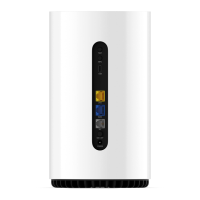
The Port has established a link with a connected device. If the LED is off the device is not properly
connected or the connected device is not powered on.
Your Wi-Fi Gateway is powered on. No LED means the power is either not connected or no power at the
wall plug. If the front service LED is off, but the power jack LED is Green then your Wi-Fi Gateway needs to
be replaced.




 To Previous Page