
 To Next Page
М
МиланаJun 8, 2026
Как его включить

Как его включить
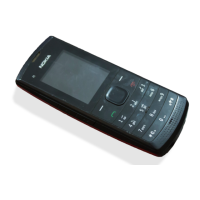
The part of the phone used for listening during calls.
The display area showing information and menus.
Key to end calls or turn the phone on/off.
The numeric and function keys for operation.
The part of the phone used for speaking during calls.
Navigational key for moving through menus and options.
Key used to initiate or answer incoming calls.
Keys used to select options or confirm actions.
Steps for inserting SIM cards into the phone's holders.
Procedure for correctly inserting the phone's battery.
Instructions for opening the memory card slot cover.
Steps to correctly insert the memory card into the slot.
Procedure for connecting the charger to the phone and wall outlet.
How the phone indicates its charging progress and full charge.
How to turn the phone on by pressing and holding the power key.
Choosing which SIM card to use for the first time.
Setting the phone's time during the initial startup process.
How to open the main menu to see available functions.
Using the scroll key to move between menu options.
Using the select key to choose menu items or functions.
Navigating to the Dual SIM settings menu.
Choosing default SIM for calls and messages.
Using one SIM card to save battery power.
Activating the keypad lock to prevent accidental key presses.
Procedure to unlock the keypad by repeating the lock action.
Steps to dial a number and initiate a call.
Adjusting volume levels during calls or radio playback.
Using side keys to increase or decrease the volume.
Enabling loudspeaker for hands-free calls or group conversations.
Connecting a headset for private listening and calls.
How to turn off the phone using the power key.
Steps to add a new contact's name and number.
Navigating to the sound settings menu.
Choosing and applying a ringtone for calls.
Turning the flashlight on by pressing up twice.
Turning the flashlight off by pressing up once.
Navigating to the messaging application.
Composing and sending text messages, including SIM selection.
Navigating to the clock function to set an alarm.
Setting the alarm's hour and minutes.
Confirming and saving the set alarm.
Navigating to the calendar feature to set reminders.
Setting the date, time, and name for a reminder.
Opening the music playback application.
Selecting and playing audio files from storage.
Attaching a headset for radio reception.
Finding and saving radio stations.
Opening the calculator application.
Using the phone's calculator for arithmetic operations.
Details on available accessories and where to purchase them.
Important safety guidelines for using accessories.
 General
| Display type | TFT |
|---|---|
| Display diagonal | 1.8 \ |
| Display resolution | 128 x 160 pixels |
| Display number of colors | 65536 colors |
| Internal memory | - MB |
| Flash card support | Yes |
| Maximum memory card size | 16 GB |
| WAP | - |
| Data network | GSM |
| GSM bands supported | 900, 1800 MHz |
| SIM card capability | Dual SIM |
| Multimedia Messaging Service (MMS) | Multimedia Messaging Service (MMS) is a standard way to send messages that include multimedia content to and from a mobile phone over a cellular network |
| Ringer type | Polyphonic |
| Battery type | BL-5J |
| Talk time (2G) | 13.1 h |
| Battery capacity | 1320 mAh |
| Standby time (2G) | 1032 h |
| Continuous audio playback time | 36 h |
| Form factor | Bar |
| Personal info management (PIM) | Alarm clock, Calculator, Calendar, Notes |
 Weight and Dimensions
| Depth | 47.3 mm |
|---|---|
| Width | 112.2 mm |
| Height | 16 mm |
| Volume | 73.2 cm³ |
| Weight | 91.05 g |