Need help?
Do you have a question about the Nokta MAKRO PulseDive and is the answer not in the manual?
Comply with laws, avoid protected sites, unexploded ordnance, and report findings.
Read manual, avoid extreme temperatures, IP68 rating, coil attachment rules, cleaning advice.
EU consumers: Do not dispose of in household waste; recycle according to regulations.
Step-by-step instructions on how to turn the scuba coil counter-clockwise and pull it out.
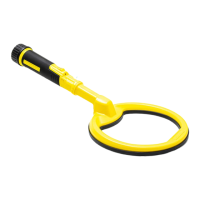
Steps for aligning, inserting, and securing the pinpointer coil and its hard-shell case.
How to attach the security lanyard to the control unit and belt/wrist band or holster.
How to charge the device using USB, powerbank, PC, or car, and charging time.
Explanation of LED signals for battery status (full, half, empty) at startup and during use.
Important notes: device does not work while charging, avoid extreme temperatures, limit charging temperatures.
How to turn the device on/off, automatic retuning, and instant retuning procedures.
Explanation of the three detection modes (Audio, Vibration, Audio + Vibration) and how to change them.
Function of the red LED for metal detection, its flashing behavior, and how to turn it on/off.
How to adjust sensitivity levels using the A and F buttons, and how levels are indicated.
How to activate and deactivate the LED flashlight using the adjustment button.
How to switch to dive mode to prevent button presses from water pressure, and how to exit it.
Using different covers for dive and land use and their properties.
How the lost alarm activates to help locate a misplaced device.
How to shift frequency to avoid interference from other detectors.
How to activate/deactivate the wireless connection for headphones and pairing instructions.
 General
| Operating Frequency | 3 kHz |
|---|---|
| Battery Life | Up to 10 hours |
| Vibration | Yes |
| LED Flashlight | Yes |
| Technology | Pulse Induction |
| Sensitivity Adjustment | 5 levels |
| Interference Blocking | Yes |
| Warranty | 2 years |
| Target ID | No |
| Ground Balance | Automatic |
| Waterproof Rating | IP68 (up to 60 meters) |
| Battery | Lithium Polymer |
| Wireless | Yes, Compatible with Nokta Makro 2.4 GHz Headphones |
| Type | Pinpointer & Scuba Detector |
| Charging Time | 2 hours |
| Audio Output | Speaker |
| Display | No |
| Accessories | USB charging cable |
| Dimensions | 280 x 90 x 50 mm (11 x 3.5 x 2 inches) |

 To Next Page