22
15. BATTERY
Before using the N-Com device for the first time, recharge the battery completely for at least 10 hours.
To obtain best performances from the battery, it is recommended to completely recharge the battery the
first few times. Afterwards, you can recharge the battery for shorter periods. Whenever possible, it is best
to recharge the battery completely.
15.1. Battery discharged signal
When turned on, the system signals when the battery is running down by switching to the “Reserve”
mode.
When the battery charging power falls below 1 hour of operation, the buttons “” and “” start to flash
in order to indicate that the system is in “Reserve” mode. Three consecutive beeps also signal the reserve
mode.
When the battery operates in “Reserve”, the system automatically turns itself off in case no button is
pressed for 30 minutes. The shutting off is signaled by a series of beeps in the helmet. This function
makes it possible to always have a small reserve of energy to use it again in case you forget to turn off
your helmet.
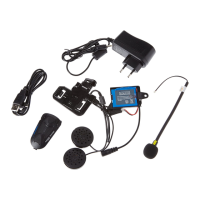
1) Connect the battery charger to the mains.
2) Plug in the battery charger connector in the
corresponding connector on the helmet.
3) When the recharging is finished, disconnect the
connector and unplug the battery charger from
the mains.


 To Next Page