10
3.5. Settings
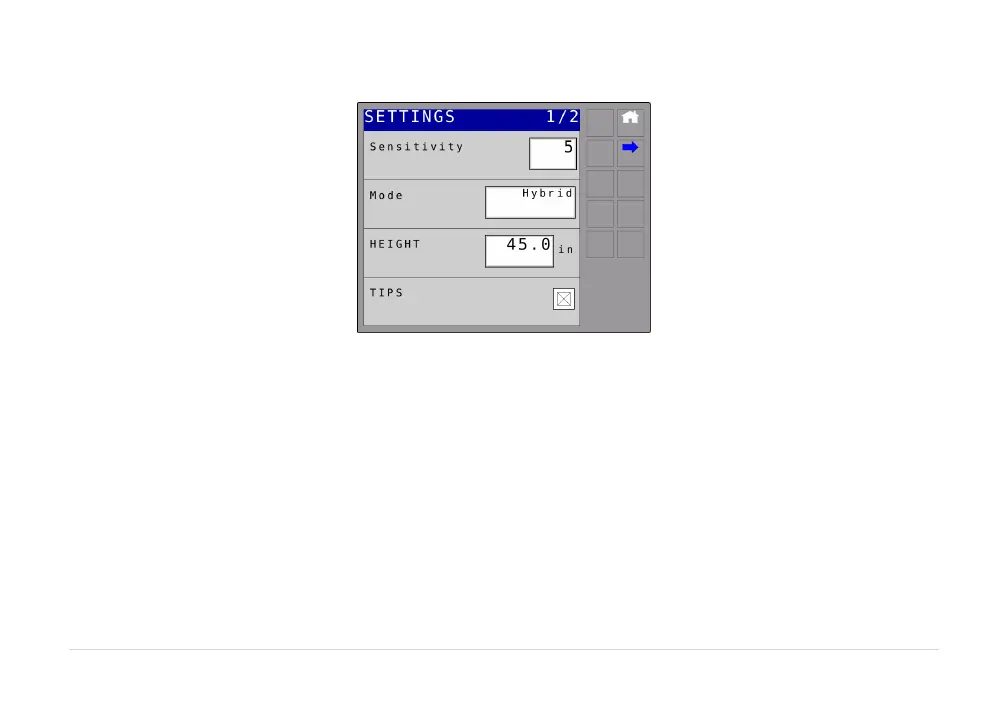
Figure6:SettingsScreen
Sensitivity:
Thesensitivitycanbeadjustedfrom1to10,with5beingthedefaultsetting.Alowernumberwillreduce
thesystemsensitivityandimprovestability.Highersettingswillspeeduptheresponse.
Mode:
The mode button allows the system to be changed between Soil Mode™, Crop Mode™ and Hybrid
Mode™.SoilModeallowsthesensorstoreadaheightfromthespraynozzlestotheground.CropMode
will read the height from the spray nozzles to the top of the crop canopy.Hybrid Mode uses a
combinationofthecropandsoilreadings.



 To Next Page